13 14
2
Your mobile ..............................................
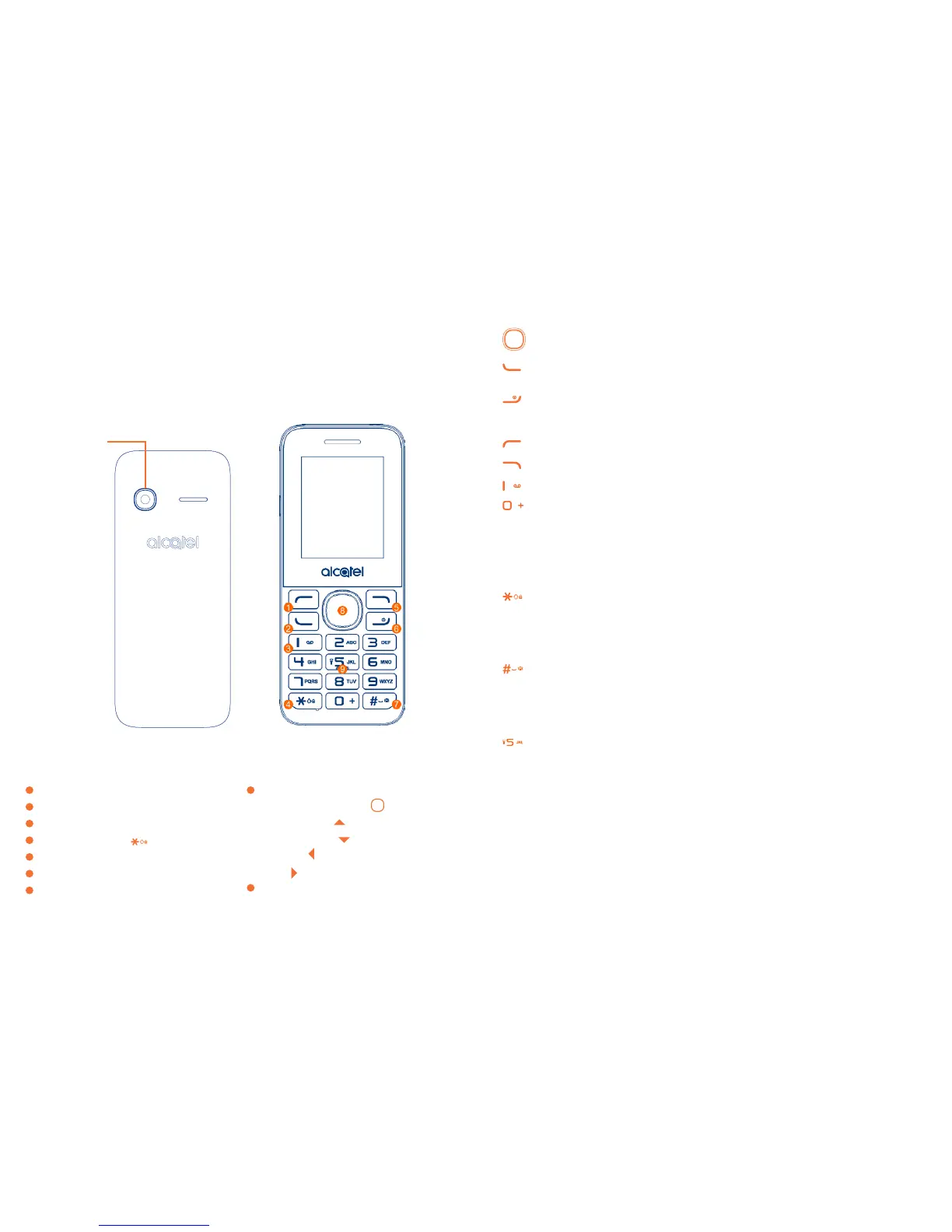
2.1 Keys
Navigation key
Confirm an option (press the middle of the key)
Send call
Access to call log (idle screen)
Power on/off the handset (long press)
End call
Return to idle
Left soft key
Right soft key
Dial the voice mail number (long press)
From Idle screen
- Press: Enter zero
- Long press: input +, "+" are used for dialing an international call.
In Edit mode:
- Press: Access symbols table
0 (add numbers)
From Idle screen
- Press: input *
- Long press: lock keypad
In Edit mode:
- Press: change input methods
From Idle screen
- Press: input #
- Long press: activate/deactivate the vibrator
In Edit mode:
- Press: input space
From Idle screen:
- Press: dial ‘5’
- Long press: turn the Torch on/off
1
Left soft key
2
Call logs (idle screen) Send call
3
Voice mail (long key-press)
4
Lock Key (long press key)
5
Right soft key
6
Power on/Power off End call
7
Vibration alert (Meeting mode activated)
8
Navigation key :
Menu/Confirm an option
Increase volume
Decrease volume
New SMS
Alarm
9
Torch
Camera



 To Next Page