55 56
5
Multimedia applications .......
5.1 Camera ..............................................
Before using the camera, make sure that you remove
the protective lens cover to avoid it affecting your
picture quality.
To take a photo or video, touch Camera from the
Home screen.
Using shortcut key
Simply double-press the Power key to open the camera.
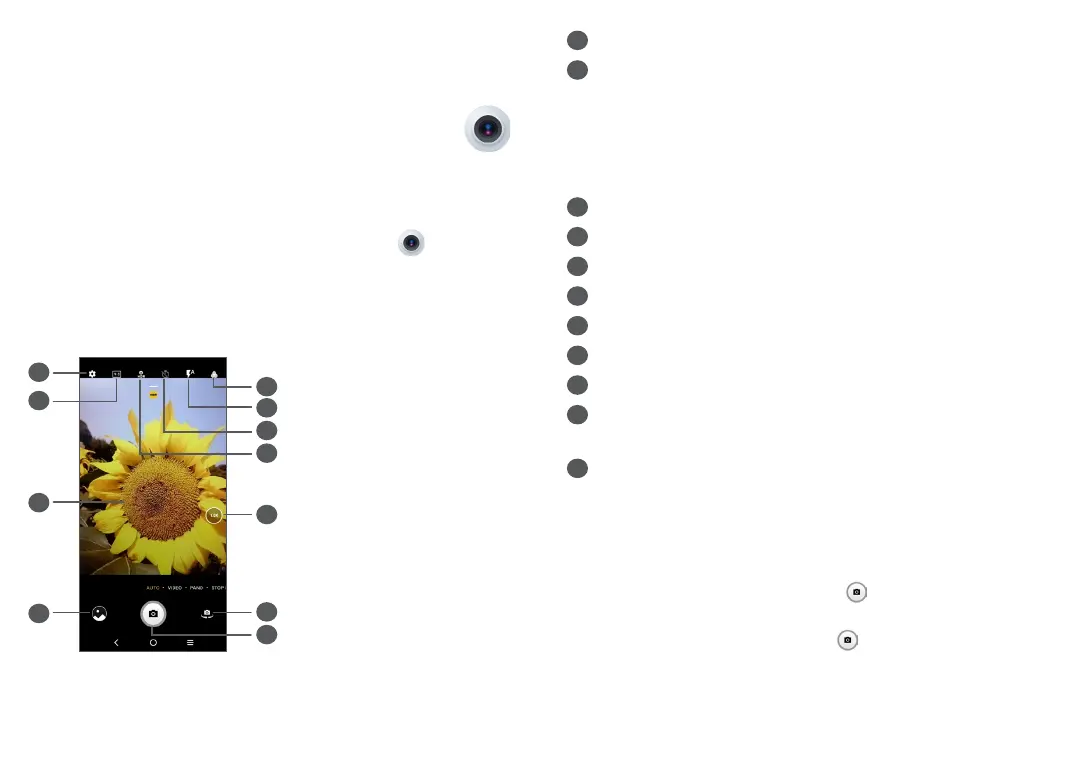
1
6
5
4
3
2
7
8
9
10
11
1
Select filter
2
Flash mode
Touch to turn on/off the camera flash
WARNING: Keep a safe distance when using the
flash. Do not point the flash toward people’s or
animals’ eyes.
3
Take a timed photo
4
Take HDR photos
5
Zoom in/out
6
Switch between front/back camera
7
Take a photo
8
Touch to access settings
9
Picture size
10
Pinch fingers together to zoom out, or spread
fingers apart to zoom in
11
View the photos or videos you have taken
To take a photo
The screen acts as the viewfinder. First, position the
object or landscape in the viewfinder, touch the screen
to focus if necessary and touch or press the Volume
key to take a photo. The photo will be automatically
saved. You can also long press to take burst shots.



 To Next Page