61 62
3.3.2 Adding a contact
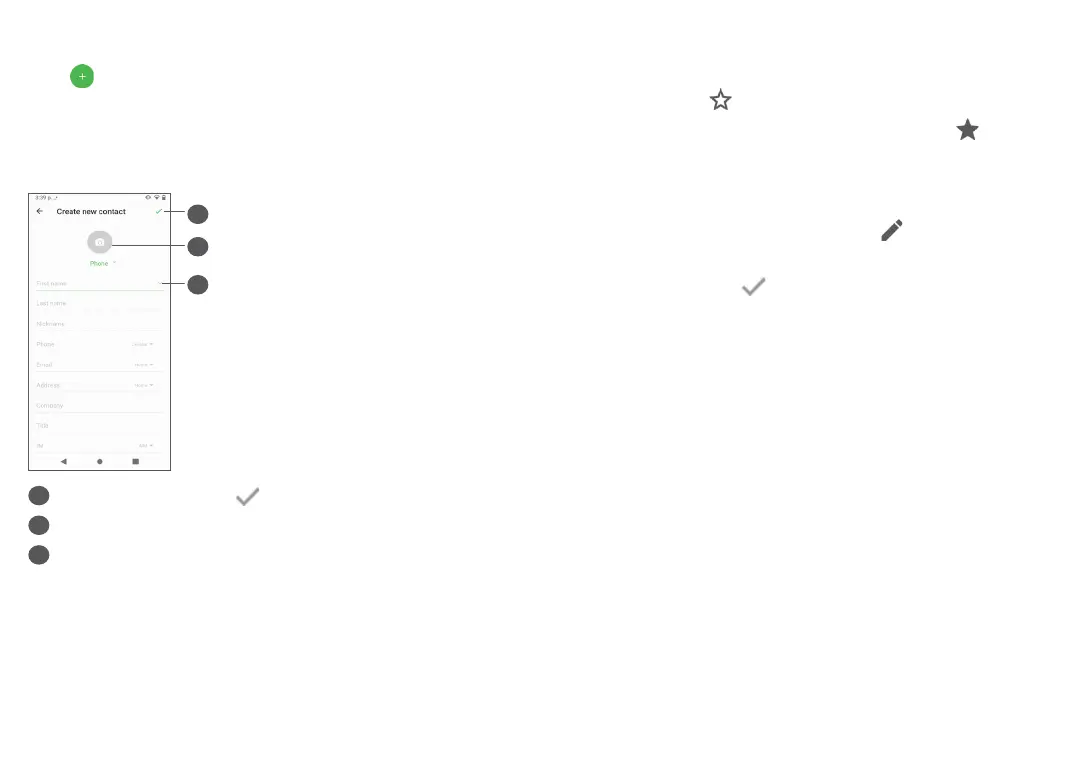
Tap from the Contacts screen to create a new
contact.
Enter the contact’s name and other contact information.
By scrolling up and down the screen, you can move
from one field to another easily.
2
3
1
1
When finished, tap to save
2
Tap to set a contact photo
3
Tap to expand other fields for contact information,
such as address and website
Add to/Remove from Favourites
(1)
To add a contact to Favourties, tap a contact to view
details then tap to add the contact to favourites.
To remove a contact from favourites, tap on the
contact details screen.
3.3.3 Editing your contacts
To edit contact information, tap in the contact
details screen.
When finished, tap to save.
(1)
Only phone contacts and account contacts can be added
to favourites.


 To Next Page