71 72
5
Multimedia applications .......
5.1 Camera ..............................................
Before using the camera, remove the protective lens
cover to avoid it affecting your picture quality.
There are multiple ways to open the Camera app.
From the Home Screen
From the home screen, tap Camera .
From the Lock Screen
When the screen is locked, press the Power key once to
light up the screen, then double tap the camera icon in
the lower right corner to open the camera.
Using shortcut key
Simply double-press the Power key to open the camera.
1
6
9
11
8
3
4
5
2
7
10
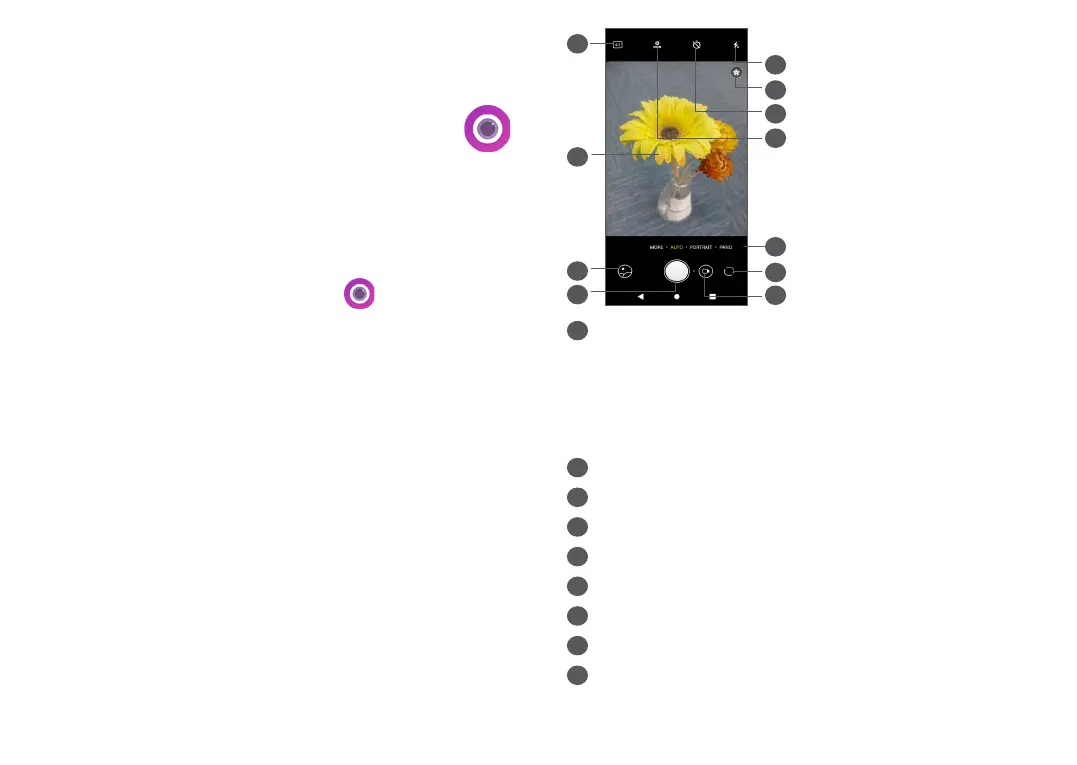
1
Flash mode
Tap to turn on/off the camera flash
WARNING: Keep a safe distance when using the
flash. Do not point the flash toward people’s or
animals’ eyes.
2
Scene detection
3
Take a timed photo
4
Take HDR photos
5
Select a camera mode
6
Switch between front and rear camera
7
Take a video
8
Picture size
9
Pinch fingers together to zoom out, or spread
fingers apart to zoom in


 To Next Page