87 88
6.2.3 Stopwatch
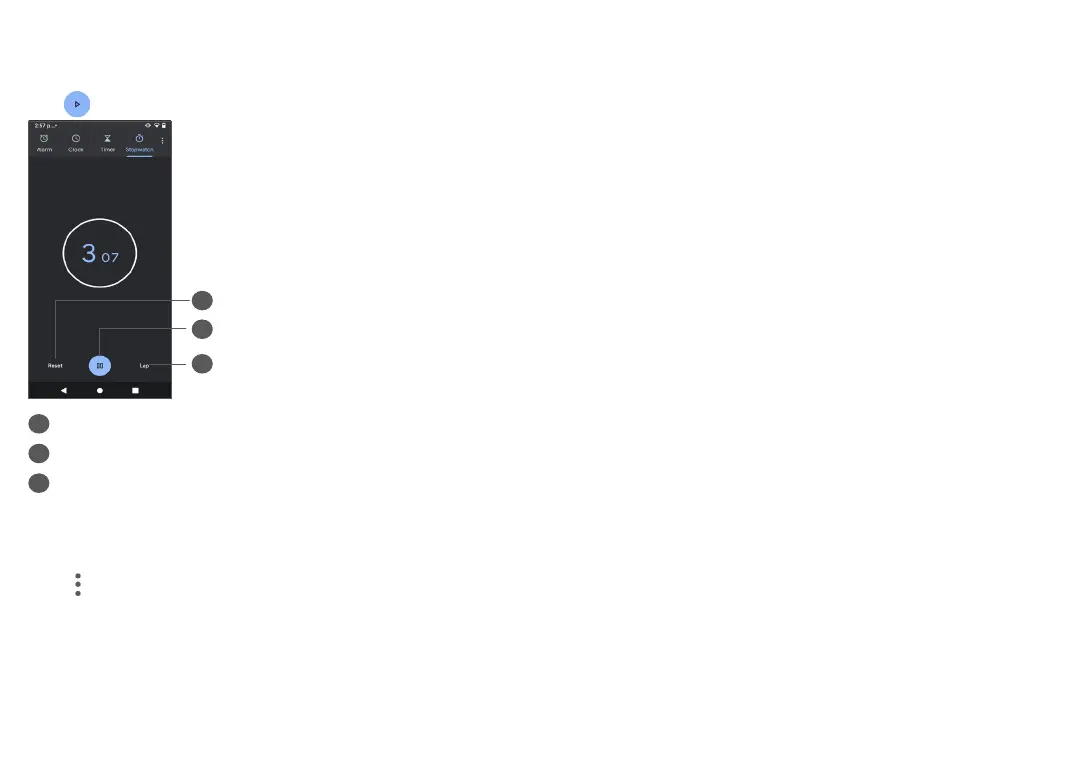
From the Clock screen, tap Stopwatch.
Tap to start the Stopwatch.
2
3
1
1
Reset
2
Pause/play
3
Tap to show a list of records according to the
updated time
6.2.4 Adjust Clock settings
Tap and then Settings to access Clock, Alarms,
Timers and Screensaver settings.
7
Google applications ...........
Google apps are preinstalled on your phone to improve
work efficiency and help you enjoy life.
This manual briefly introduces the apps. For detailed
features and user guides, refer to related websites or
the introduction provided in the apps.
You are recommended to register with a Google account
to enjoy full functionality.
7.1 Google
A web browser with which you can surf the internet.
Your bookmarks, browsing history, and settings across
all devices on which the browser is installed can be
synchronized with your Google account.
7.2 Gmail
As Google's web-based email service, Gmail is configured
when you first set up your phone. With this application,
you can send and receive emails, manage emails by
labels, archive them, etc. Emails can be automatically
synchronized with your Gmail account.


 To Next Page