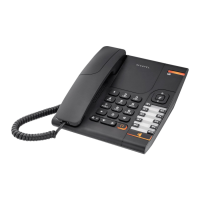
2315 Hotel set
The manufacturer reserves the right to modify any product characteristics without prior notice.
RCS Nanterre 390 546 059
8
9.4. Setting Flash Timing
♦ Press HOLD
♦ Press FLASH
♦ Press:
• 1 for 100 ms
• 3 for 300 ms
• 6 for 600 ms
• Press HOLD again
• A long beep is generated to confirm Flash Timing is programmed.
9.5. Setting Melody
♦ Press HOLD
♦ Press RD
♦ Press:
• 1 to select pitch 1, pitch 1 has a higher frequency
• 2 to select pitch 2, pitch 2 has a lower frequency
♦ Press HOLD again
♦ A long beep is generated .
9.6. Exiting manual programming mode
♦ To exit manual programming mode, just hang up. The phone will return to normal
telephone mode.
10. SAFETY
♦ This product is designed to be connected to an analog telephone line classified TNV3/TRT3
DECLARATION OF CONFORMITY
♦ According the disposition of the directive 1999/5/EC of the European parliament and of the
council of 9 March 1999 on radio equipment and the mutual recognition of their conformity.
♦ The certificate of conformity is available from the following Internet site : “www.atlinks.com”
Services Commerciaux et Marketing :
41, Boulevard de la République – Bat B6
78400 Chatou – France
Siège Social : 46, Quai Alphonse Le Gallo
92100 Boulogne Billancourt - France


 To Next Page