7 8
Power key
• Press: Lock the screen/Light up the screen
• Press and hold: Show the pop-up menu to select from Power off/Restart/Airplane mode/
Ringer mode
• Press and hold: Power on
• Press and hold Power key and Volume down key to capture a screenshot.
• Press to mute the ringtone when there’s an incoming call.
• Press and hold Power key and Volume up key for more than 7 seconds to restart the
phone when it is dead.
Volume Keys
• In call mode adjusts the earpiece or headset volume.
• In Music/Video/Streaming mode adjusts the media volume.
• In general mode adjusts the ring tone volume.
• Mute the ringtone of an incoming call.
• Press to light up the screen when it dims during a call.
1.2 Getting started
1.2.1 Set-up
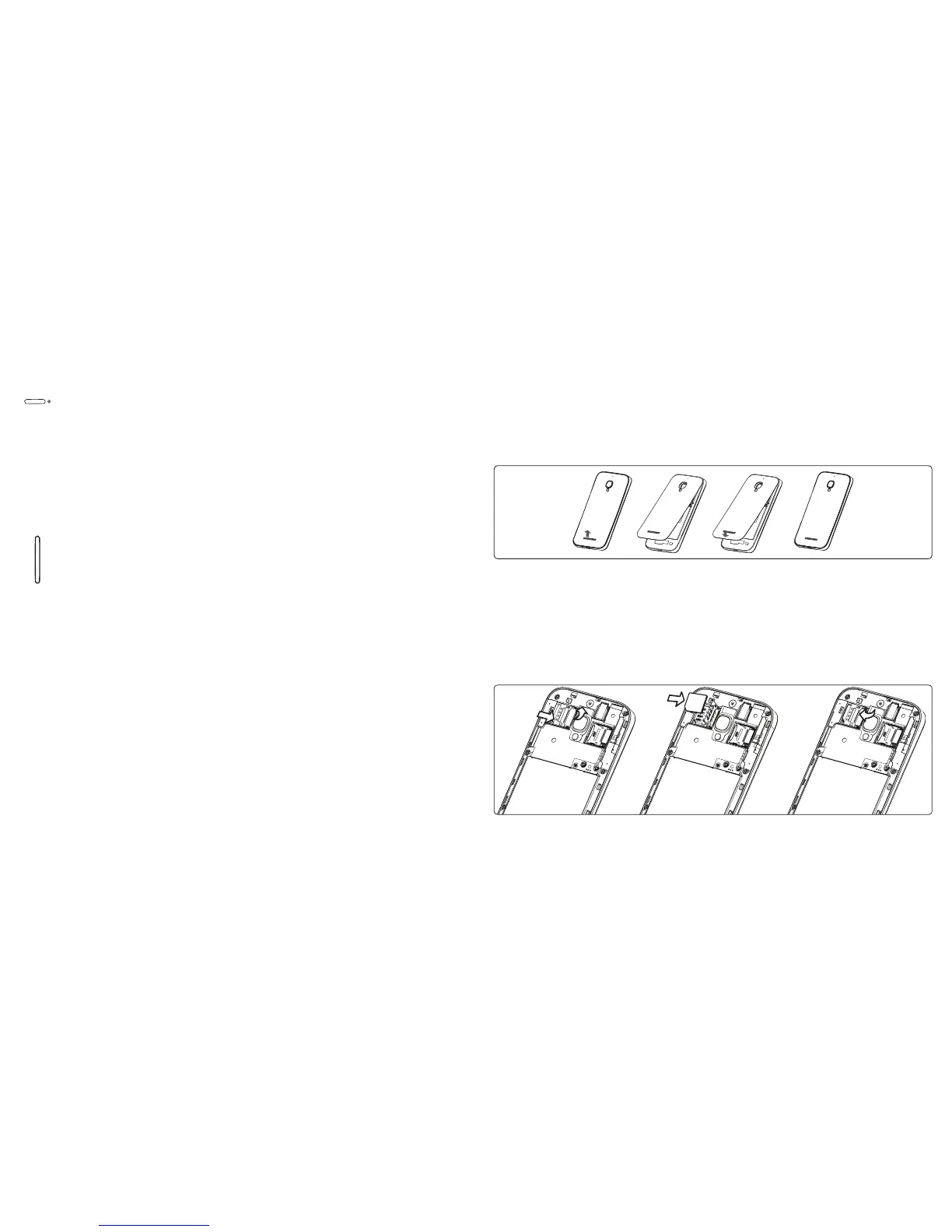
Removing or installing the back cover
Caution: DO NOT REMOVE BATTERY, this may result in injury and will void your warranty. This phone
model has a non-removable battery.
Inserting or removing the SIM card
You must insert your SIM card to make phone calls. Please power off your phone before inserting or
removing SIM card. This phone does not support automatic SIM card hot-swapping and phone must be
rebooted for SIM card to be recognized.
Inserting SIM card












 To Next Page