13 14
Getting started
1
.....................
Set-up1.1
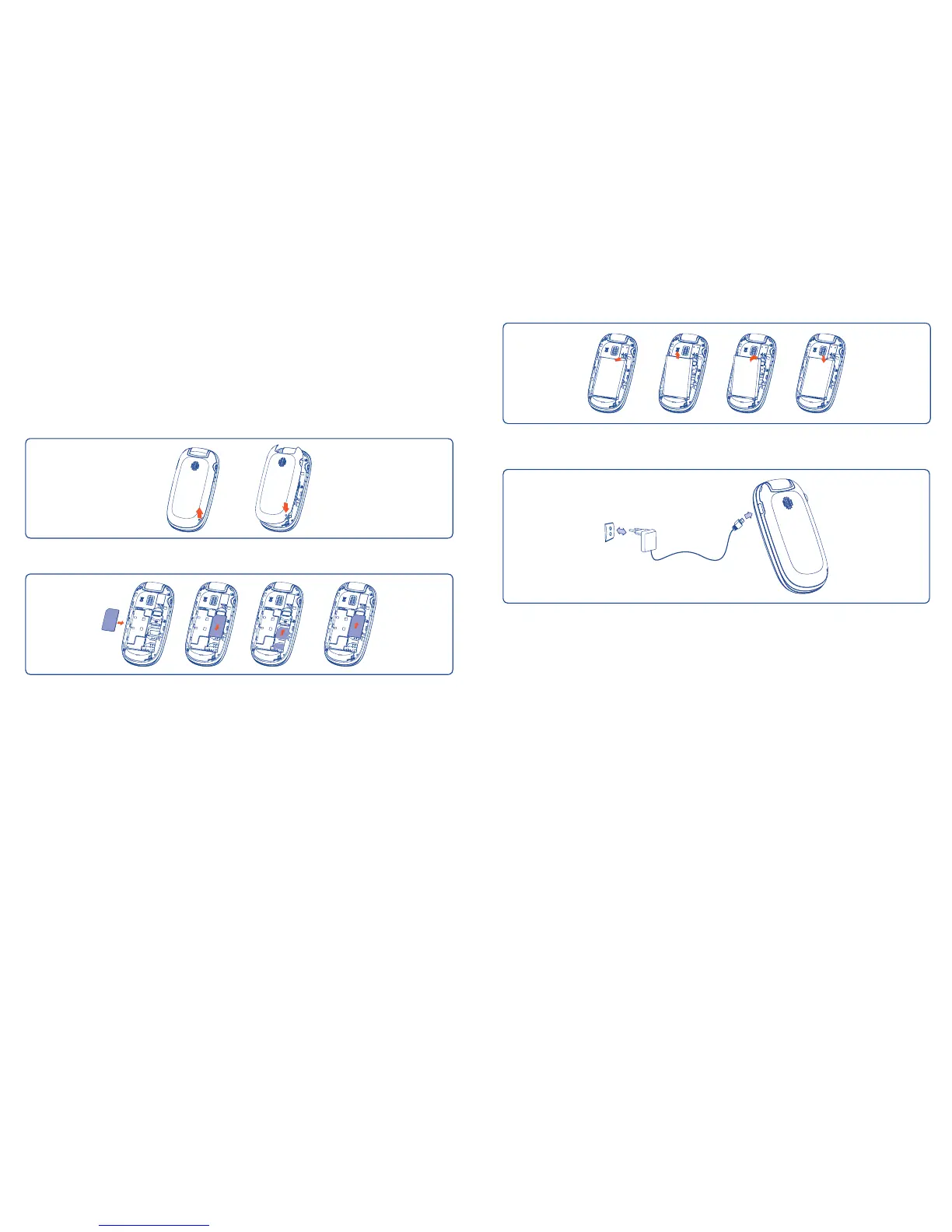
Removing and installing the back cover
Inserting and removing the SIM card
(1)
Place the SIM card with the chip facing downwards and slide it into its
housing. Make sure that it is correctly inserted. To remove the card, press
it and slide it out.
(1)
Check with your network operator to make sure that your SIM card is 3V or
1.8V compatible. The old 5 Volt cards can no longer be used. Please contact
your operator.
Removing and installing the battery
Charging the battery
Connect the battery charger to your cellphone and outlet respectively.
The charging may take about 20 minutes to start if the battery is flat.•
Be careful not to force the plug into the socket.•
Make sure the battery is correctly inserted before connecting the •
charger.
The outlet must be near to the cellphone and easily accessible (avoid •
electric extension cables).






 To Next Page