EasyManua.ls Logo

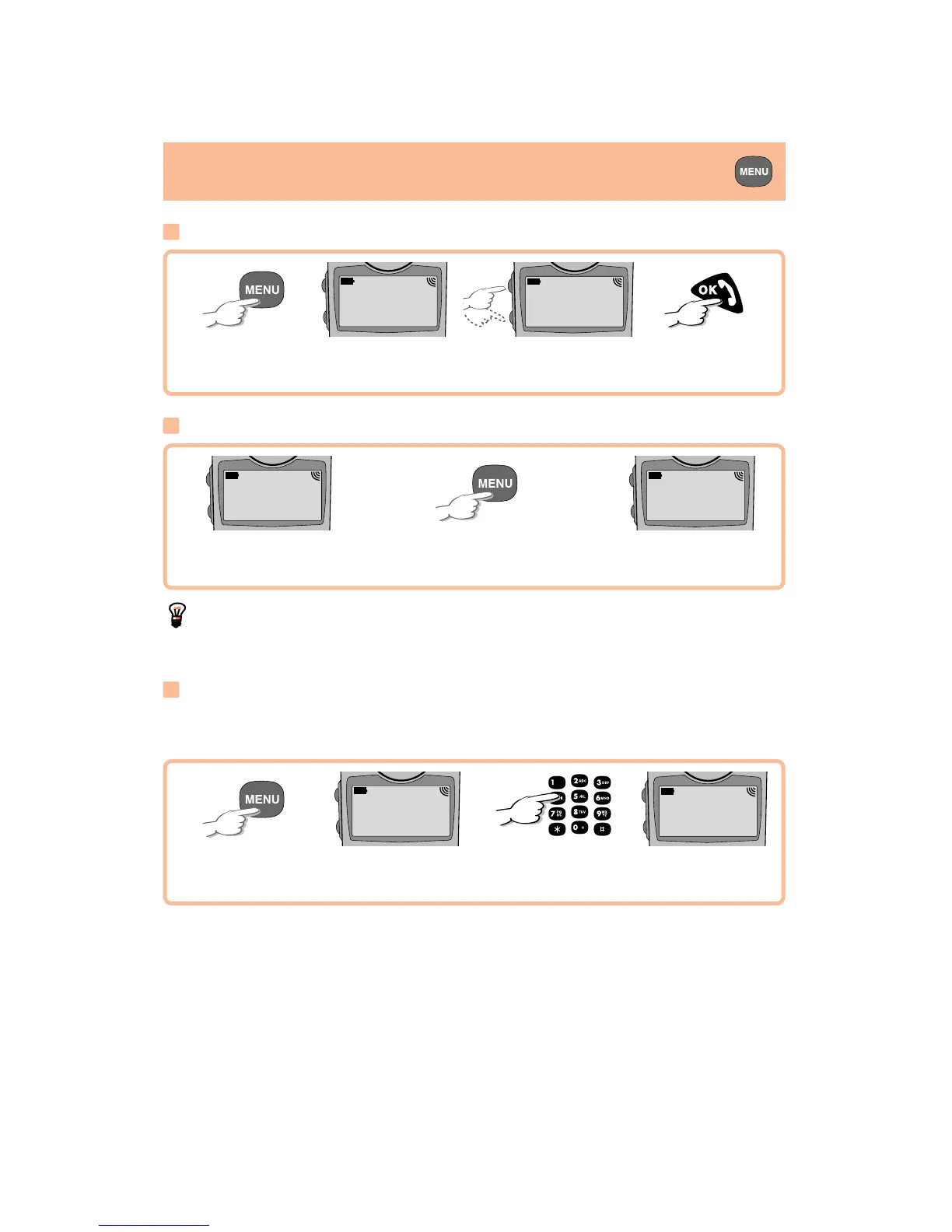
Alcatel ONE TOUCH - Menu: Choosing and Quitting Options; Choosing a Menu Option; Quitting a Menu Option; Quick Search by Menu Code

Alcatel ONE TOUCH
40 pages
Print Icon
To Next Page IconTo Next Page
To Previous Page IconTo Previous Page
Loading...
LANGUAGES
V English ...
MENU ...
22/
Access the Menu
You are on the
first option
Obtain that
option
Search for desired
option
Choosing an option
MENU
1. Set Up ...
MENU
2. Appointmt ...
Back out
You want to quit
this option
You can choose a dif-
ferent option
Quitting an option
Appointmt
1. To Set ...
MENU
2. Appointmt ...
T
he "..." symbol at the end of a line indicates that there is more informa-
tion.
Access the Menu
You are on the
first option
You are on the
"Languages" option
e.g. key in
code "16"
Quick search
Please see Abbreviated menu (previous page) in order to identify the code
used to access the chosen option directly.
MENU
1. Set Up ...

Other manuals for Alcatel ONE TOUCH

Related product manuals