64 65
Working with pictures
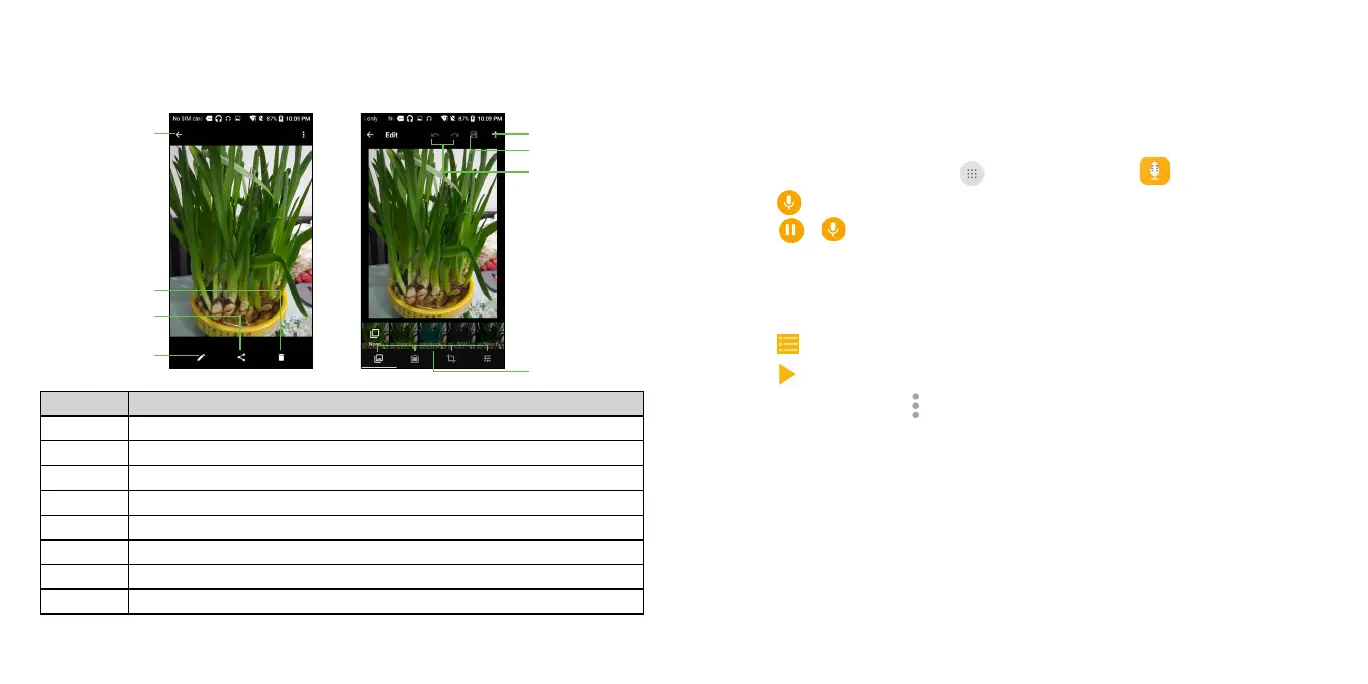
Tap a picture in an album to view the picture in full screen. Tap the screen to
view the following features.
Number Function
1 Return to the album.
2 Delete the photo.
3
Share the photo.
4 Tap to enter the photo's Edit interface.
5 Tap to access more options.
6 Save the photo.
7 Undo or redo the action.
8 Edit the photo.
Making memorable memos
Sound Recorder enables you to record voice memos and listen to them
whenever you like.
Recording a voice memo
1. From the home screen, tap > Sound Recorder .
2.
Tap to start recording. During recording, you can do the following:
• Tap
/ to pause or continue the recording.
• Tap DISCARD and confirm to cancel the recording.
• Tap SAVE and name the recording to save.
Playing any saved memo
1. Tap at the top right of the screen to see all recordings.
2.
Tap before the memo to play it.
Note: You can also tap
to rename, delete, share, check the file information.





 To Next Page