92 93
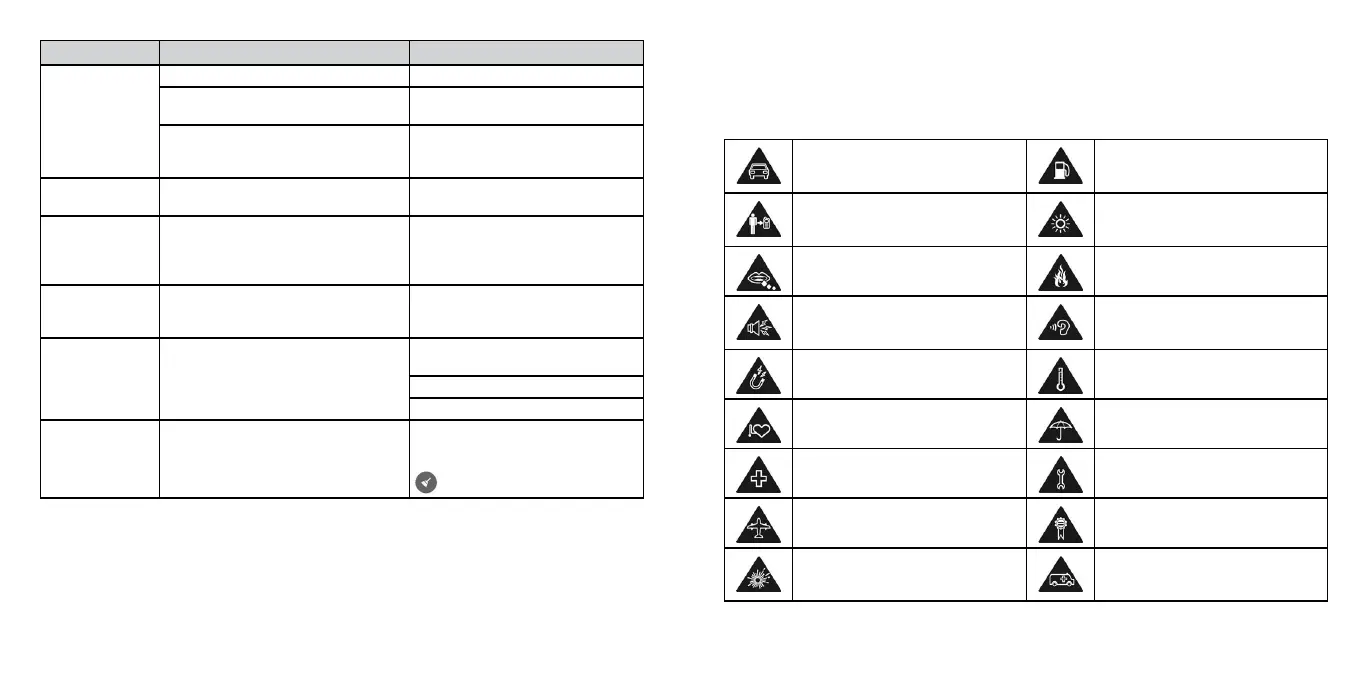
Problem Possible causes Possible solution
Unable to
connect to the
network
The micro-SIM card is invalid. Contact your service provider.
You are not within the network’s
service area.
Check the service area with your
service provider.
Poor signal. Move to an open space, or if you
are inside a building, move closer
to a window.
Cannot make
outgoing calls
You have activated Fixed Dialing
Numbers.
Go to Fixed Dialing Numbers and
disable it.
PIN code
blocked
You have entered an incorrect PIN
code three consecutive times.
Contact your service provider. If
the service provider provides the
SIM card’s PUK code, use the PUK
code to unlock the SIM card.
Unable to enter
information into
the phonebook
The phonebook’s memory is already
full.
Delete unnecessary data from the
contacts.
Phone crashes,
reboots, freezes,
or cannot be
powered on
Some third-party software is not
compatible with your phone.
Uninstall the software that may
cause the problem.
Upgrade the phone software.
Reset the phone to factory status.
Device slow or
sluggish
Too many apps running in the
background.
Touch the Overview key to show
your recently-used apps. Swipe it
left or right to close the app. Touch
to close all the running apps.
For your safety
General safety
Don’t make or receive handheld
calls while driving. And never text
while driving.
Don’t use at gas stations.
Keep your phone at least half an
inch (15 mm) away from your ear
or body while making calls.
Your phone may produce
a bright or flashing light.
Small parts may cause choking.
Don’t dispose of your phone in
a fire.
Your phone can produce
a loud sound.
To prevent possible hearing
damage, do not listen at high
volume levels for long periods
Avoid contact with anything
magnetic.
Avoid extreme temperatures.
Keep away from pacemakers and
other electronic medical devices.
Avoid contact with liquids . Keep
your phone dry.
Power off when asked to in
hospitals and medical facilities.
Don’t take your phone apart.
Power off when told to
in aircrafts and airports.
Only use approved accessories.
Power off when near explosive
materials or liquids.
Don’t rely on your phone as a
primary device for emergency
communications.



 To Next Page