25
Before use
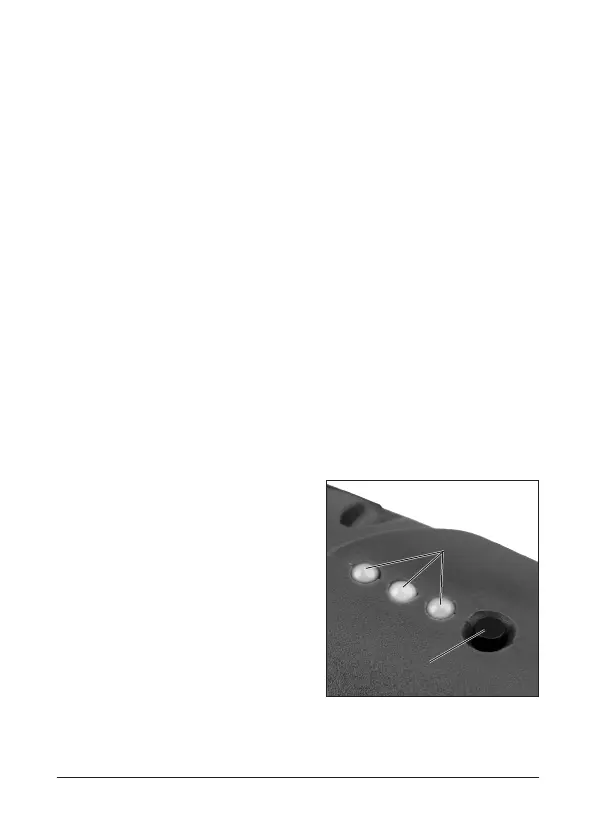
• During the charging process, the red LED on the
charging level display (1) lights up. When the battery is
fully charged, all 3 LEDs light up.
•
The battery is overload protected. The charging process
stops when the rechargeable battery is fully charged.
Over loading of the rechargeable battery is not possible.
• The pivot handle screwdriver must not be operated
during the charging process.
• Once charging is complete, disconnect the battery
charger from the mains power socket and the charg-
ing plug from the charging socket on the pivot handle
screwdriver.
Displaying the charging level
• Press the button (2) and
the 3 coloured LEDs of the
charging level display (1)
will indicate the charging
status of the integrated
battery pack:
• Red: Battery discharged,
charging required
• Red/Yellow: Battery par-
tially discharged
2
1
FX-5902183-5902184-Bedien-2002.indd 25FX-5902183-5902184-Bedien-2002.indd 25 18.05.20 15:4518.05.20 15:45



 To Next Page