Need help?
Do you have a question about the ALDI Workzone CSD40QU and is the answer not in the manual?
Guidelines for maintaining a safe and well-lit workspace.
Precautions related to power plugs, outlets, and avoiding earthed surfaces.
Advice on staying alert, using PPE, and preventing unintentional starting.
Instructions on proper tool usage, maintenance, and storage.
Guidelines for charging, handling, and safety of battery packs.
Instructions for servicing and safety notes for battery/charger.
Specific safety points for charging the screwdriver's battery.
Further safety instructions for using the battery charger.
Detailed steps for charging the screwdriver's battery.
Lists common problems, their causes, and solutions for the screwdriver.
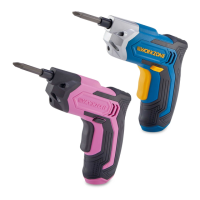
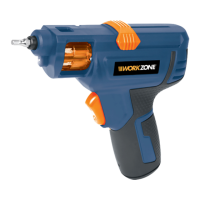
The WORKZONE 4V Li-Ion Screwdriver (Model No.: CSD40QU, 10997) is a compact and versatile cordless power tool designed for private domestic DIY use, specifically for driving in and loosening screws. It is not intended for commercial or trade applications. The screwdriver comes with a range of accessories, including a charger, various 25mm bits (PH 1-2, PZ 1-2, Slotted 4, Torx T20; PH 0-1-2-3, Slotted 5-6-7; PH 0-2-3, Slotted 4-5-6; PZ 2-2-3, Torx T20-T27, Slotted 7), and two 50mm extension shafts, along with an instruction manual and a warranty card.
The screwdriver operates on a 4V Li-Ion battery cell, which is integrated into the device. It features a chuck (2) that holds the screwdriver bits and a bit cartridge (3) for convenient storage and selection of bits. The tool is equipped with both forward rotating (9) and reverse rotating (8) on/off switches, allowing for both driving and removing screws. An LED light (10) is integrated to illuminate the work area, enhancing visibility in dark or enclosed spaces. The device also includes a charging indicator light (7) to show the charging status.
Before first use, it is crucial to read and understand the entire instruction manual, paying particular attention to safety warnings and operating procedures. The screwdriver's battery must be charged using the supplied 4V Li-Ion battery charger (13). The charging process involves plugging the charger into a power outlet and connecting its DC plug to the battery charging socket (6) on the screwdriver. The charging indicator light (7) will turn red during charging and green when the battery is fully charged, typically taking 3-5 hours. It's important to note that the screwdriver cannot be used while charging.
Selecting and replacing bits is a straightforward process. To select a bit from the cartridge, the top slide cover (4) must be pulled backward completely. The bit cartridge (3) can then be manually rotated anti-clockwise until the desired bit appears in the top bit window (14). Once selected, the top slide cover (4) is pushed forwards completely, and the magnetic chuck will firmly hold the bit. The screwdriver will not operate if the top slide cover is not fully engaged.
If a bit in the cartridge needs to be replaced, the top slide cover (4) is pulled backward, and the bit cartridge (3) is pushed out from the left window of the driver. The old bit can then be replaced with a new one, ensuring it is properly positioned and not protruding from the back of the cartridge. Alternatively, if the top slide cover (4) is in the forward position, a worn or broken bit can be simply pulled out from the chuck and replaced with a new one. This new bit will automatically load into the bit cartridge (3) when the top slide cover (4) is pulled backward. Only 25mm bits are compatible with this screwdriver.
The screwdriver is also equipped with two 50mm extension shafts (11) to extend the reach into recessed areas. To install an extension shaft, a desired bit is selected and the top slide cover (4) is pushed forwards. The original bit is then removed by hand, and an extension shaft is inserted into the chuck (2). Finally, the desired bit is inserted into the extension shaft.
To operate the screwdriver, either the forward rotating on/off switch (9) or the reverse rotating on/off switch (8) is depressed. Releasing pressure on the switch stops the driver. The forward switch (9) is used for driving in screws, while the reverse switch (8) is for removing or loosening them. It is critical never to change the direction of rotation while the chuck is still spinning; always wait until it has stopped. The screwdriver features a fully automatic spindle locking (auto-lock) mechanism, meaning the chuck (2) is locked when neither switch is pressed. This allows for manual use of the driver when needed. However, when using it manually, avoid pressing either on/off switch to prevent damage to the screwdriver. The LED light (10) automatically turns on when either switch is pressed and turns off when released, providing illumination during operation.
The WORKZONE 4V Li-Ion Screwdriver requires minimal maintenance. It does not need additional lubrication or servicing, as there are no user-serviceable parts. To clean the tool, simply wipe it with a dry cloth; never use water or chemical cleaners. It should always be stored in a dry place, protected from weather and temperature extremes, and out of reach of children and animals. The motor ventilation slots should be kept clean, and all working controls free of dust. Occasional sparks seen through the ventilation slots are normal and do not indicate a fault.
The ambient temperature range for using and storing the screwdriver is 0°C-40°C, and the recommended charging temperature range is also 0°C-40°C. Charging outside this range can affect performance and potentially damage the battery. For transportation in vehicles, the product should be secured to prevent movement or falling, which could cause injury or damage. The Li-ion battery is protected against deep discharging by a "Discharging Protection System," which will switch off the driver when the battery is depleted, preventing further rotation of the chuck. In such cases, the battery needs to be recharged. After extended periods of storage, it may be necessary to charge and discharge the power tool several times to achieve maximum performance. The battery performs best at normal room temperature (20°C ± 5°C). When disposing of battery cells, keep different electrochemical systems separate and dispose of them properly, as they can be hazardous to the environment and human health. Only use the charger specified by the manufacturer and avoid mixing cells of different types or capacities.
 General
| Voltage | 4V |
|---|---|
| Battery Type | Li-Ion |
| No-load Speed | 200 RPM |
| Charging Time | 3-5 hours |
| Chuck Size | 6.35 mm (1/4 inch) |

 To Next Page