-65-
8. EXPANDING WITH MULTIPLE OUTDOOR UNITS
8.1 Introduction:
Up to a maximum of 4 outdoor units may be connected to a single indoor unit. In
this way you can guard multiple entrances to your company or home (main en-
trance, personnel entrance, warehouse, garden gate, and garage).
Additional outdoor units are available via the Alecto service department via the
internet www.alecto.nl
8.2 To register additional outdoor units:
Preparation for registration:
1. Install the batteries into the indoor unit and charge them.
2. Install the batteries into the outdoor unit or connect the adaptor to the unit
3. Keep both the indoor unit and outdoor unit handy
4. Keep a small screwdriver or paperclip handy
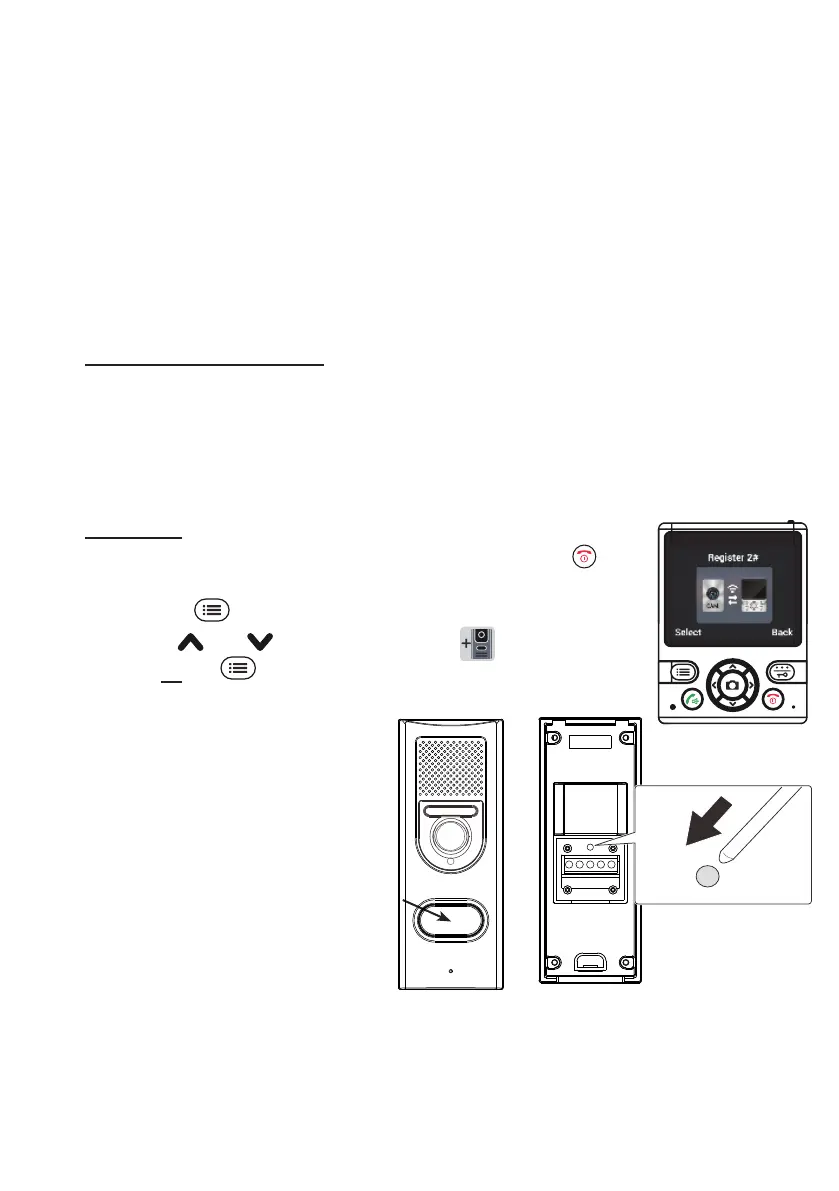
To register:
1. with the indoor unit on stand-by, rst briey press the
but-
ton to wake up the indoor unit
2. press the
MENU soft-button
3. use the
and buttons to select the Register function
4. press 2x the
SELECT soft-button; in the lower part of the
display ‘Searching...’ will appear.
5. press 1x the bell pusher of the
outdoor unit
6. now press and hold the register
button at the rear of the outdoor
unit until the camera lighting
starts ashing after several
seconds
7. the indoor unit and outdoor unit
are now searching for each oth-
er; the registration is successful
as soon as the indoor unit shows the image of the outdoor unit; the number of
the outdoor unit is indicated in the middle of the display at the top


 To Next Page