3
2.2 STARTING THE IOS APP.
Start the app. by clicking on the Start button.
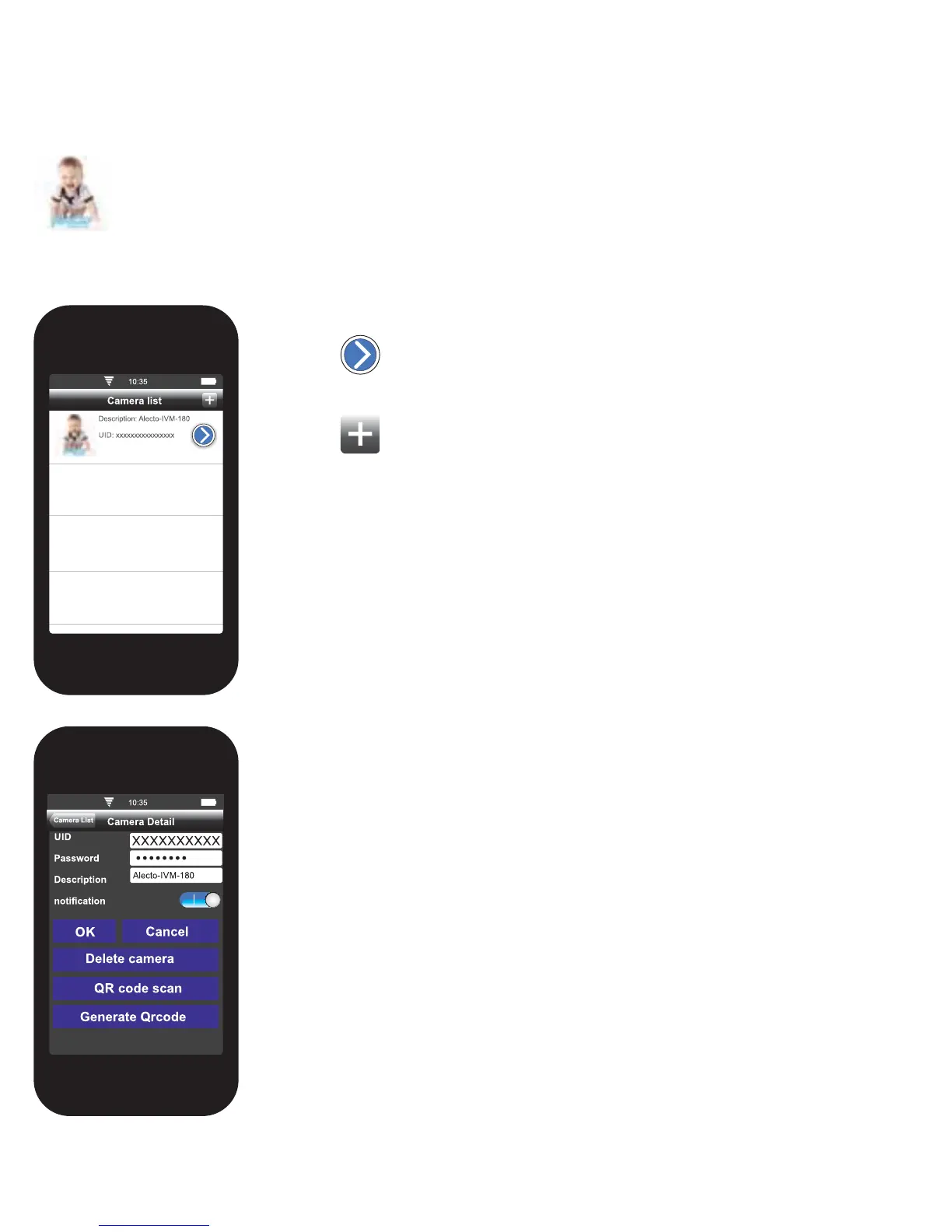
The following screen will appear.
Press the
button to get to the login details of the camera.
Press the
button to add a new camera. The same login screen will
appear with blank fi elds. The UID code, password, name, and notifi cation
fi elds will be empty.
UID: Unique Identifi cation code. This code ensures that the camera can
easily be accessed from the outside.
Password: The entered password is shown here. The default password
is “12345678”. Change the password when the camera is activated. To
prevent abuse, the password must be changed. See section 4.3 to change
the password.
Description: The name of the camera is shown here. The name of the
camera will be displayed if there is an alarm notifi cation. When using
multiple cameras, it may be helpful to give each camera a separate name.
This can be altered here.
notifi cation: Click here to set notifi cation messages for when there is an
alert. Notifi cation messages can be sent, or if the ambient temperature
outside a preset value treed.
Delete camera: Press here to delete the app. from the camera.
100%


 To Next Page