EasyManua.ls Logo

Alecto WS5200 - Page 85

Alecto WS5200
Print Icon
To Next Page IconTo Next Page
To Previous Page IconTo Previous Page
Loading...
85
7) Press Scan and select
your SSID from the list.
If it is a dual band
router and the SSIDs
are different, make sure
you connect to the 2. 4
GHz band.
Enter the WiFi
password.
8) If you already have an
Ecowitt account you
can connect your
account.
Tap ON and select an
upload interval in
minutes
Make a note of the
MAC address.
If not then skip this
step
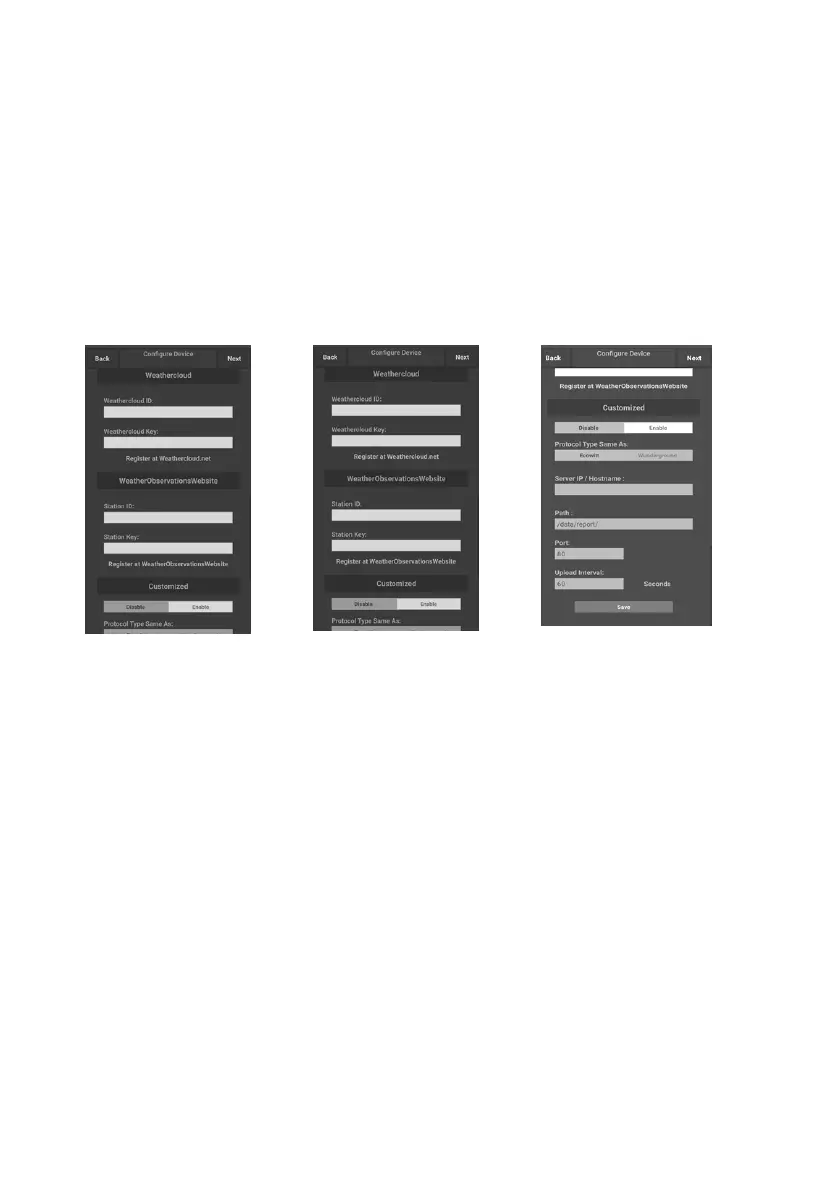
9) If you already have an
Weather underground
account you can
connect your account.
Enter the Station ID
and Station Key
obtained from
Wunderground. com
into this panel.
If not then skip this
step
10) If you already have an
WeatherCloud account
you can connect your
account.
WeatherCloud. net .
Enter the Station ID
and Password into this
panel.
If not then skip this
step
11) If you already have an
WeatherObservationsW
eb account you can
connect your account.
Enter the Station ID
and Password into this
panel
If not then skip this
step
12) Upload your data to
your own sever.
The website should
have the same protocol
with Wunderground or
Ecowitt. Input all the
information needed.
If not then skip this
step

Related product manuals