8 LTBT-TM-MSET2
Microset™ II—Installation and Operations Guide
Wiring
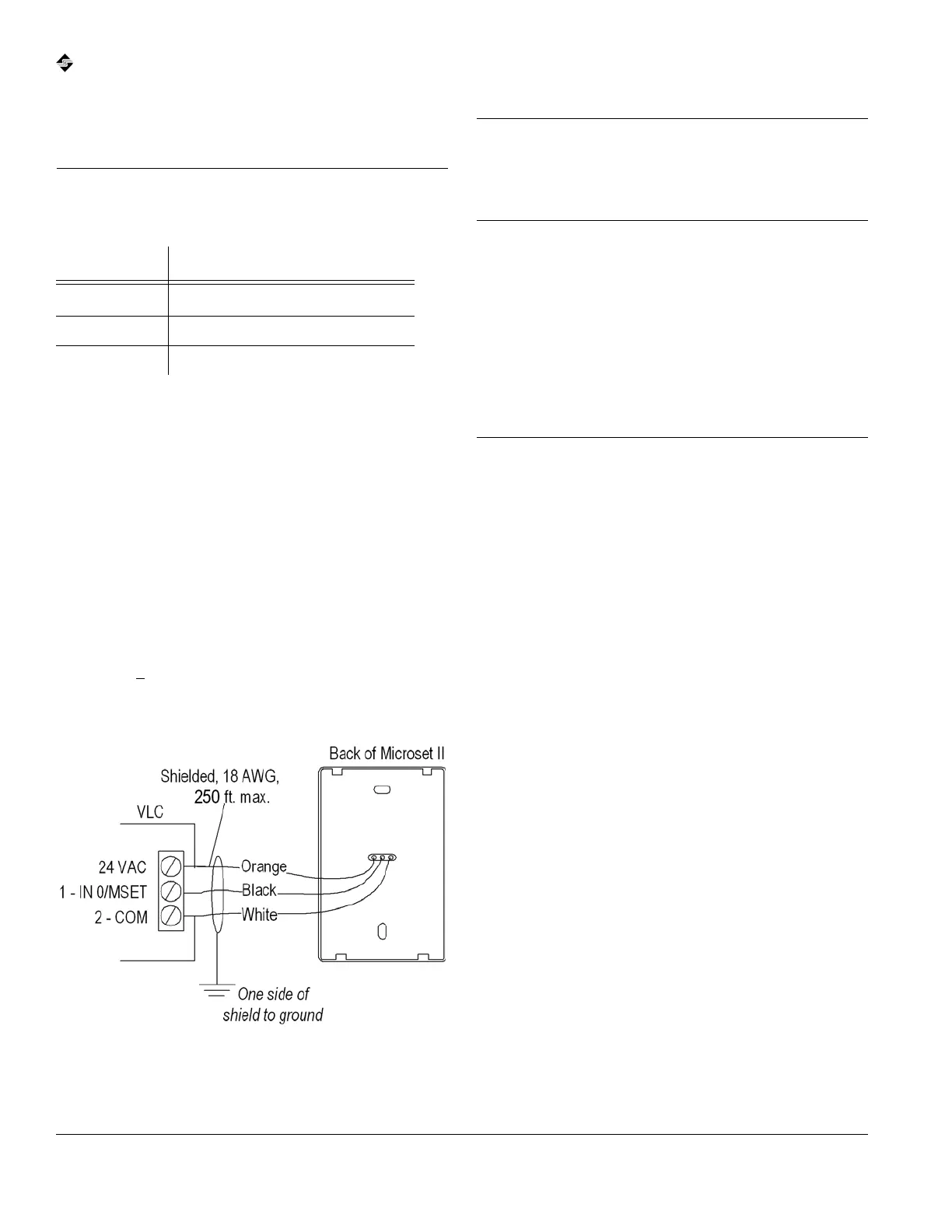
The Microset II has a three-conductor connection to the VLC.
See Fig. 5 for wiring connections and terminations. Also see
the Gen 4 VLC Installation and Wiring Guide (LTBT-TM-
GEN4VLC) for detailed input wiring instructions for VLCs and
the Network Installation and Design Guide (LTBT-TM-
NETWRK) for instructions on installing twisted-pair wiring.
Wire Specifications
Type: 18 AWG, shielded
Length: <
250 ft.
Resistance: <12Ω
Fig. 5 Basic Microset II wiring.
Note Do not run Microset II wire in the same conduit or
alongside building power cables. This can cause
interference. If power cables must be crossed, cross at
90°.
Compatibility
with Earlier
Version VLCs
VLC firmware versions prior to 1.09 do not fully support the
Microset II. Use the following information to determine if
retrofitting older version VLCs with a Microset II will provide
a satisfactory feature set for the application.
VLC Versions Prior to
1.06c
VLC versions earlier than 1.06c do not have BV-72 and higher
(see Table 7 on p. 26). They do not support fan-control or hotel
modes. None of these options is available: space humidity
display, outside humidity display, fan speed display, and time
of day display. The LCD backlight is always ON.
VLC Versions 1.06c
through 1.08
VLC versions 1.06c–1.08 do not have BV-80 and higher (see
Table 7 on p. 26). The Microset II may be used in fan-control
applications by cutting a circuit board trace on the Microset II
(contact your Alerton Representative or Alerton Technical
Support). If the trace is cut, BV-65 selects office mode or hotel
mode (ON = office). None of these options is available: inside
humidity display, outside humidity display, and time of day
display.
Table 2 VLC wire terminations.
Wire color VLC terminal
Orange
24VAC or 24VDC
a
a. The orange lead powers the backlit display. It is optional; if left
unterminated, the backlight is not available. Connecting to a
VLC terminal is preferred, but the orange lead may connect to
any point on the VLC source. Do not connect to a 24VAC
source that does not have common ground with the VLC.
Black IN 0/MSET
White COM


 To Next Page