LTBT-TM-MSET2 7
Mounting
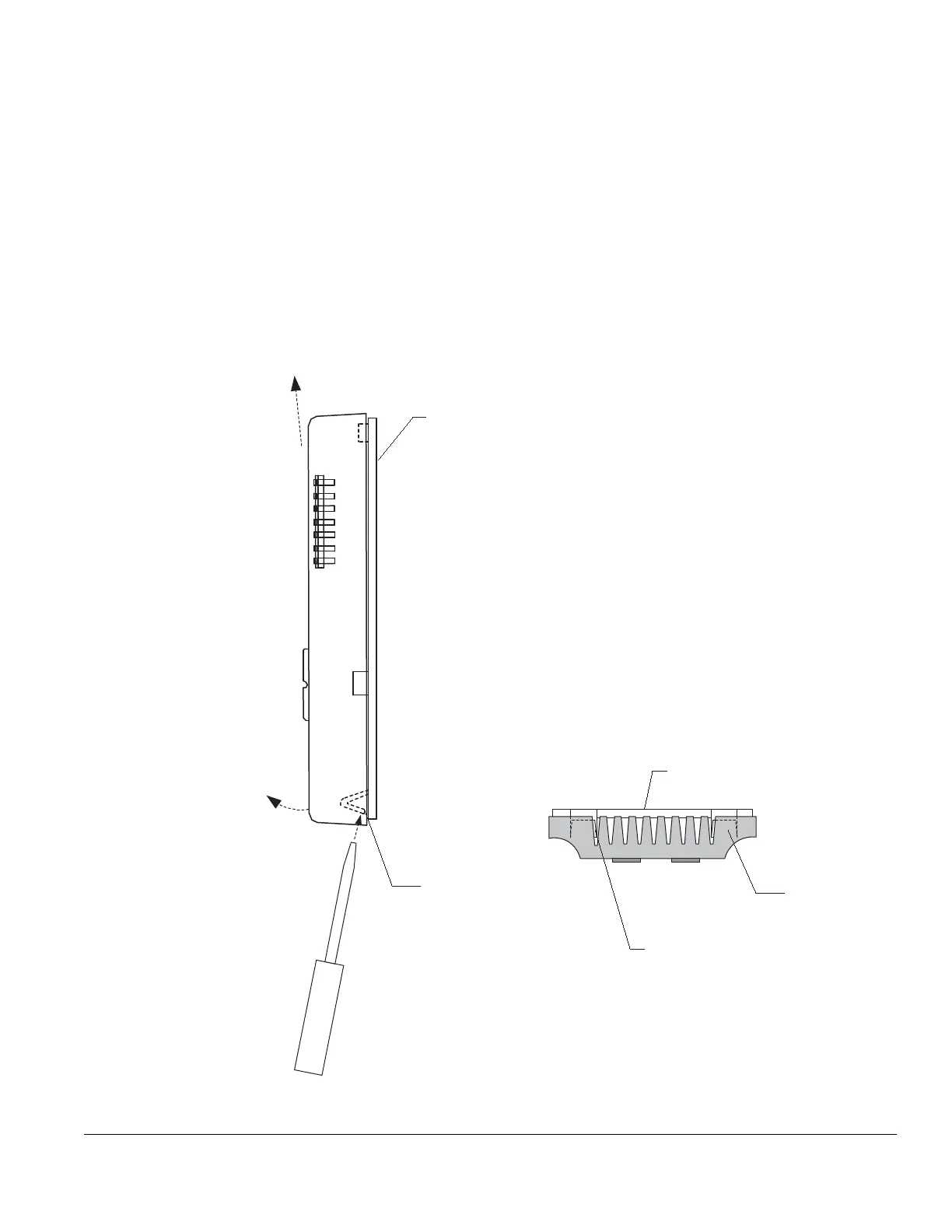
k To remove the Microset II from the backplate:
1 Insert a thin, flat-tipped screwdriver into the last vent
slot on the bottom of the Microset. Position the
screwdriver so that you can apply pressure to the
backplate leg (see Fig. 4, bottom view).
2 Firmly depress the backplate leg until it is clear of the
tab-stop on the Microset II.
3 Gently pull the freed corner of the Microset II away
from the wall.
4 Repeat steps 1–4 on the other side.
5 Push upward on the bottom of the Microset II until it is
completely free of the backplate.
Fig. 4 Removal of Microset II from backplate.
Microset II backplate
Side view
Bottom view
Microset II backplate
Backplate leg
Place screwdriver here to
depress backplate leg.
Repeat on other side.
Backplate leg
1. Insert screwdriver in
last vent slot and
contact backplate leg.
2. Push upward with
screwdriver, depressing leg
until it is free of tab.
3. Lift bottom corner
away from backplate.
4. Repeat on other side.
5. Push upward on
Microset II until free of
the backplate.


 To Next Page