6 LTBT-TM-MSET2
Microset™ II—Installation and Operations Guide
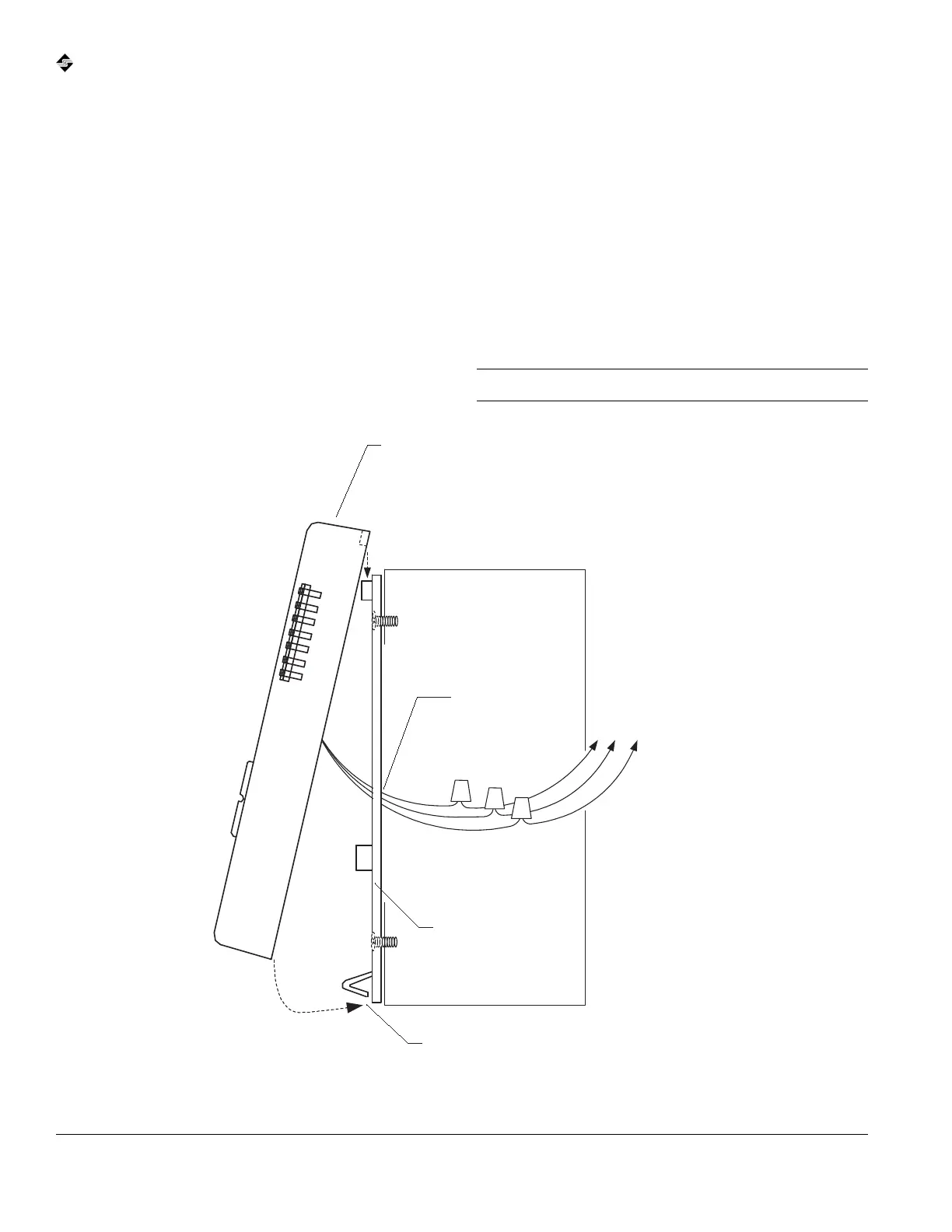
k To secure the Microset II to a mounting surface:
1 Remove the backplate from the Microset II and the
wiring pigtail.
2 Flip the backplate so the smooth side faces the
mounting surface.
3 Rethread the wires through the center knockout on the
backplate.
4 Use wire nuts or other connectors to splice the
Microset II wires to the wire run from the VLC (see
“Wiring” on p. 8 for details).
5 Secure the backplate to the mounting surface with the
enclosed screws or your own.
6 Hold the Microset II at an angle above the backplate
and then slide it down.
The two tabs on the inside top edge of the Microset II
should fit into the tab slots on the backplate
(see Fig. 3).
7 Push the bottom of the Microset II onto the backplate
legs until they snap securely on the tab-stops (see Fig.
3).
Caution Do not crimp or kink the pigtail wires.
Fig. 3 Microset II mounting.
1. Splice Microset II
pigtail to VLC wire run.
2. Secure backplate to
mounting surface with
screws (provided).
3. Insert Microset II tabs
into backplate slots.
4. Push bottom of Microset
II until the backplate
legs click into position.
To VLC. (Black to IN-0. White
to COM. Orange to 24 VAC.)
Backplate legs (face
away from wall)
Microset II backplate
Microset II pigtail
Microset II



 To Next Page