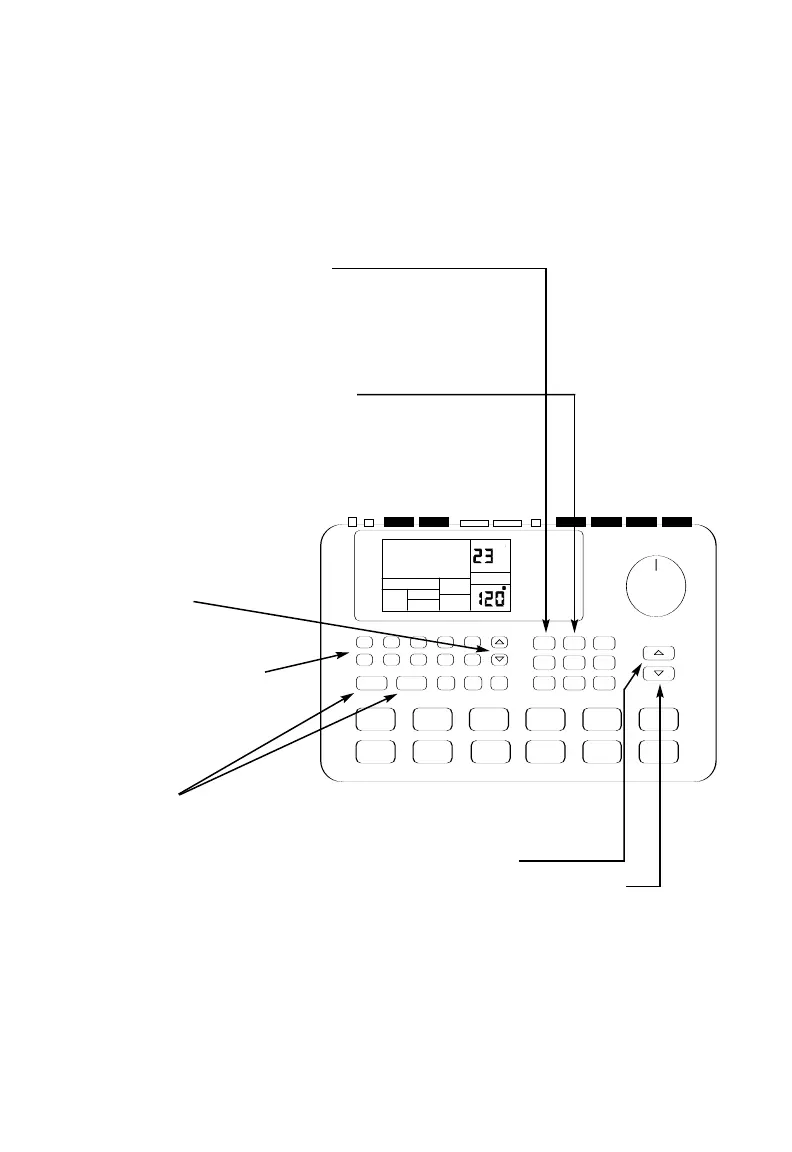
5 Speed up the tempo by pressing the
TEMPO/UP arrow button.
Slow down the tempo by pressing the
TEMPO/DOWN arrow button.
4 Press PLAY to start a
pattern, STOP to stop it.
3 Press the UP/DOWN
arrow buttons
to select a Pattern. You
can also enter a pattern
number (00-49) with the
Number buttons. Use a
“leading zero” (e.g. 01,
02, 03) for the first nine
patterns.
2 If the display's upper right window shows
USER, press the PRESET/USER button
to select Preset Patterns.
1 If the display's upper right window shows Song,
Press the PATTERN/SONG button
once to select Pattern mode.
Playing Patterns



 To Next Page