EasyManua.ls Logo

AlgoLaser DIY KIT MK2 - Machine Status Explanation; Laser Indicator Light

AlgoLaser DIY KIT MK2
73 pages
Print Icon
To Next Page IconTo Next Page
To Previous Page IconTo Previous Page
Loading...
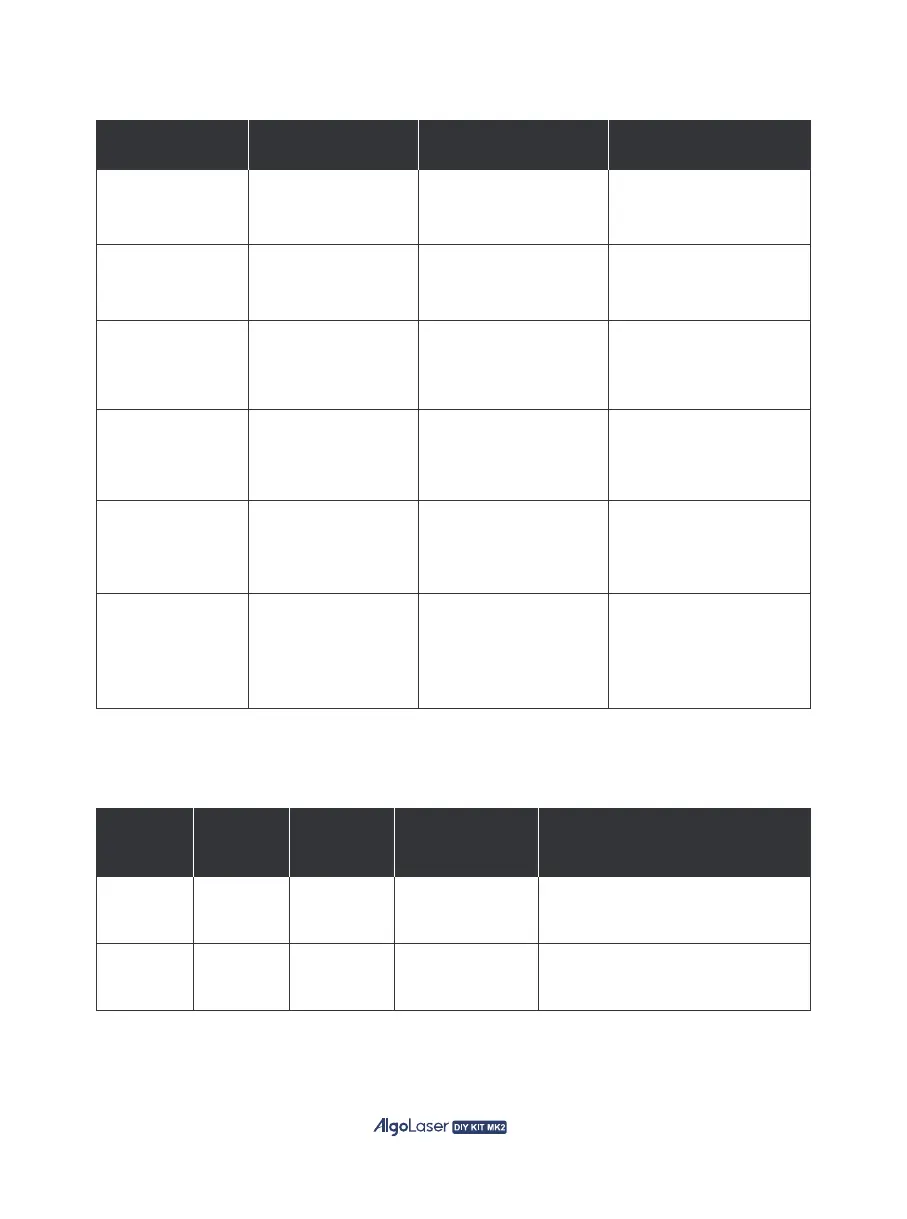
Power on
Power off
Standby
Working
3.4 Machine Status Explanation
Status Action
LED Indicator
Descriptions
Result
3.5 Laser Indicator Light
Power Green light
Power connected
indication
Laser emission
indication
Green light stays on when power
is connected.
Blue light stays on during
laser emission
Blue lightLaser
Indicator
Light
Main
Status
Sub-status Meaning
Note
Hold the power
button for>300ms
while powered on
The Green Light
gradually brightens
Machine powers on and
quickly seeks the home
position
Hold the power
button for>1s
while powered off
The Green Light
gradually dims
Machine powers off and
stop all operations
Machine powered on
and idle
The Green Light
remains steady
Machine is in idle
standby mode
Machine powered on
and working
The Green Light
remains steady
Machine is in motion and
processing
Fault indicator
Machine has a fault
and can't perform
engraving motion
Green light with
repeated <di> sound
The machine cannot
engrave
there is a malfunction
Screen Feedback
using the screen
click the screen and ring
out <di> sound
The screen displays
feedback and proceeds
to the corresponding
message
31