Pocket size soldering iron
User Manual www.alientek.com
9
T80&T80P Smart Soldering Iron User Manual
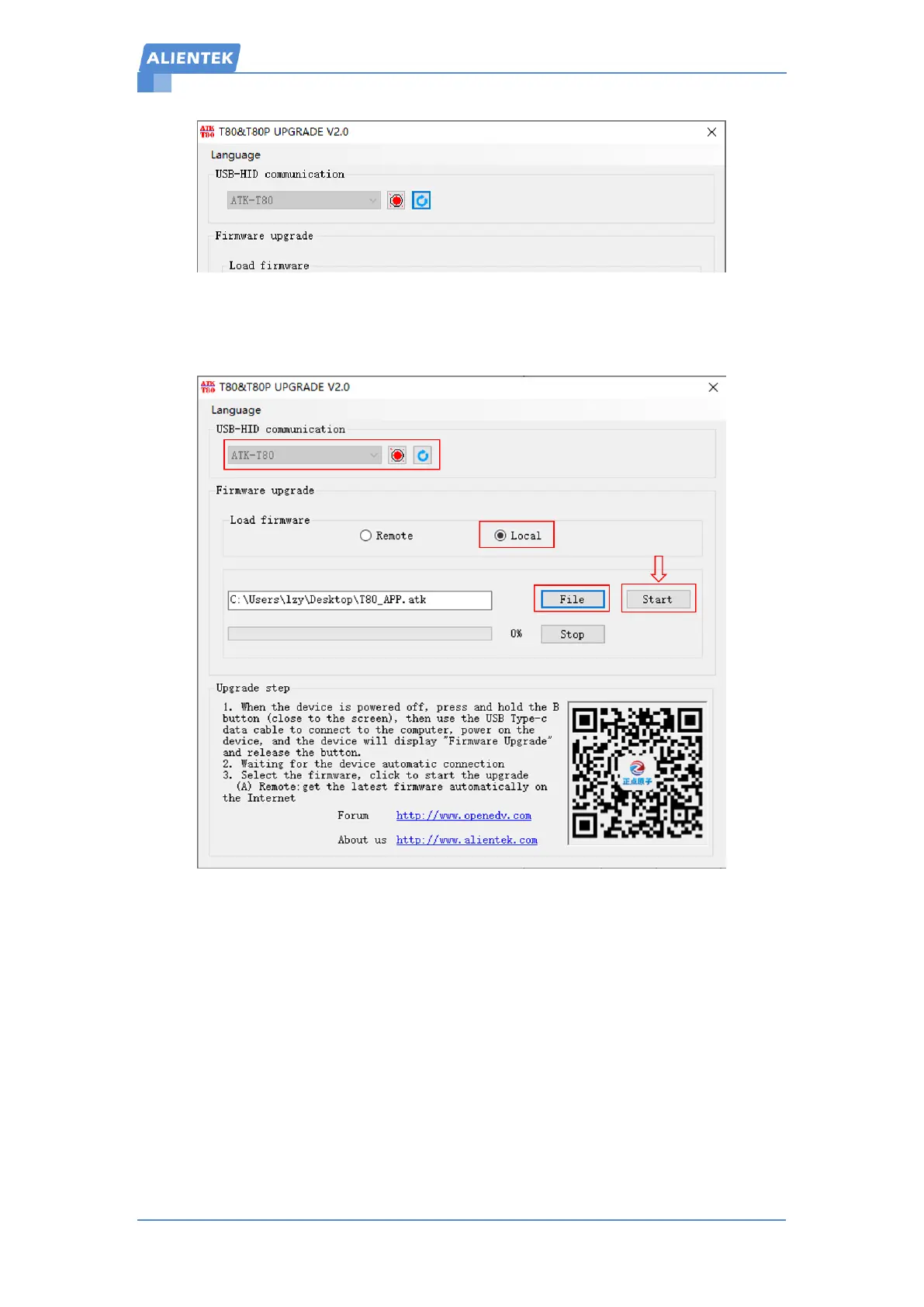
Figure 10-2 connection succeeded
Step 4: Select the local firmware, and load the T80_APP.atk file, click to start the upgrade
and wait for the upgrade to complete. The operation is shown in Figure 10-3 below.
Figure 10-3 Firmware upgrade
11. Maintenance
When the new tip is used for the first time, it is necessary to heat the tin to 250 ° C
first to prevent dry burning oxidation!
When the new tip is used for the first time, there will be a temperature jump
problem, which will stabilize after a few hours of use!
After the soldering iron is used, apply proper tin to the tip of the soldering iron to
prevent oxidation before disconnecting the power supply.
The tip of the soldering iron works normally at a temperature of about 300 to 380 ° C.
Do not use it for a long time (more than 420 ° C) to avoid the effect of dry burning on
the life of the tip.


 To Next Page