Pocket size soldering iron
User Manual www.alientek.com
6
T80&T80P Smart Soldering Iron User Manual
7. System flow
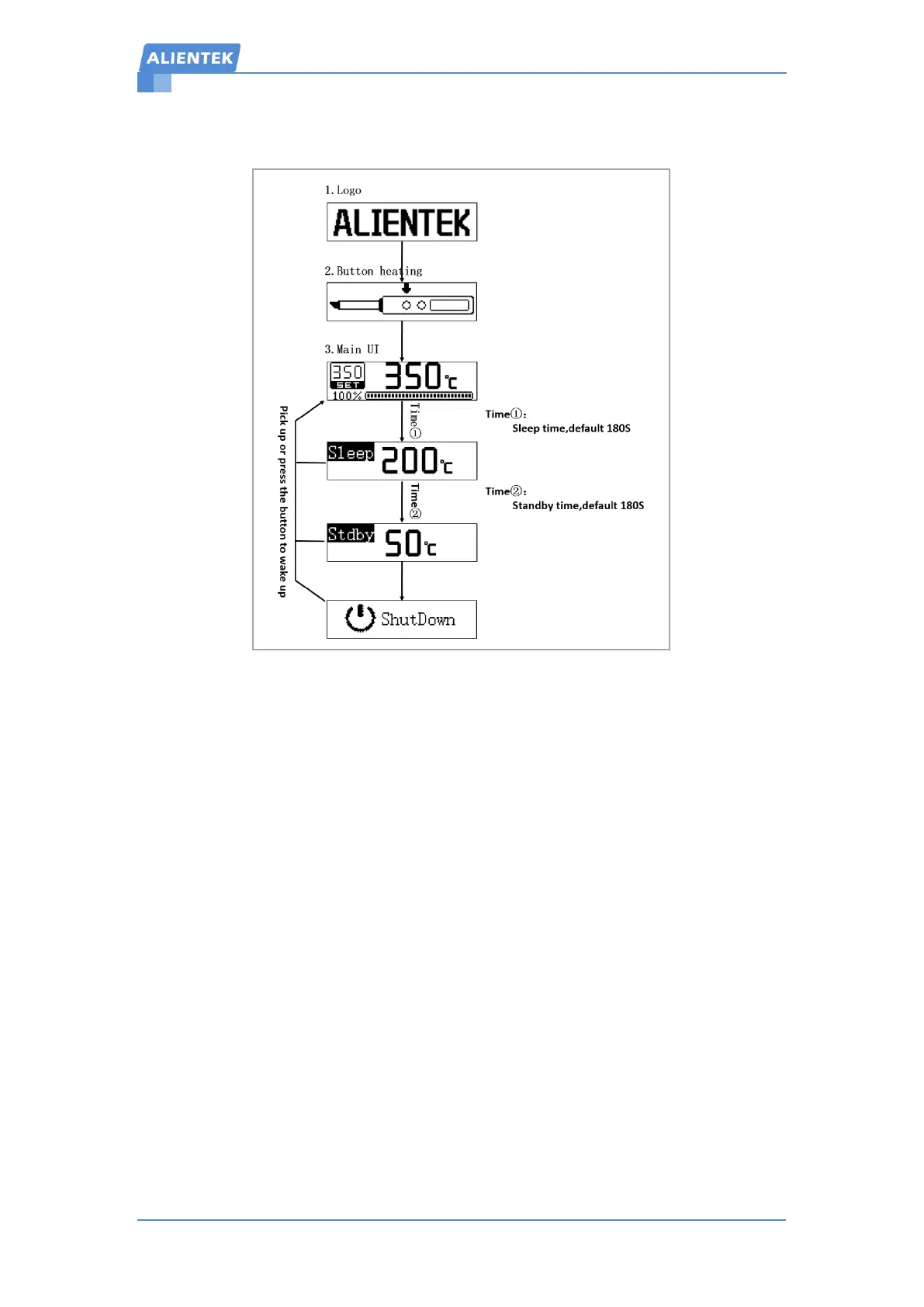
Figure 7-1 Work flow
After the T80&T80P smart soldering iron is powered on, it displays the logo first, Then it is
prompted to press the A button to enter the main UI (the button heating UI can be set to turn on or
off in the menu. After turning on, the machine will directly enter the main UI). In the button
heating UI, if the A button is not pressed within 10 seconds, it will automatically shut down. In
main UI, which is in a normal working state. The running status can be divided into the following
four types:
Working state (main UI): The soldering iron is heated, and the temperature is constant at
the user's set temperature. If the handle is not used for a period of time (timing 1: sleep time),
it will enter the sleep state.
Sleep state: The soldering iron is heated, and the temperature is constant at the sleep
temperature (the default is 200°). It will exit the dormant state and return to the main UI
when it senses the hand held or presses the button. Otherwise, after a period of time (timing
2: standby time), it will enter the standby state.
Standby state: The soldering iron is not heated. In the same way, it will exit the dormant
state and return to the main UI when it senses a hand held or presses a button. Otherwise, the
temperature of the soldering iron tip will slowly drop, and when it drops to 50°C, it will enter
the shutdown countdown state, and when the countdown ends, it will enter the screen off
state.
Screen off state: The soldering iron is not heating. In this state, the system is running with
low energy consumption, and restarts when it senses a hand held or presses a button.


 To Next Page
 Loading...