Steps
1. Open the latch and disconnect the display cable from the system board.
2. Disconnect the Alienhead LED cable from the system board.
3. Disconnect the RGB-IR camera cable from the USB board.
NOTE: This step applies to devices that are shipped with a hybrid RGB-IR camera module.
4. Lift the system board Mylar and peel the tapes that secure the RGB-IR camera cable to the system board.
NOTE: This step applies to devices that are shipped with a hybrid RGB-IR camera module.
5. Lift the RGB-IR camera cable off the system board.
NOTE: This step applies to devices that are shipped with a hybrid RGB-IR camera module.
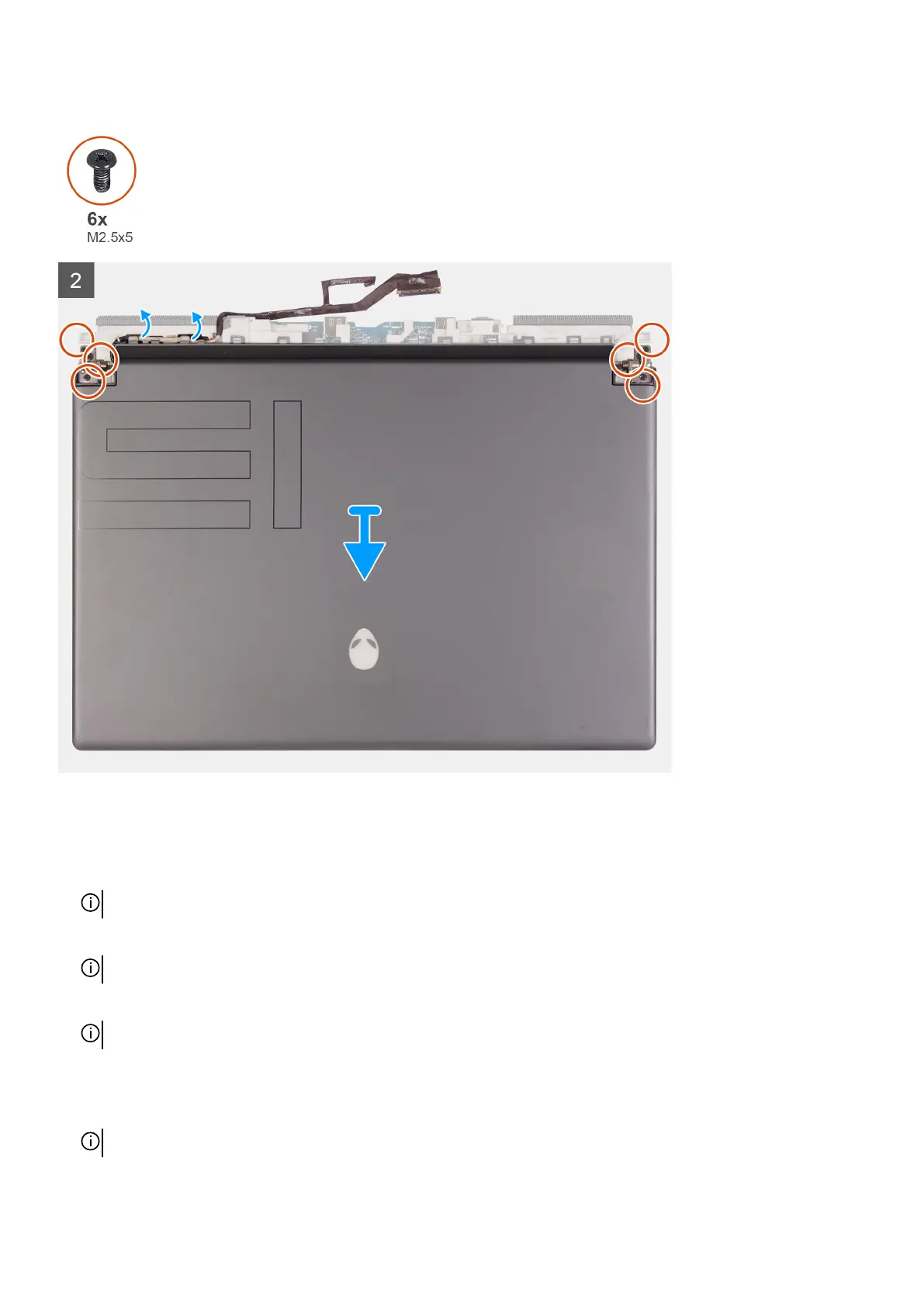
6. Turn the computer over and place the computer on a clean and flat surface.
7. Remove the display cable from the routing guides on the palm-rest and keyboard assembly.
8. Remove the RGB-IR camera cable from the routing guides on the palm-rest and keyboard assembly.
NOTE: This step applies to devices that are shipped with a hybrid RGB-IR camera module.
9. Remove the six screws (M2.5x5) that secure the display hinges to the palm-rest and keyboard assembly.
48


 To Next Page