3) Tone Unit Adjustment
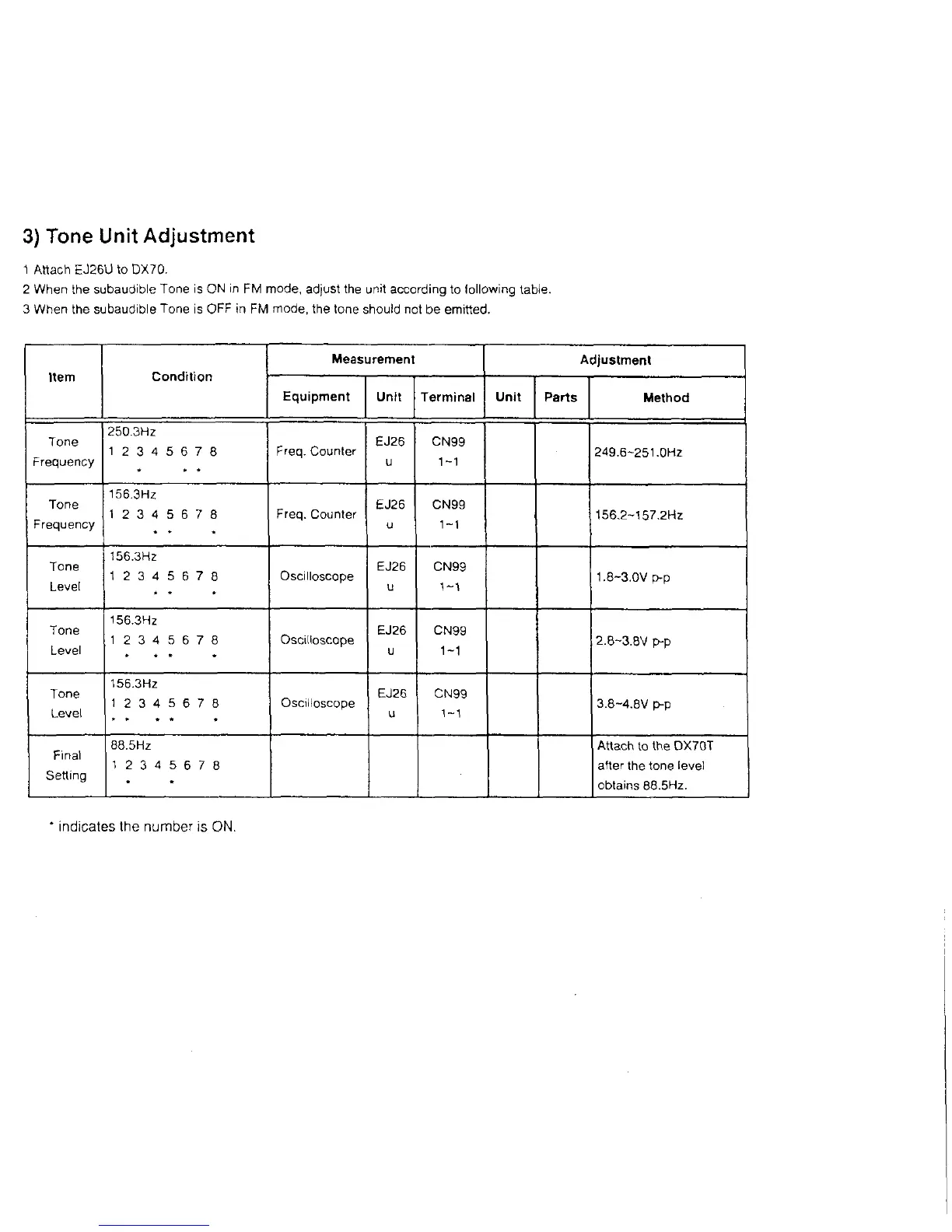
1 Attach EJ26U to DX70.
2 When the subaudible Tone is ON in FM mode, adjust the unit according to following table.
3 When the subaudible Tone is OFF in FM mode, the tone should not be emitted.
Item
Condition
Measurement
Adjustment
Equipment Unit
Terminal
Unit
Parts Method
Tone
Frequency
250.3Hz
1 2 3 4 5 6 7 8
Freq. Counter
EJ26
u
CN99
1-1
249.6-251.0Hz
Tone
Frequency
156.3Hz
1 2 3 4 5 6 7 8
Freq. Counter
ËJ26
u
CN99
1-1
156.2-157.2Hz
Tone
Level
156.3Hz
1 2 3 4 5 6 7 8 Oscilloscope
EJ26
u
CN99
1.8-3.0V p-p
Tone
Level
156.3Hz
1 2 3 4 5 6 7 8 Oscilloscope
EJ26
u
CN99
1-1
2.8-3.8V p-p
Tone
Level
156.3Hz
1 2 3 4 5 6 7 8 Oscilloscope
EJ26
u
CN99
1-1
3.8-4.8V p-p
Final
Setting
88.5Hz
1 2 3 4 5 6 7 8
Attach to the DX70T
after the tone level
obtains 88.5Hz.
* indicates the number is ON.



 To Next Page