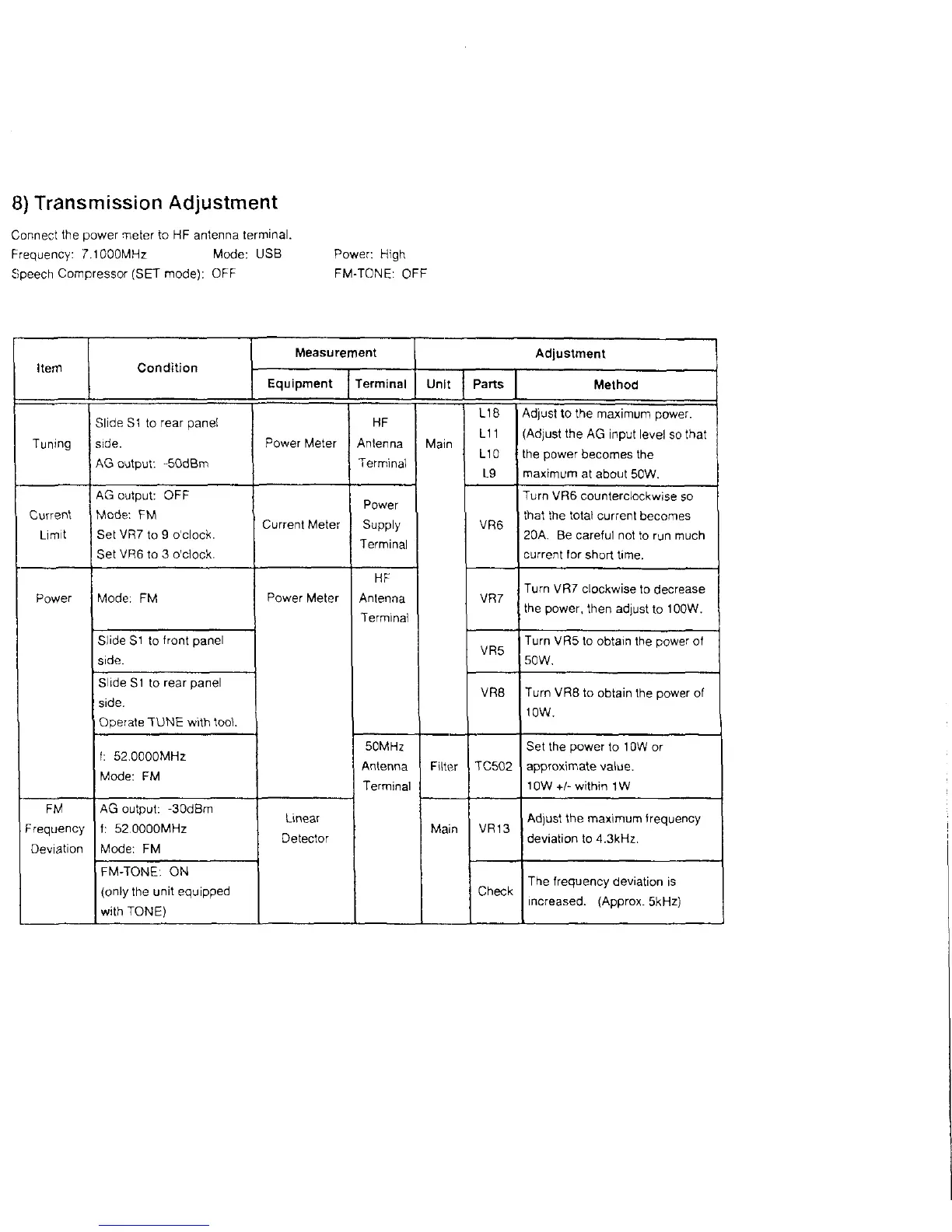
8) Transmission Adjustment
Connect the power meter to HF antenna terminal.
Frequency: 7.1000MHz Mode: USB Power. High
Speech Compressor (SET mode): OFF FM-TONE: OFF
Item
Measurement
Adjustment
Equipment Terminal
Unlit Parts
Method
Tuning
Slide S1 to rear panel
side.
AG output: -50dBm
Power Meter
HF
Antenna
Terminal
Main
L18
L11
L10
L9
Adjust to the maximum power.
(Adjust the AG input level so that
the power becomes the
maximum at about 50W.
Current
Limit
AG output: OFF
Mode: FM
Set VR7 to 9 o'clock.
Set VR6 to 3 o'clock.
Current Meter
Power
Supply
Terminal
VR6
Turn VR6 counterclockwise so
that the total current becomes
20A. Be careful not to run much
current for short time.
Power
Mode: FM
Power Meter
HF
Antenna
Terminal
VR7
Turn VR7 clockwise to decrease
the power, then adjust to 100W.
Slide S1 to front panel
side.
VR5
Turn VR5 to obtain the power of
50W.
Slide S1 to rear panel
side.
Operate TUNE with tool
VR8
Turn VR8 to obtain the power of
10W.
1: 52.0000MHz
Mode: FM
50MHz
Antenna
Terminal
Filter TC502
Set the power to 10W or
approximate value.
10W +/- within 1W
FM
Frequency
Deviation
AG output: -30dBm
1: 52.0000MHz
Mode: FM
Linear
Detector
Main VR13
Adjust the maximum frequency
deviation to 4.3kHz.
FM-TONE: ON
{only the unit equipped
with TONE)
Check
The frequency deviation is
increased. (Approx. 5kHz)



 To Next Page