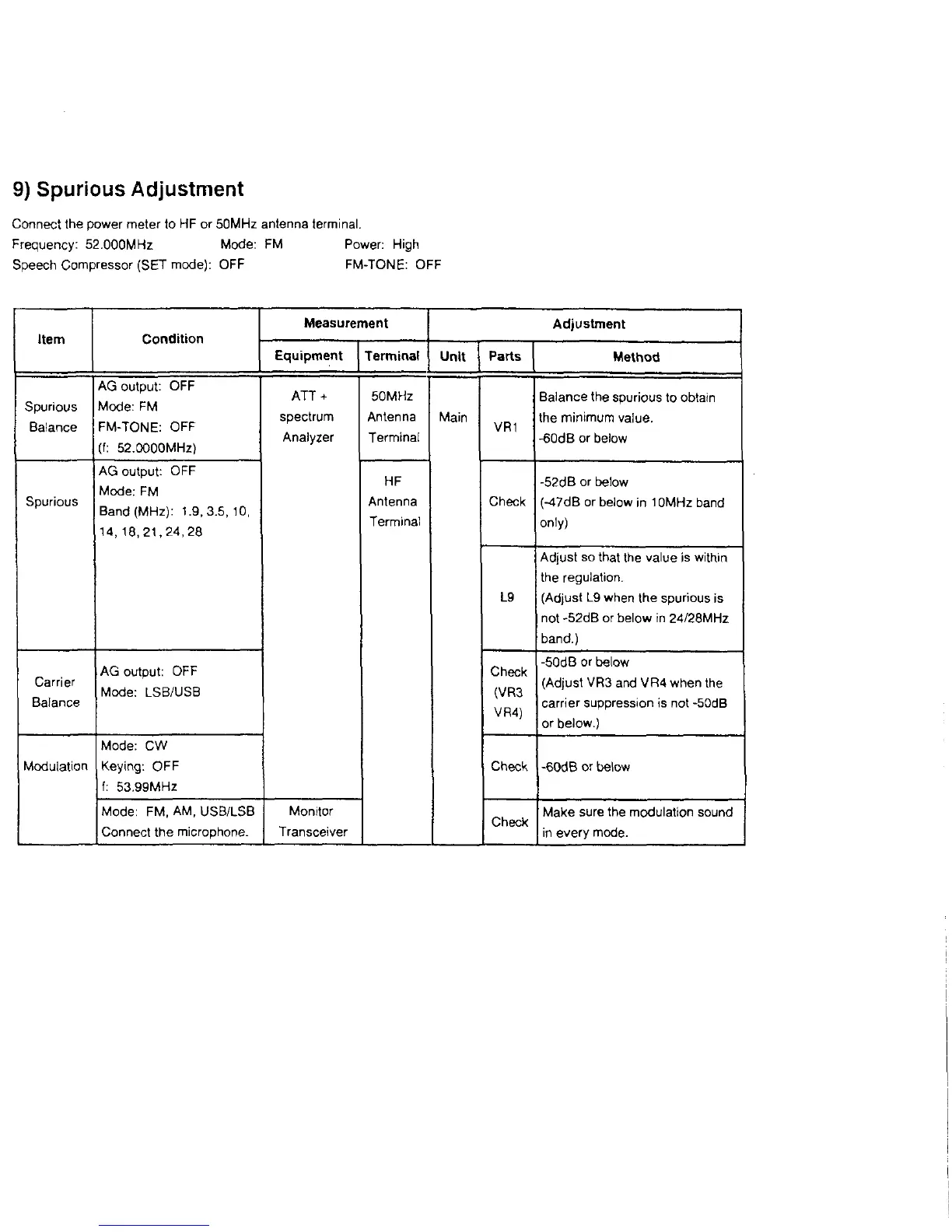
9) Spurious Adjustment
Connect the power meter to HF or 50MHz antenna terminal.
Frequency: 52.000MHz Mode: FM Power: High
Speech Compressor (SET mode): OFF FM-TONE: OFF
Item
Condition
Measurement
Adjustment
Equipment Terminal
Unit
Parts
Method
Spurious
Balance
AG output: OFF
Mode: FM
FM-TONE: OFF
(f: 52.0000MHz)
ATT +
spectrum
Analyzer
50MHz
Antenna
Terminal
Main
VR1
Balance the spurious to obtain
the minimum value.
-60dB or below
Spurious
AG output: OFF
Mode; FM
Band (MHz): 1.9,3.5,10,
14, 18,21,24,28
HF
Antenna
Terminal
Check
-52dB or below
(-47dB or below in 10MHz band
only)
L9
Adjust so that the value is within
the regulation.
(Adjust L9 when the spurious is
not -52dB or below in 24/28MHz
band.)
Carrier
Balance
AG output: OFF
Mode; LSB/USB
Check
(VR3
VR4)
-50dB or below
(Adjust VR3 and VR4 when the
carrier suppression is not -50dB
or below.)
Modulation
Mode: CW
Keying: OFF
f: 53.99MHz
Check -60dB or below
Mode: FM, AM, USB/LSB
Connect the microphone.
Monitor
Transceiver
Check
Make sure the modulation sound
in every mode.



 To Next Page