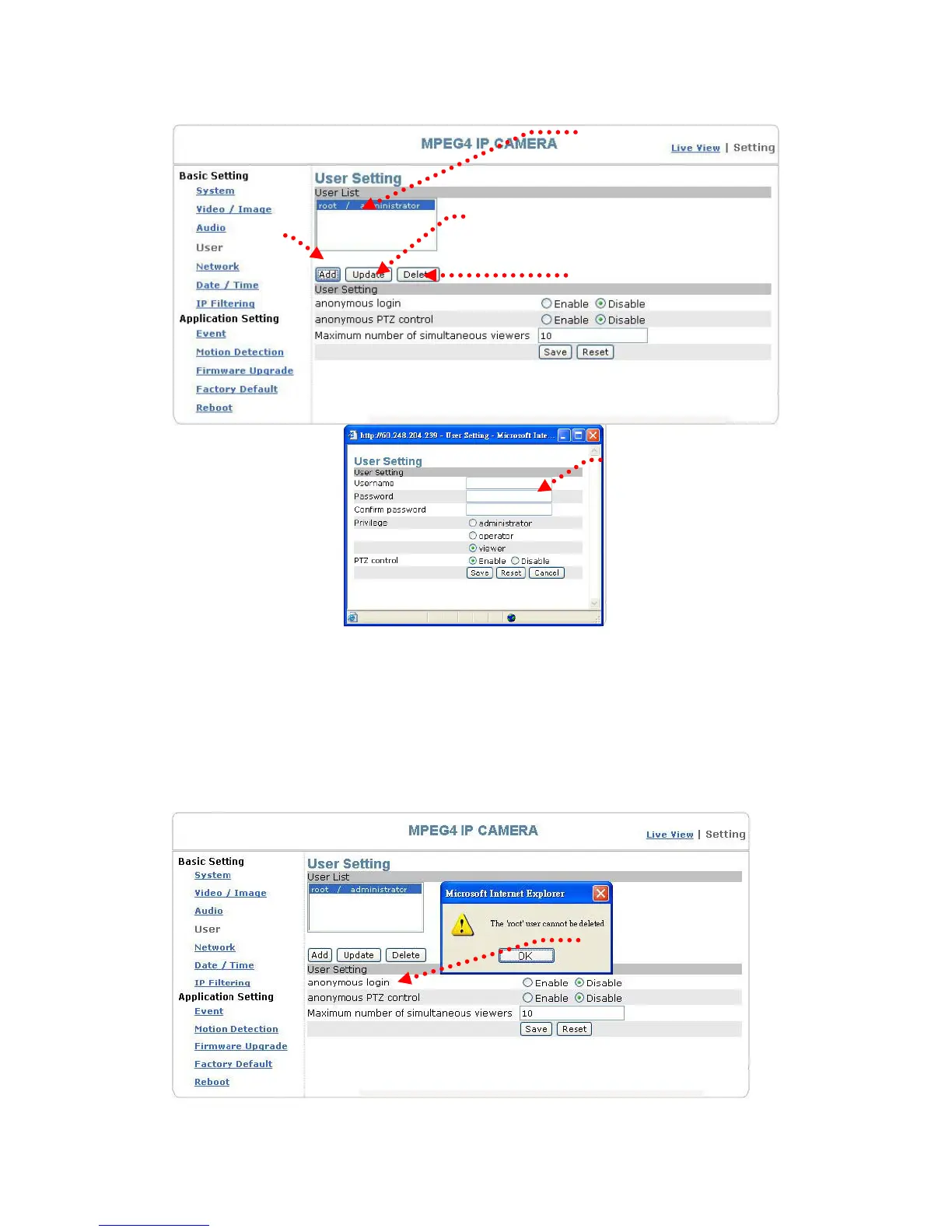
e the name of the user.
User setting
Add a new user and set up a
different privilege.
Delete a user from the list.
Log in the username, password and
privilege as required. You can also
define the PTZ control here.
Basic Setting > User > User Setting (privilege setting)
For special business situations, the product allows you to log in to browse without the
need of keying in your username and password. For this purpose, you need to check
“Enable” at Anonymous Login. To allow the user to control the camera, you need to
check “Enable” at Anonymous PTZ Control. However, “Disable” for both options is
recommended for the sake of security. Depending on the bandwidth and requirements,
a limit up to 10 can be defined for the number of viewers who are allowed to view the
camera simultaneously.
Activate the anonymous view and
camera rotation functions; define the
number of viewers who are allowed for
on-line review simultaneously.
37


 To Next Page