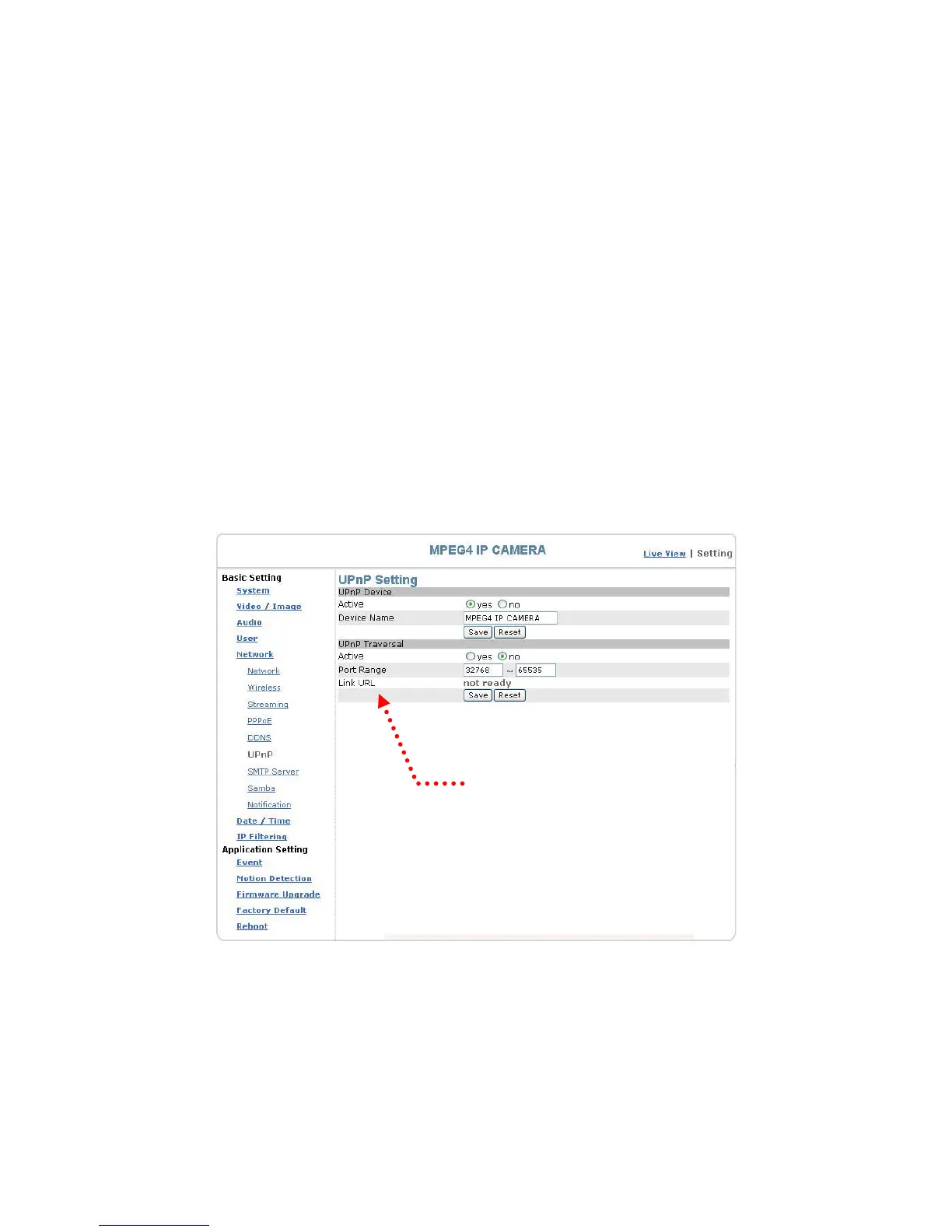
Basic Setting > Network > UPnP (Universal Plug and Play)
If you connect your camera to a router, IP allocator, or wireless AP, your camera will
possibly be blocked by the NAT and can’t be located on the Internet. To penetrate into
the firewall, activate the supportive item- UPnP. The Link URL shows the external IP
address and the port of the router. Enter the IP address in the Internet Explorer to
penetrate the NAT.
Basic Setting > Network > UPnP > UPnP Device
Active: yes (enable)/no (disable)
Device Name: the name of the UPnP device
Basic Setting > Network > UPnP > UPnP Traversal
Active: yes (enable)/no (disable)
Port Range: the range of the usable ports, from 32768 to 65535 as default
Link URL: Uniform Resource Locator, the web address
Click “Save” to confirm when you finish.
Web address
UPnP setting
48


 To Next Page