Main Screen
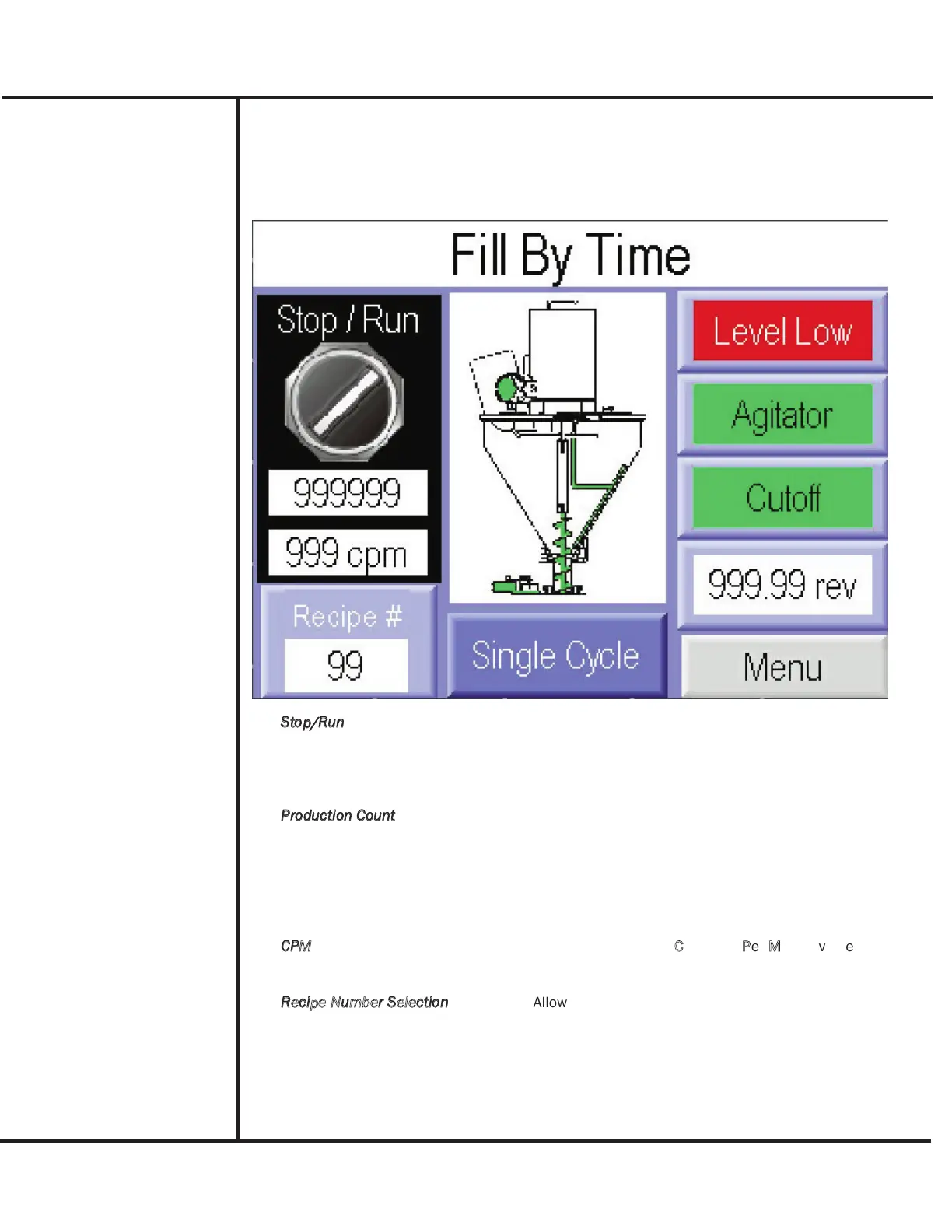
The Main screen provides operational control of the filler, as well as displaying machine produc-
tion totals and equipment operating status. Included are the following.
Model B-350Touch Control Panel Operating Instructions
3
AFI Publication 1200316 ● Issue: Review ● March 2016
B-350Touch Controller
Operation
Stop/Run
Selection used to halt or operate the filler. Pressing
the Stop/Run switch icon puts the filler in Run Mode
for subsequent initiation/cycling or halts the run mode
for testing.
Production Count
Displays the number of fill cycles performed since the
Run control was used and provides access to the
Recycle Control screen. The display can be used to
track container/product usage or indicate production.
Pressing the display accesses the Recycle Control
Menu screen.
CPM
Displays a computed
C
ontainer
P
er
M
inute value indi-
cating production level.
Recipe Number Selection
Allows setup recipe number to be selected and pro-
vides access to the Recipe Number menu screen.
Pressing the Recipe # selection allows a different
recipe to be selected and accesses the Recipe
Number Menu screen.



 To Next Page