AB168 Getting Started Guide 2 AP9588 iss.4
Copyright © 2021 Allen & Heath Ltd, Kernick Industrial Estate, Penryn, TR10 9LU, UK. All rights reserved.
When running the correct firmware and connected to a mixer, the ‘Lnk/Err’ LED next to the dSnake port
will flash yellow to show link activity and the ‘Ready’ LED on the front panel will illuminate.
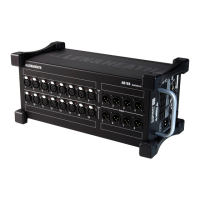
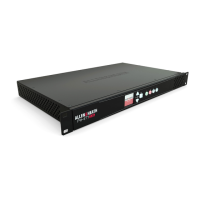
AB168 Panel Layout
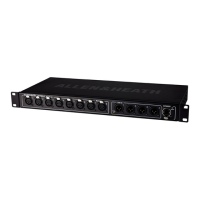
Input sockets 16 balanced XLR mic/line inputs with +48V Phantom Power indicator. The
preamps are built into the AB168 and their Gain, Pad and 48V phantom power are controlled remotely
from the mixer via the dSNAKE link. The Phantom Power indicator detects voltage at the socket whether
supplied by the AB168 or received from an external source. Refer to mixer documentation for information
on patching these sockets to input channels or other destinations in the system.
Output sockets 8 balanced XLR outputs operating at nominal +4dBu line level. Refer to mixer
documentation for information on patching output signals to these sockets.
Socket labelling Space is provided next to the sockets for custom labelling.
Vents Ensure good ventilation at the sides and back
of the rack. Avoid obstruction of vents while operating. Avoid dirt
or liquid ingress.
Mains power input IEC connector and fuse for the built-in
universal voltage power supply unit. This accepts worldwide
voltages from 100 to 240V AC 50/60Hz. Check that you have
received the correct mains lead for your territory.
Secure the cable in place using the plastic P-clip. Use a T20
Torx screwdriver to refit the screw.
dSNAKE port EtherCon/RJ45 socket to connect
directly to the mixer or through an AR2412 or another AB168.
This carries inputs, outputs and ME/monitor sends to and from
the AB168 as well as preamp control and system status
messages.
EXPANDER port EtherCon/RJ45 socket to connect a
second AB168, an AR84 or a ME/monitor system.
EtherCon locking connectors are recommended to prevent damage to cables or ports and
avoid accidental disconnection.
Read the Safety Instructions Sheet included with the product and the information printed on the panel before operating.
A limited one-year manufacturer’s warranty applies to this product, the conditions of which can be found at:
www.allen-heath.com/legal
By using this Allen & Heath product and the software within it you agree to be bound by the terms of the relevant End User Licence Agreement
(EULA), a copy of which can be found at: www.allen-heath.com/legal
Register your product with Allen & Heath online at: http://www.allen-heath.com/support/register-product/
Check the Allen & Heath website for the latest documentation and software updates.
www.allen-heath.com



 To Previous Page
 Loading...