RC3-LOG & RC3P-LOG INSTRUCTION MANUAL Page 10
SHAWALMEX-EUROPE BV RC3-LOG & RC3P-LOG INSTRUCTION MANUAL SEPT 2018
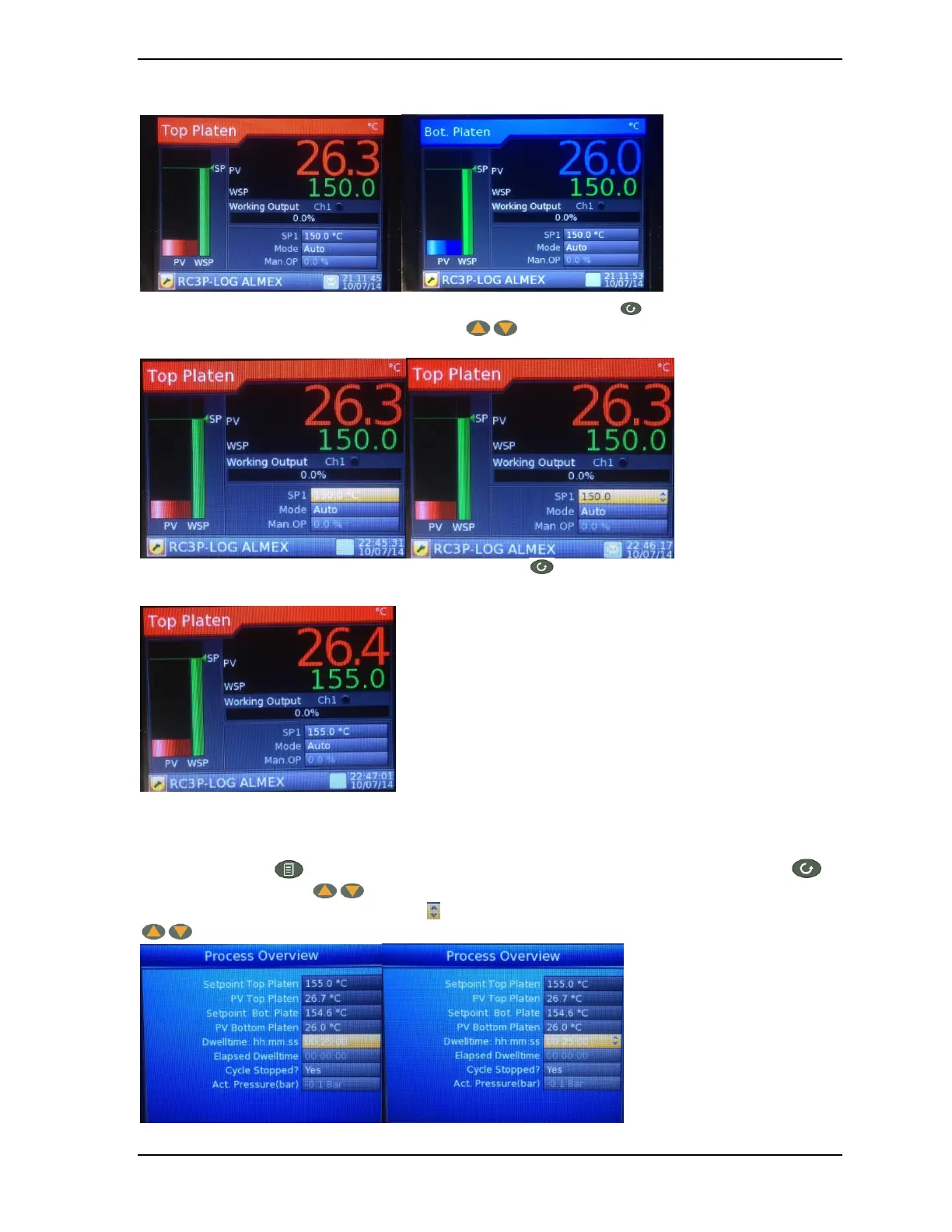
Another option for changing the setpoints of the platens is by using the Control loop screens (figure 8)
Once the desired platen control loop screen is selected, push the scroll button 2 times and the temperature
will become black. By using the raise/lower buttons the temperature value can be set to the desired
value.
Once the desired value has been reached push the scroll button once more to enter the new value. Pushing
the page button will lock the new temperature value:
Important: The maximum recommended operating temperature is 325F (163C).
5.1.3. Setting the dwelltime
Push the page button untill the Process overview screen (Figure 5) is shown. Push the scroll button
and the raise/lower buttons to scroll to dwelltime. Once the dwelltime is selected pushing the scroll
button will activate the black up/down arrows and the dwelltime can be changed with the raise/lower buttons
:



 To Next Page