RC3-LOG & RC3P-LOG INSTRUCTION MANUAL Page 9
SHAWALMEX-EUROPE BV RC3-LOG & RC3P-LOG INSTRUCTION MANUAL SEPT 2018
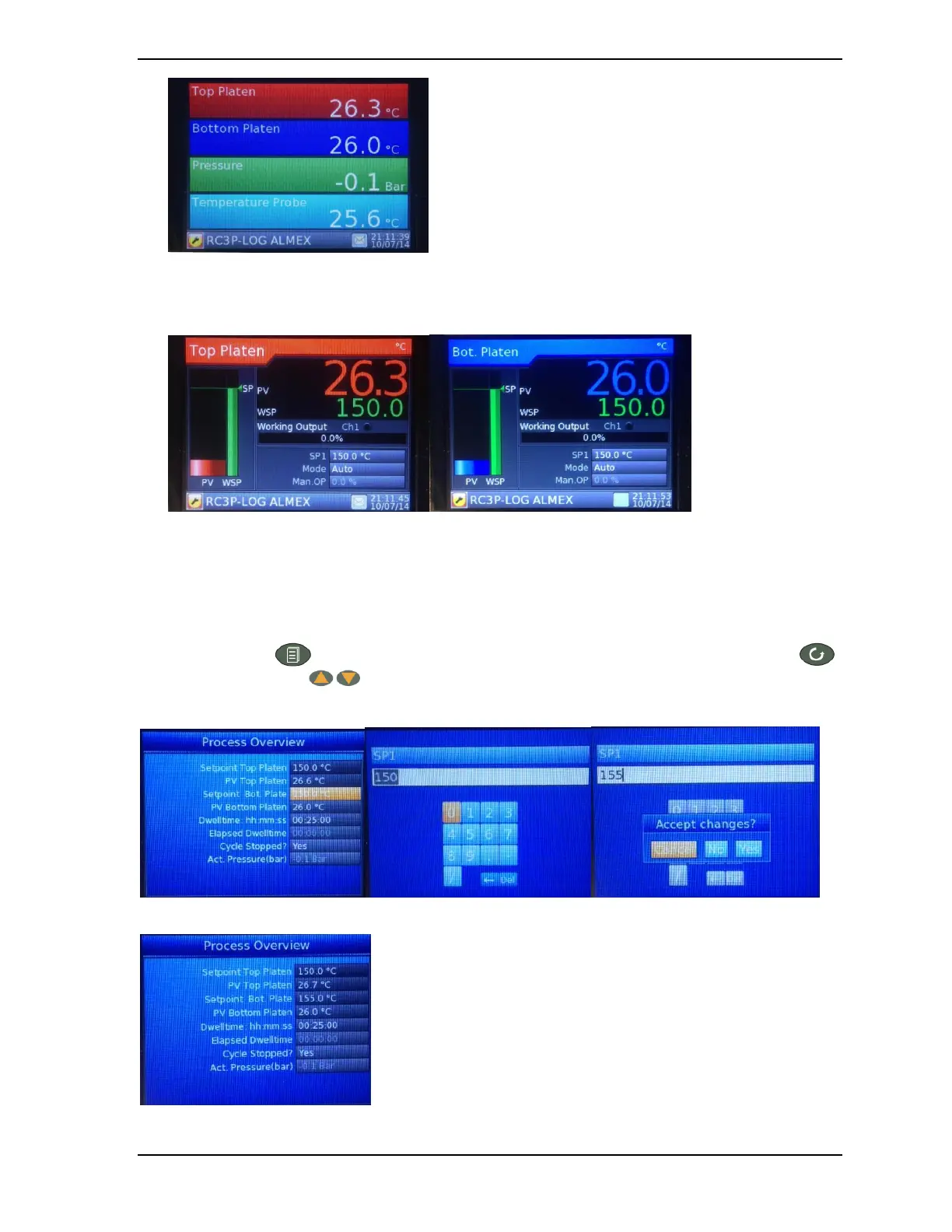
4. Figure 7: Process values screen.
This screen gives a clear overview of the actual temperatures and the pressure.
5. Figure 8: control loop Top/Bottom Platen.
5.1.2. Set the Platen Temperatures
Push the page button untill the Process overview screen (Figure 5) is shown. Push the scroll button
and the raise/lower buttons to select the setpoint or dwelltime that needs to be changed:
The scroll button acts as the enter button to select the right value. The selected value will become yellow:
Change the value by entering the desired temperature. Push the page button and select yes to accept the changes.
The Bottom platen temperature has now been changed.



 To Next Page