30
5.8 Press START KEY
Press START KEY to start operation.
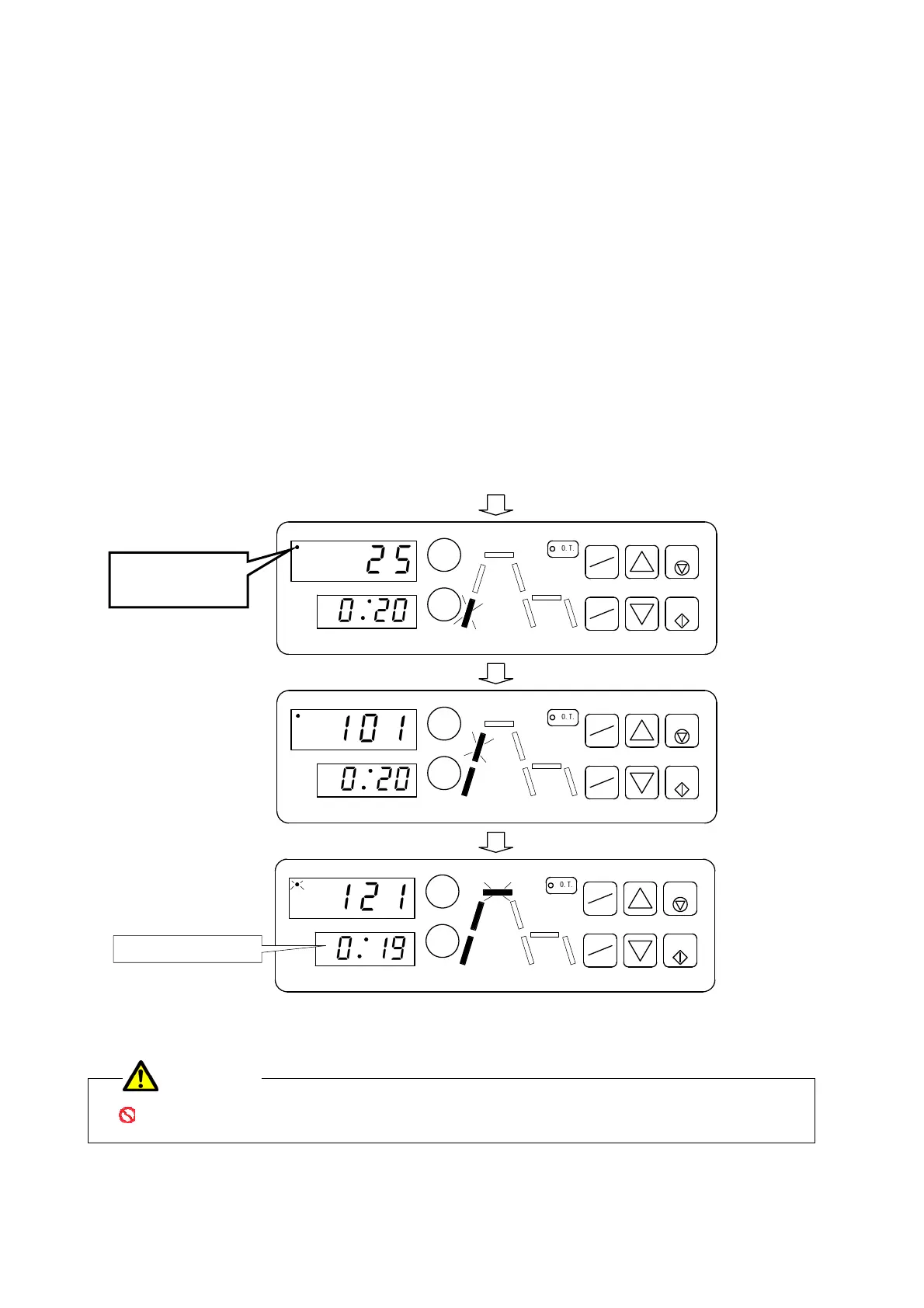
① The heater is on with “the output lamp of heater” on TEMPERATURE DISPLAY lighting up, and
HEATING-1 PROCESS LAMP blinking.
②Mixture of steam and air in chamber is evacuated to exhaust bottle with rise of temperature. This is
the process of filling chamber with saturated steam, not abnormal condition. The mixture steam
stops evacuating at 101℃ to 120℃ by closing exhaust valve which is controlled by
microprocessor.
When the air evacuation finishes, HEATING-2 PROCESS LAMP blinks as below chart.
Afterwards, temperature and pressure in chamber rise quickly to setting sterilization temperature.
③ When the temperature in chamber reaches to setting temperature, sterilization timer starts to work,
and remaining time of sterilization is counted down on TIMER DISPLAY.
Afterwards, the autoclave keeps the temperature and pressure constantly during sterilization time.
STERILIZATION PROCESS LAMP and the output lamp of heater blink during sterilization as below
chart.
Do not touch autoclave more than necessary.
If operator touches autoclave more than necessary, it may cause serious accident.
WARNING
℃
℃
℃
Begin operation.
Remaining time of
sterilization
PATTERN
MON DAY
HR MIN
EXHAUST
START
TIMER
STERILIZE
START
STOP
O
.
T
.
TEMP
TIME
ENTER
HEAT
PATTERN
MON DAY
HR MIN
EXHAUST
START
TIMER
START
STOP
O
.
T
.
TEMP
TIME
ENTER
HEAT
PATTERN
MON DAY
HR MIN
EXHAUST
START
TIMER
START
STOP
O
.
T
.
TEMP
TIME
ENTER
HEAT
Press START KEY.
2
5
0
2
0
1
0
1
0
2
0
1
2
1
0
1
9
①
②
③
Start operation.
The output lamp
of heater


 To Next Page
 Loading...