37
5.13.2 Reservation operation
Autoclave has function of reservation operation which can be set starting time of operation
with calendar timer. If you set reservation operation for next day, you will be able to unload
objects from chamber next morning. This function save time especially busy morning. You
can use it as following procedure accordingly.
Be sure to check drain valve is closed and water level in chamber before reservation operation.
There is a possibility that autoclave breaks down due to water lack.
Make autoclave ready to start operation. (Refer to 5.1 to 5.7)
CAUTION
℃
℃
℃
℃
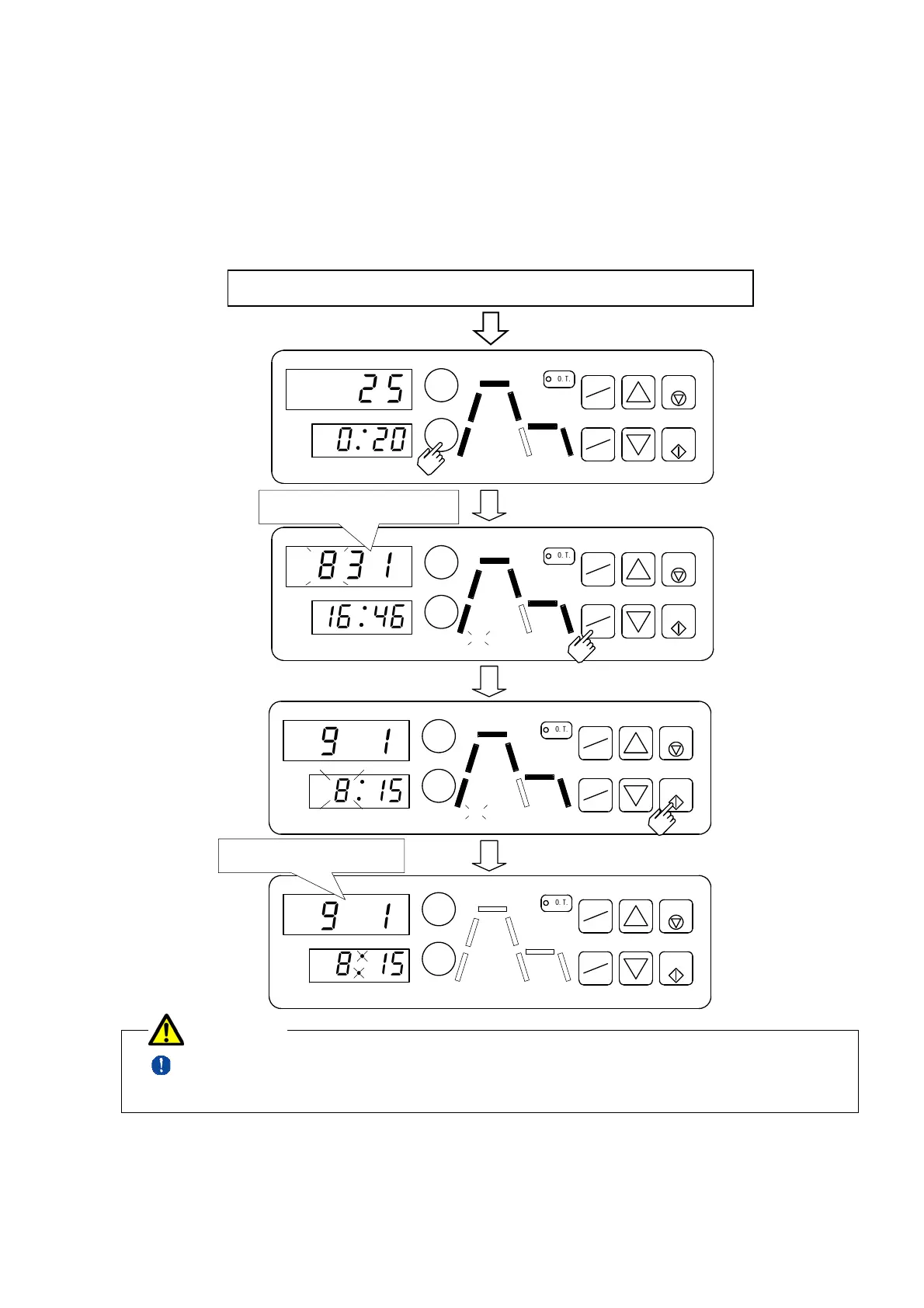
Press START KEY to
start resevertion operation.
Press START TIMER KEY
to reservation mode.
A time at present is displayed.
16:46, August 31th.
The operation will be started
from 8:15, September 1st.
Change month, day, hour,minute
by CHANGE▲▼ KEY.
Press PATTERN/ENTER KEY to change a blink
in order of month, day, hour, and minute.
MON DAY
HR MIN
EXHAUST
START
TIMER
START
STOP
O
.
T
.
TEMP
TIME
PATTERN
ENTER
READY
MON DAY
HR MIN
EXHAUST
START
TIMER
STERILIZE
START
STOP
O
.
T
.
TEMP
TIME
PATTERN
ENTER
READY
HEAT
WARM
MON DAY
HR MIN
EXHAUST
START
TIMER
STERILIZE
START
STOP
O
.
T
.
TEMP
TIME
PATTERN
ENTER
HEAT
WARM
MON DAY
HR MIN
EXHAUST
START
TIMER
STERILIZE
START
STOP
O
.
T
.
TEMP
TIME
PATTERN
ENTER
READY
HEAT
WARM
2
5
0
2
0
8
3
1
1
6
4
6
9
1
8
1
5
9
1
8
1
5
.


 To Next Page
 Loading...