4
3. Installation and Operating Instructions
3.1. Packaging
3.1.1. Remove the PE foam.
3.1.2. Inspect accessories
○,
1
RS-232 cable x1 pcs
○,
2
USB cable x1 pcs
○,
3
CD (monitoring software, Setting tool and user manual) x1 pcs
○,
4
Backplate and screws x1 set
○,
5
Power cable x2 pcs ( Available only for ATS-216 models)
3.2. Choose an installation location
An appropriate installation location will optimize system performance, reduce
the chances of malfunctions, and prolong product lifespan. Please follow the
guidelines below for an appropriate location:
3.2.1. Avoid excessive high temperature or high humidity;
3.2.2. Keep away from dust, volatile gases, excessive salt content, or
corrosive gases;
3.2.3. Do not use outdoors.
5
3.3. Product Introduction
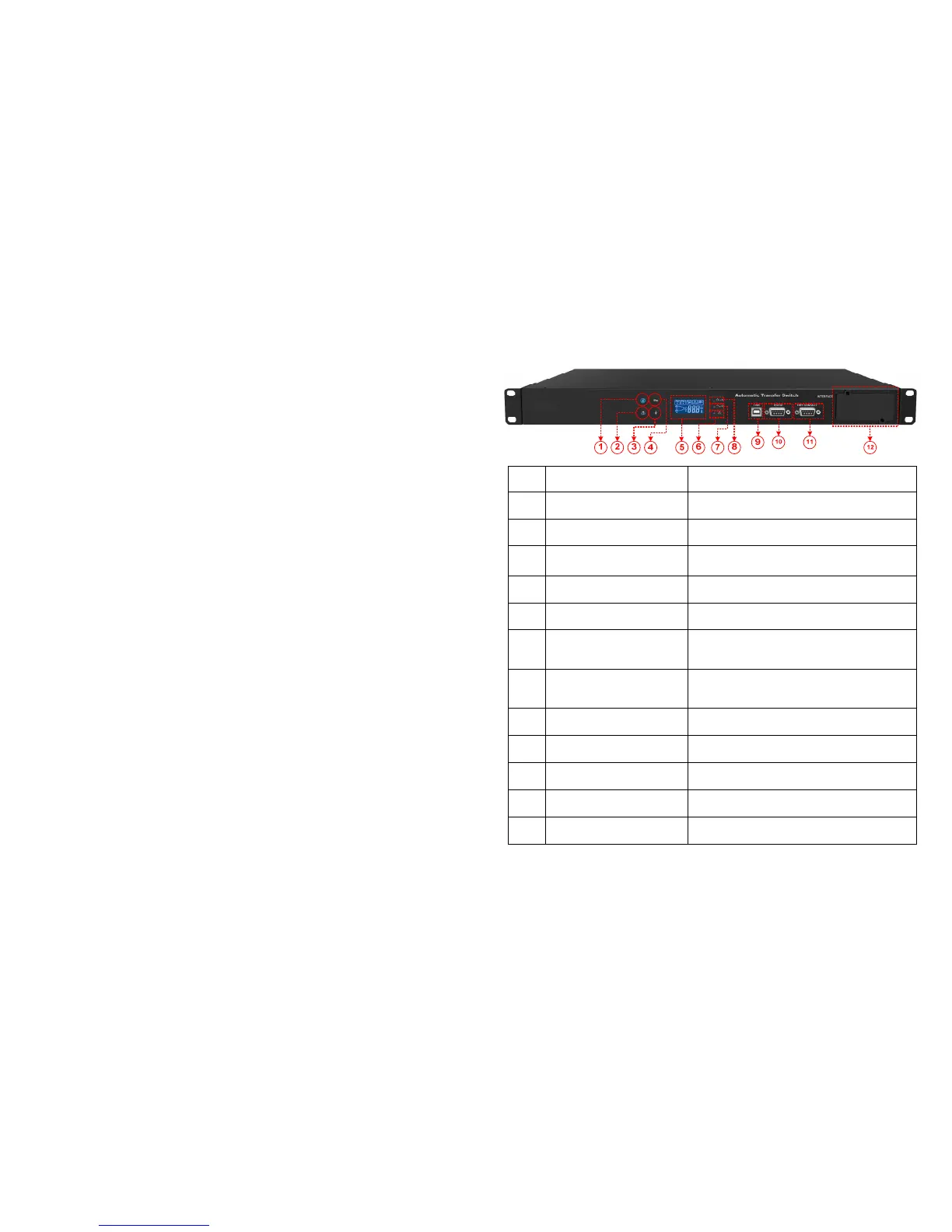
3.3.1. Front Panel
No.
Item Description/function
○
,1
Mute button Turns off alarm
○
,2
Select source to view info: Input A, Input B,
Info selection button
Select source info to view: Voltage, current,
frequency, load capacity
○
,4
Input selection button Switch input source: Input A Input B
○
,5
LCD System status display
○
,6
Input indicator A
Lit: Normal input voltage and frequency
Dim: Abnormal input voltage and frequency
Flashing: Indicates higher priority
○
,7
Input indicator B
Lit: Normal input voltage and frequency
Dim: Abnormal input voltage and frequency
Flashing: Indicates higher priority
○
,8
Error indicator
Lit: System malfunction or abnormal
Dim: System normal
○
,9
Connection for software setup or monitoring
Connection for software setup or monitoring
Dry contact port Dry Contact
○
,12
slot
For external communication cards, e.g. RS-
485, SNMP


 To Next Page