EasyManua.ls Logo

Alpine 7281M - Page 11

Alpine 7281M
22 pages
Print Icon
To Next Page IconTo Next Page
To Previous Page IconTo Previous Page
Loading...
.
OPERATION
Preset
Tuning
After
the
preset
stations
have
been
memorized,
you
can
tune
in
your
desired
station
with
just
a
touch
of
a
switch.
1.
Select
the
tuning
band
(FM1,
FM2,
MW
or
LW)
©
with
the
BAND
select
switch
@.
2.
Press
any
one
of
the
preset
switches
and
the
number
(1
6)
will
illuminate
in
the
display
@.
D.A.P.
(Direct
Access
Preset)
This
feature
allows
the
storage
of
FM,
MW
and
LW
presets
on
the
same
band.
Press
the
D.A.P.
switch
@
to
light
up
the
D.A.P.
indicator
©.
To
memorize
stations
into
D.A.P.,
follow
the
same
procedures
as
in
Manual
Memory
Preset
on
page
10.
To
Access
the
D.A.P.
Presets
1.
Press
the
D.A.P.
switch
@.
The
D.A.P.
indicator
®
will
illuminate
in
the
display.
2.
Press
any
one
of
the
preset
switches
and
the
number
(1
6)
will
iluminate
in
the
display.
FM
Stereo/Monaural
Selection
(MONO
Switch)
During
stereo
reception,
should
the
signal
level
become
weak
(the
ST
indicator
@
in
the
display
blinks),
select
monaural
reception
by
pressing
the
MONO
switch
@
to
decrease
noise
level.
NOTE:
Monaural
mode
has
been
set
initially.
Push
the
MONO
switch
@
when
a
stereo
broadcast
is
being
received.
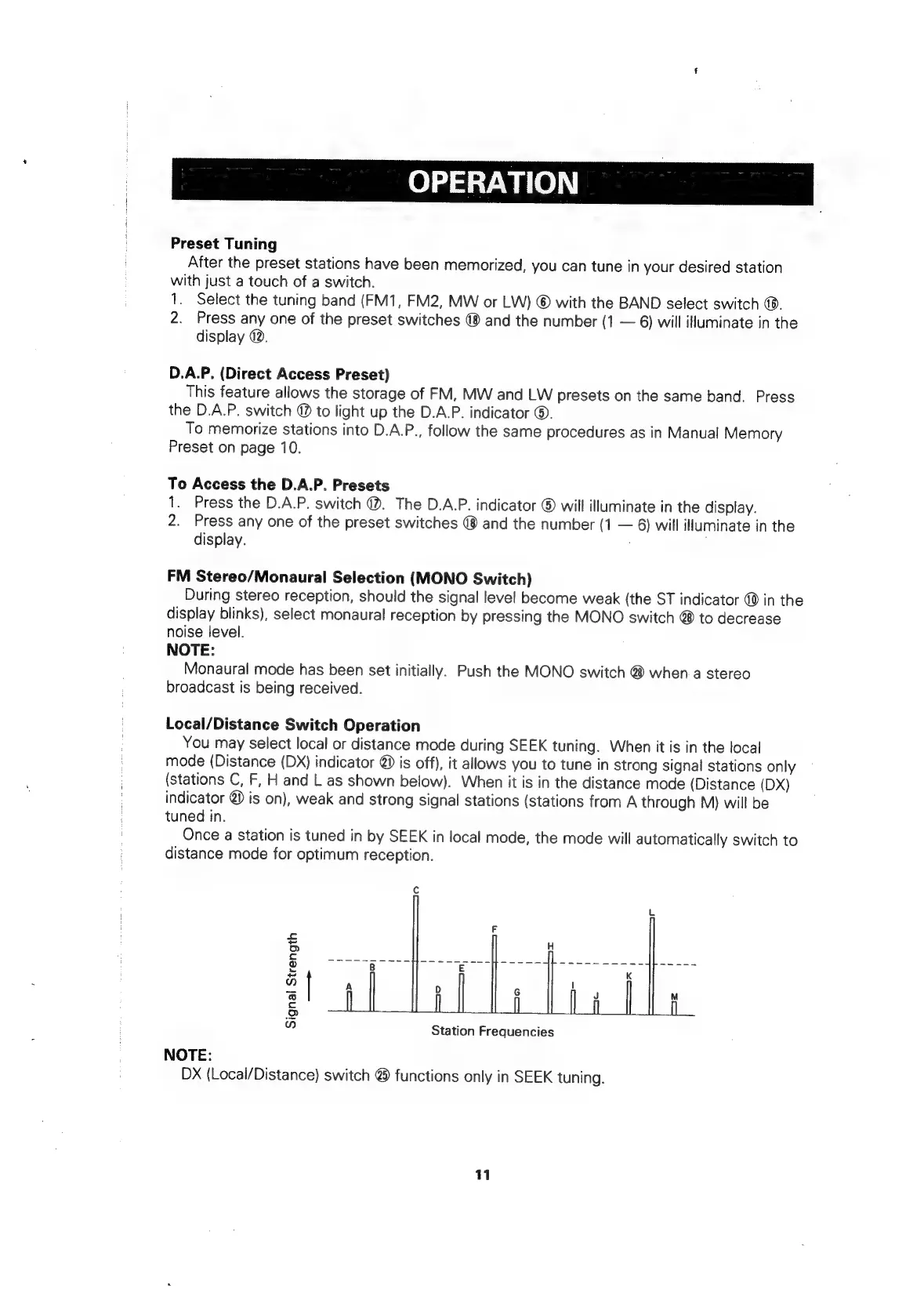
Local/Distance
Switch
Operation
You
may
select
local
or
distance
mode
during
SEEK
tuning.
When
it
is
in
the
local
mode
(Distance
(DX)
indicator
@
is
off),
it
allows
you
to
tune
in
strong
signal
stations
only
(stations
C,
F,
H
and
L
as
shown
below).
When
it
is
in
the
distance
mode
(Distance
(DX)
indicator
@
is
on),
weak
and
strong
signal
stations
(stations
from
A
through
M)
will
be
tuned
in.
Once
a
station
is
tuned
in
by
SEEK
in
local
mode,
the
mode
will
automatically
switch
to
distance
mode
for
optimum
reception.
Signal
Strength
a>
=—==a
—=1~)
=
=
SS
Foc
--=-—~
mz
Station
Frequencies
NOTE:
DX
(Local/Distance)
switch
@
functions
only
in
SEEK
tuning.
11

Related product manuals