EasyManua.ls Logo

Alpine 7516M - Operation; Basic Operation and Controls

Alpine 7516M
66 pages
Print Icon
To Next Page IconTo Next Page
To Previous Page IconTo Previous Page
Loading...
Rechter
1
(Pink.
Wiute)
|
{RosaWei)
INTERRUPT
OUT
Audiounterbrechungs-Ausgang
(Blue)
(Biau)
Audiounterbrechungs-
(White/Biue}
(WeiR/Blau}
{Biue/White}
{Blau/Weil)
REMOTE
ON
POWER
ANT
|
Leistungsantenne
OIMMER
CONTROL
Abblendregel
(Pink/White)
auDIO
(Rosa/Weil)
INTERRUPT
IN
Eingang
Ein-Fernleitung
IGNITION
Zundung
(Yellow)
(Gelb)
BATTERY
Batterie
Rechter
‘echer
Lautsprecher
Lautsprecher
\
(vorne)
AKER
SPEAKER
SPEAKER
AT
RIGHT
RIGHT
R
Oo
FRONT
Grey/Black
Grey
Grau/Schwarz
Grau
‘Solet/Black
tw
Schwarz
®
@
Rear
right
Hinten
rechter
Arsere
droit
Posteriore
destro
Trasero
derecho
Hoger
hogtalare
bak
Front
right
Vorne
rechter
Devant
droit
Anteriore
destro
Delantero
derecho
Hoger
hogtalare
fram
BB
REMOTE
ON
|
Blue
White
(Biau
Weid)
BA
in
PAUSE
BrownWwmite
(Braun
Wed}
fl]
BaTTEAY
Yellow
iGelp}
EA)
IGNITION
Red
(Rot)
mmo
tocar
roo
ee
rrr
|
(7516M/7516MM
model
only)
q
To
the
Audio
Interrupt
tn
Lead
of
another
unit
l
An
die
Tonunterbrechung
Innenleitung
eines
anderen
Gerats
(
Aun
fil
d’entree
de
sourdine
audio
d'une
autre
unile
I
Al
filo
ds
ingresso
dell
interruztone
del
suone
di
un
altro
componente
1
A
un
cable
de
entrada
de
interruptor
de
audio de
otra
unidad
|
Till
ingangskabetn
for
jpudavbrott
pa
en
annan
apparat
To
power
antenna/Zu
Power
Ant
Vers
l'antenne
de
puissance/All‘antenna
di
potenza
Ala
antena
eléctrica/Til
el-antenn
To
vehicle
phone/Zu
dem
Telephon
des
Fahrzeuges
Vers
le
telephone
du
vehicule
Al
telefono
de!
veicolo/Al
telefono
de!
vehicula
Till
biltelefon
To
dimmer
control
lead
Zur
Helligkeits-Steue(enung
Vers
le
conducteur
de
commande
du
gradateur
Al
fito
di
controll
del
dimmer
Al
cable
de
control
del
reducior
de
luz
Till
kable
for
dampning
av
belysningen
To
amplifier
or
equalizer
Zu
Verstarker
oder
Equalizer
Vers
l'amphificateur
ou
legaliseur
Alt‘amplificatore
o
all’equalizzatore
At
amplificador
o
al
ecualizador
Tul
forstarkare
eller
equalizer
Ignition
Key
Zundschlussel
Cle
de
contact
Chiave
di
accensione
Llave
de
encendido
Tandnyckel
Battery
Batterie
Batterie
Batteria
Batena
Batteri
fDi
@
Antenna
Receptacte
@
Audio
Interrupt
Out
Lead
(Pink/White)
(7516M/7516MM
model
only)
()
Power
Antenna
Lead
(Blue)
When
loaded
with
a
power
antenna,
connect
to
the
+B
termi-
nal
of
the
power
antenna.
4)
Audio
Interrupt
In
Lead
(Pink/White}
®
Dimmer
Control
Lead
(White/Blue)
Connect
this
lead
to
the
lead
in
the
vehicle‘s
parking
lights
cir-
cuit
that
provides
(+)12V
when
the
parking
lights
are
turned
on.
This
will
dim
the
unit's
backlighting
at
night
when
the
parking
lights
are
on.
©
Remote
Turn-On
Lead
(Blue/White)
Connect
this
Jead
to
the
remote
turn-on
tead
of
your
amplifier
or
signal
processor.
Switched
Power
Lead
(Ignition)
(Red)
Connect
this
lead
to
an
open
terminal
on
the
vehicle’s
fuse
box
or
another
unused
power
source
which
provides
(+)12V
only
when
the
ignition
is
turned
on
or
in
the
accessory
posi-
tion.
®
Battery
Lead
(Yellow)
Connect
this
lead
to
the
positive
(+)
post
of
the
vehicle's
bat-
tery.
@
Ground
Lead
Connect
this
lead
to
a
good
chassis
ground
on
the
vehicle.
Make
sure
the
connection
is
made
to
bare
metal
andis
secure-
ly
fastened
using
the
sheet metal
screw
provided.
Power
Wiring
Harness
(included}
Connect
to
the
Power
Supply
Connector
@.
Power
Supply
Connector
Connect
to
the
receptacle
of
Power
Wiring
Harness
19.
Fuse
Holder
(7A)
Right
Front
Speaker
Output
Lead
(Grey)
Right
Speaker
Output
Lead
(Common)
(Grey/Black)
Right
Rear
Speaker
Output
Lead
(Violet)
Left
Rear
Speaker
Output
Lead
(Green)
Left
Speaker
Output
Lead
(Common)
(White/Black)
Left
Front
Speaker
Output
Lead
(White)
Rear
Output
RCA
Connectors
RED
is
right
and
WHITE
is
left.
DIN
Connector
Connect
this
to
5957/5952V
CD
Shuttle
only
for
control.
NOTE:
5952/5952S
can
also
be
connected,
if
you
use
the
adap-
ter.
SSSSOO0GS
© @
@
7516M/7516MM
/7516L
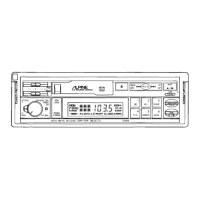
OPERATION
@
BASIC
OPERATION
Initial
System
Turn-On
When
operating
the
system
for
the
first
time
after
installation
or
after
the
vehicle's
battery
has
been
disconnected
and
reconnected,
press
the
Reset
switch
88
with
a
sharp
pencil
or
other
pointed
object.
Power
Switch
and
Volume
Control
&
Rotating
the
Power
switch
@9
clockwise
turns
the
power
ON
and
continuously
increases
the
volume.
Rotating
the
control
counterclockwise
will
continuously
decrease
the
volume,
and
turn
the
power
OFF.
NOTE:
Keep
the
volume
control
turned
fully
counterclockwise
before
your
program
starts.
Adjust
the
volume
by
gradually
turning
the
control
clockwise
once
playback
begins.
Do
not
turn
the
control
clockwise
abruptly
as
the
excessive
power
could
damage
the
speakers.
Balance
Control
¢9
Pull
on
the
Volume
control
69
and
rotate
to
balance
between
left
and
right
speakers.
Fader
Control
Rotate
the
Fader
control
@
for
your
desired
front
to
rear
volume
balance.
Separate
Bass
and
Treble
Controls
(©,
@)
Slide
these
controls
to
the
right
to
increase,
and
to
the
left
to
decrease
the
level
of
Bass
or
Treble.
LOUDness
Press
the
LOUD
switch
@
for
more
than
two
seconds
to
activate
the
loudness
function.
Press
the
LOUD
switch
again
for
more
than
two
seconds
to
defeat
this
feature.
Mode
Switching
1.
Radio
Mode
Press
the
TUNER
button
@
to
put
the
unit
into
the
radio
mode.
The
Band
indicator
(FM,
MW
or
LW)
wiil
appear
in
the
display.
2.
Cassette
Player
Mode
Press
the
TAPE
button
@
to
put
the
unit into
the
cassette
player
mode.
3.
CD
Shuttle
Mode
Press
the
DISC
button
@
to
put
the
unit into
the
CD
mode.
-13-

Related product manuals