EasyManua.ls Logo

Alpine 7619R - Page 6

Alpine 7619R
80 pages
Print Icon
To Next Page IconTo Next Page
To Previous Page IconTo Previous Page
Loading...
7619R
7619R
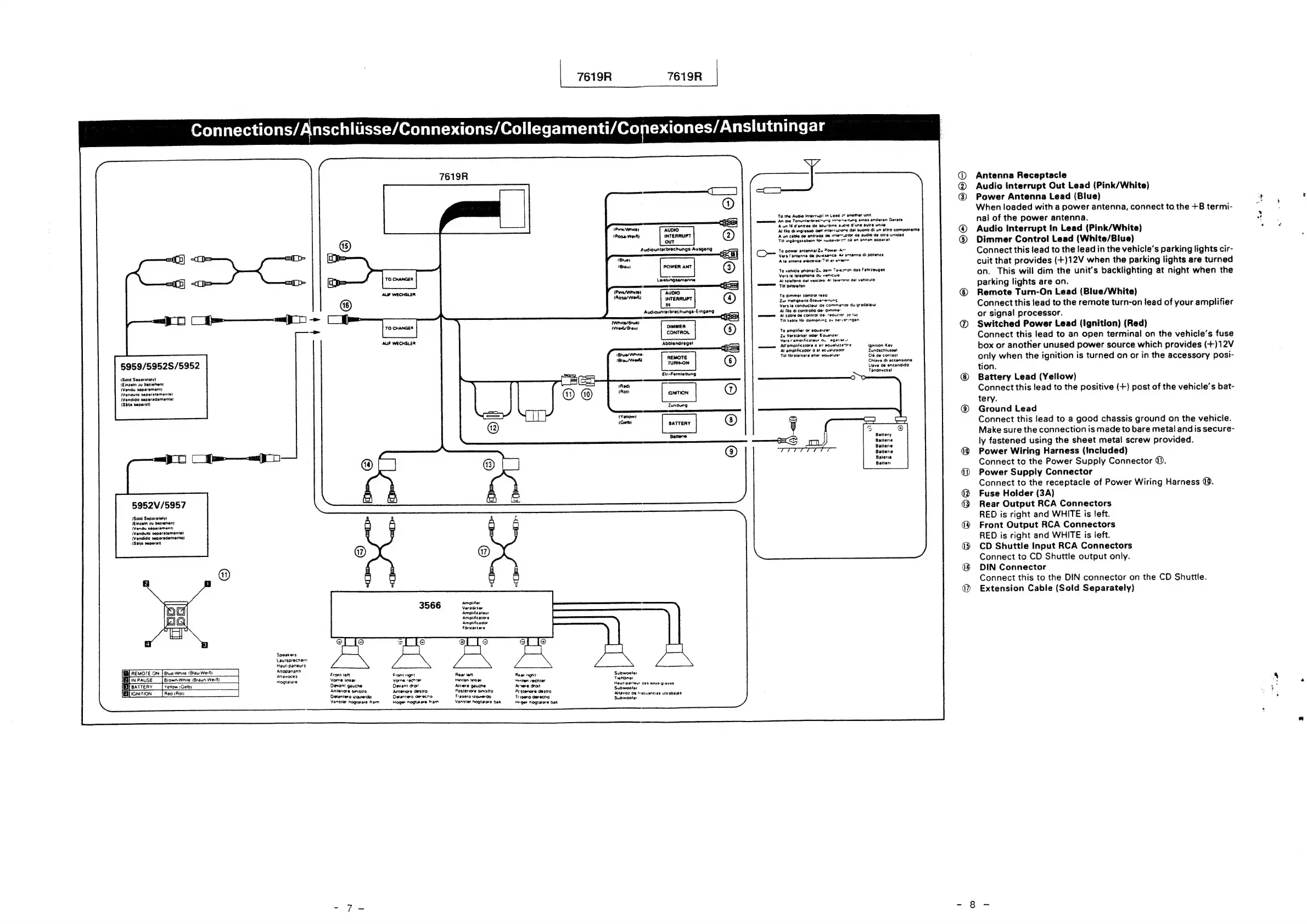
Connections/Anschliisse/Connexions/Collegamenti/Conexiones/Anslutningar
To
the
Audio
Interruo:
in
Leec
27
another
unit
efac
eons
An
die
Tonunterbrecnung-inne~etung
eines
anderen
Gerats
BSED
:
Prom
Aun
fi
Cenvee
de
sourcine
sc
d'une
autre
unite
a
writer
aAuDIO
Al
filo
di
ingresso
Gell
mterrurone
de!
suono
di
un
altro
componente
(Rosa
wel)
INTERRUPT
‘Aun
cable
oe
entraaa
oe
inte—oror
de
audio
de
otra
unidad
ouT
Till
ingangstabein
for
woevo
>>
28
en
annan
apparat
Audiounterbrechungs-Ausgang
a
To
power
antenna/Zu
ower
-A~"
==}
(Com
Vers
Tantenne
de
pussance
AY
sntenna
di
potence
ioe
Ala
antena
electrica:Til
et-antenn
(Blau)
POWER
ANT
(
3
)
To
venicie
pnone/Zu
Gem
Te-ezron
des
Fahrreuges
=
Vars
le
telephone
ou
venicue
Lestungsantenne
Al
telefono
det
veicora
A!
tererono
del
vehicula
Till
bilteleton
ve
pea
PT
Todi
ol
ieao
West
'9
dimmer
convo
je:
ipese
.
INTER
®
Zur
Hetignets-Steverretung
ul
Vers
le
conducteur
de
commence
du
gradateur
Audiounterbrechungs-Eingang
Al
fie
di
controile
Ge:
aimme:
char
mmm
Al
cable
Ge
control
Oe.
reauct
ful
(White/Blue)
Til
kable
for
CémoORINg
av
DEN
Ngen
(Weit/Biau!
DIMMER
4
GONTROL
To
amplifier
of
equanzer
Zu
Verstirker
oder
Equalizer
Vers
Fampldficateur
on
|
eganse.r
Apblanarage!
eas
Al’
ampiificatore
0
att
equaluzeae
Ignition
Key
Al
amplificador
0
a!
ecuslzaom
Zundschlussel
REMOTE
Till
torstirkare
eller
equaizer
Clé
de
contact
5959/5952S/5952
TURN-ON
®
Chive
di
accansion
Llave
de
encendido
Tandnyckel
(Sold
Separetety)
Eir-Fernieitung
(Einzein
zu
beziehen)
(Vendu
separement)
(Venduto
separatamente}
GhanOn
(Vendido
separadamente)
{(Shijs
separat)
Zundung
BATTERY
|
)
Ganene
Battery
Batterie
Batterie
Battena
Batera
Batten
5952V/5957
{Sold
Separately)
(€inzein
ru
bereben)
(Vendu
separement)
(Venduto
seperstamente)
(Vendido
separsdamente)
(Salis
separat)
3566
cit
Verstarter
Ampiificateur
Amptificatore
Amplificador
Forstarkare
Speakers
Lautsprecnemn
Maut-padeurs
I]
REMOTE
ON
[Biue
Wnie
(Blau
Wed
Altopariann:
C
Btue
Wht
y
aiiagoces
Front
left
Front
ngnt
Rear
lett
Rear
ngnt
Subwooter
Ba}
in
PAUSE
Brown
White
(Braun
Wer})
Hogiaiare
Vorne
hnker
Vorne
recnter
Hunten
tinker
inten!
reenter
Trehoner
[EMfeatteny
|
venow
Ger)
Devant
gauche
Devant
oro:
Arnere
gauche
Arete
drat
Pipl
ae
hatte
ica
[Eficnition
|
Red
(Rot)
Antenore
smsuo
Anterore
Oestro
Postenore
sumstro
Pestenore
destro
aitivos
a
frecuencies
ultrabayes
Detantero
quedo
Detantero
oerecno
Trasero
wqurerdo
Trisero
Gerecho
Sudwooler
vanster
hogtalare
tram
Hoger
nogtaiare
fram
Vanster
hogtatare
bak
Heger
hogtatare
bak
OX
OTS)
@e@
©
©
68
©
®
©
Antenna
Receptacle
Audio
Interrupt
Out
Lead
(Pink/White)
Power
Antenna
Lead
(Blue)
When
loaded
with
a
power
antenna,
connect
to
the
+B
termi-
nal
of
the
power
antenna.
Audio
Interrupt
In
Lead
(Pink/White)
Dimmer
Control
Lead
(White/Blue)
Connect
this
lead
to
the
lead
in
the
vehicle’s
parking
lights
cir-
cuit
that
provides
(+)12V
when
the
parking
lights
are
turned
on.
This
will
dim
the
unit's
backlighting
at
night
when
the
parking
lights
are
on.
Remote
Turn-On
Lead
(Blue/White)
Connect
this
lead
to
the
remote
turn-on
lead
of
your
amplifier
or
signal
processor.
Switched
Power
Lead
(Ignition)
(Red)
Connect
this
lead
to
an
open
terminal
on
the
vehicle's
fuse
box
or
another
unused
power
source
which
provides
(+)12V
only
when
the
ignition
is
turned
on
or
in
the
accessory
posi-
tion.
Battery
Lead
(Yellow)
Connect
this
lead
to
the
positive
(+)
post
of
the
vehicle's
bat-
tery.
Ground
Lead
Connect
this
lead
to
a
good
chassis
ground
on
the
vehicle.
Make
sure
the
connection
is
made
to
bare
metal
and
is
secure-
ly
fastened
using
the
sheet
metal
screw
provided.
Power
Wiring
Harness
(included)
Connect
to
the
Power
Supply
Connector
©.
Power
Supply
Connector
Connect
to
the
receptacle
of
Power
Wiring
Harness
@.
Fuse
Holder
(3A)
Rear
Output
RCA
Connectors
RED
is
right
and
WHITE
is
left.
Front
Output
RCA
Connectors
RED
is
right
and
WHITE
is
left.
CD
Shuttle
Input
RCA
Connectors
Connect
to
CD
Shuttle
output
only.
DIN
Connector
Connect
this
to
the
DIN
connector
on
the
CD
Shuttle.
Extension
Cable
(Sold
Separately)

Related product manuals