EasyManua.ls Logo

Alpine 7619R - Page 7

Alpine 7619R
80 pages
Print Icon
To Next Page IconTo Next Page
To Previous Page IconTo Previous Page
Loading...
OPERATION
'
@
BASIC
OPERATION
Function
Confirmation
Display
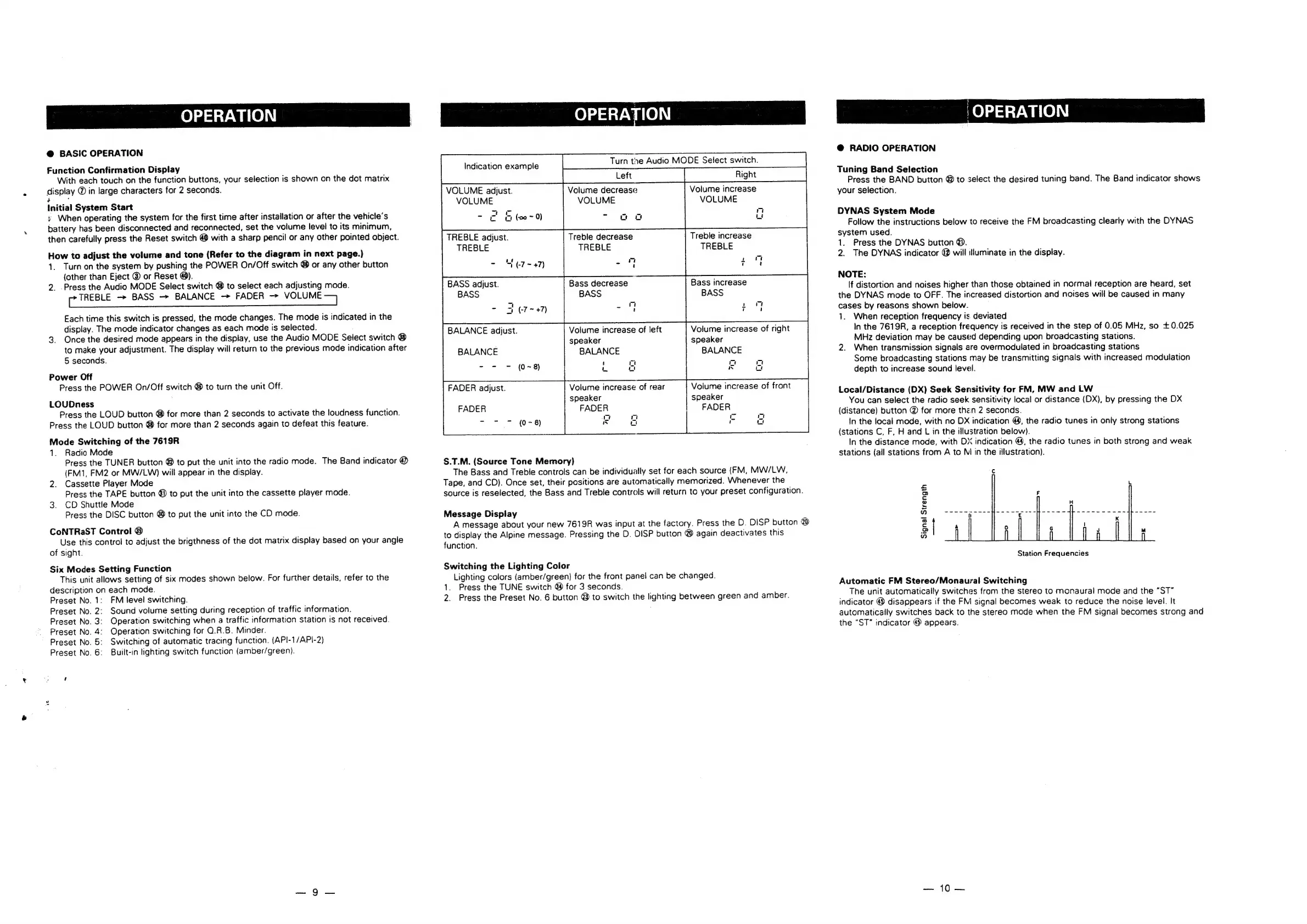
With
each
touch
on
the
function
buttons,
your
selection
is
shown
on
the
dot
matrix
display
@
in
large
characters
for
2
seconds.
é
Initial
System
Start
+
When
operating
the
system
for
the
first
time
after
installation
or
after
the
vehicle’s
battery
has
been
disconnected
and
reconnected,
set
the
volume
level
to
its
minimum,
then
carefully
press
the
Reset
switch
@
with
a
sharp
pencil
or
any
other
pointed
object.
How
to
adjust
the
volume
and
tone
(Refer
to
the
diagram
in
next
page.)
1.
Turnon
the
system
by
pushing
the
POWER
On/Off
switch
@
or
any
other
button
(other
than
Eject
®
or
Reset
@).
2.
Press
the
Audio
MODE
Select
switch
@
to
select
each
adjusting
mode.
pr
TREBLE
BASS
BALANCE
FADER
>
VOLUME
Each
time
this
switch
is
pressed,
the
mode
changes.
The
mode
is
indicated
in
the
display.
The
mode
indicator
changes
as
each
mode
is
selected.
3.
Once
the
desired
mode
appears
in
the
display,
use
the
Audio
MODE
Select
switch
®
to
make
your
adjustment.
The
display
will
return
to
the
previous
mode
indication
after
5
seconds.
Power
Off
Press
the
POWER
On/Off
switch
@
to
turn
the
unit Off.
LOUDness
Press
the
LOUD
button
@
for
more
than
2
seconds
to
activate
the
loudness
function.
Press
the
LOUD
button
@
for
more
than
2
seconds
again
to
defeat
this
feature.
Mode
Switching
of
the
7619R
1.
Radio
Mode
Press
the
TUNER
button
@
to
put
the
unit
into
the
radio
mode.
The
Band
indicator
@
(FM1,
FM2
or
MW/LW)
will
appear
in
the
display.
2.
Cassette
Player
Mode
Press
the
TAPE
button
@
to
put
the
unit
into
the
cassette
player
mode.
3.
CD
Shuttle
Mode
Press
the
DISC
button
4
to
put
the
unit
into
the
CD
mode.
CoNTRaST
Control
@&
Use
this
control
to
adjust
the
brigthness
of
the
dot
matrix
display
based
on
your
angle
of
sight.
Six
Modes
Setting
Function
This
unit
allows
setting
of
six
modes
shown
below.
For
further
details,
refer
to
the
description
on
each
mode.
Preset
No.
1:
FM
level
switching.
Preset
No.
2:
Sound
volume
setting
during
reception
of
traffic
information.
Preset
No.
3:
Operation
switching
when
a
traffic
information
station
is
not
received.
Preset
No.
4:
Operation
switching
for
O.R.B.
Minder.
Preset
No.
5:
Switching
of
automatic
tracing
function.
(API-1/API-2)
Preset
No.
6:
Built-in
lighting
switch
function
(amber/green).
OPERATION
Turn
the
Audio
MODE
Select
switch.
Volume
increase
VOLUME
Volume
decrease
VOLUME
Er
(20
~
0)
2
aa
VOLUME
adjust.
VOLUME
U
TREBLE
adjust.
TREBLE
-
“¢r~+7)
Treble
increase
TREBLE
Treble
decrease
TREBLE
BASS
adjust.
Bass
decrease
Bass
increase
BASS
BASS
BASS
Volume
increase
of
left
speaker
BALANCE
BALANCE
adjust.
Volume
increase
of
right
speaker
BALANCE
BALANCE
- -
=
(0~8)
Volume
increase
of
front
speaker
FADER
FADER
adjust.
Volume
increase
of
rear
speaker
FADER
FADER
-
oad
wn
S.T.M.
(Source
Tone
Memory)
The
Bass
and
Treble
controls
can
be
individually
set
for
each
source
(FM,
MW/LW,
Tape,
and
CD).
Once
set,
their
positions
are
automatically
memorized.
Whenever
the
source
is
reselected,
the
Bass
and
Treble
controls
will
return
to
your
preset
configuration.
Message
Display
A
message
about
your
new
7619R
was
input
at
the
factory.
Press
the
D.
DISP
button
@
to
display
the
Alpine
message.
Pressing
the
D.
DISP
button
@
again
deactivates
this
function.
Switching
the
Lighting
Color
Lighting
colors
(amber/green)
for
the
front
panel
can
be
changed.
1.
Press
the
TUNE
switch
@
for
3
seconds.
2.
Press
the
Preset
No.
6
button
@
to
switch
the
lighting
between
green
and
amber.
|OPERATION
@
RADIO
OPERATION
Tuning
Band
Selection
Press
the
BAND
button
4
to
select
the
desired
tuning
band.
The
Band
indicator
shows
your
selection.
DYNAS
System
Mode
Follow
the
instructions
below
to
receive
the
FM
broadcasting
clearly
with
the
DYNAS
system
used.
1.
Press
the
DYNAS
button
@.
2.
The
DYNAS
indicator
@
will
illuminate
in
the
display.
NOTE:
If
distortion
and
noises
higher
than
those
obtained
in
normal
reception
are
heard,
set
the
DYNAS
mode
to
OFF.
The
increased
distortion
and
noises
will
be
caused
in
many
cases
by
reasons
shown
below.
1.
When
reception
frequency
is.
deviated
In
the
7619R,
a
reception
frequency
is
received
in
the
step
of
0.05
MHz,
so
£0.025
MHz
deviation
may
be
caused
depending
upon
broadcasting
stations.
2.
When
transmission
signals
are
overmodulated
in
broadcasting
stations
Some
broadcasting
stations
may
be
transmitting
signals
with
increased
modulation
depth
to
increase
sound
level.
Local/Distance
(DX)
Seek
Sensitivity
for
FM,
MW
and
LW
You
can
select
the
radio
seek
sensitivity
local
or
distance
(DX),
by
pressing
the
DX
(distance)
button
@
for
more
then
2
seconds.
In
the
local
mode,
with
no
DX
indication
@,
the
radio
tunes
in
only
strong
stations
(stations
C,
F,
H
and
L
in
the
illustration
below).
In
the
distance
mode,
with
DX
indication
@,
the
radio
tunes
in
both
strong
and
weak
stations
(all
stations
from
A
to
M
in
the
illustration).
Signal
Strength
Station
Frequencies
Automatic
FM
Stereo/Monaural
Switching
The
unit
automatically
switches
from
the
stereo
to
monaural
mode
and
the
“ST”
indicator
@
disappears
if
the
FM
signal
becomes
weak
to
reduce
the
noise
level.
It
automatically
switches
back
to
the
stereo
mode when
the
FM
signal
becomes
strong
and
the
“ST”
indicator
@
appears.
10

Related product manuals