35-EN
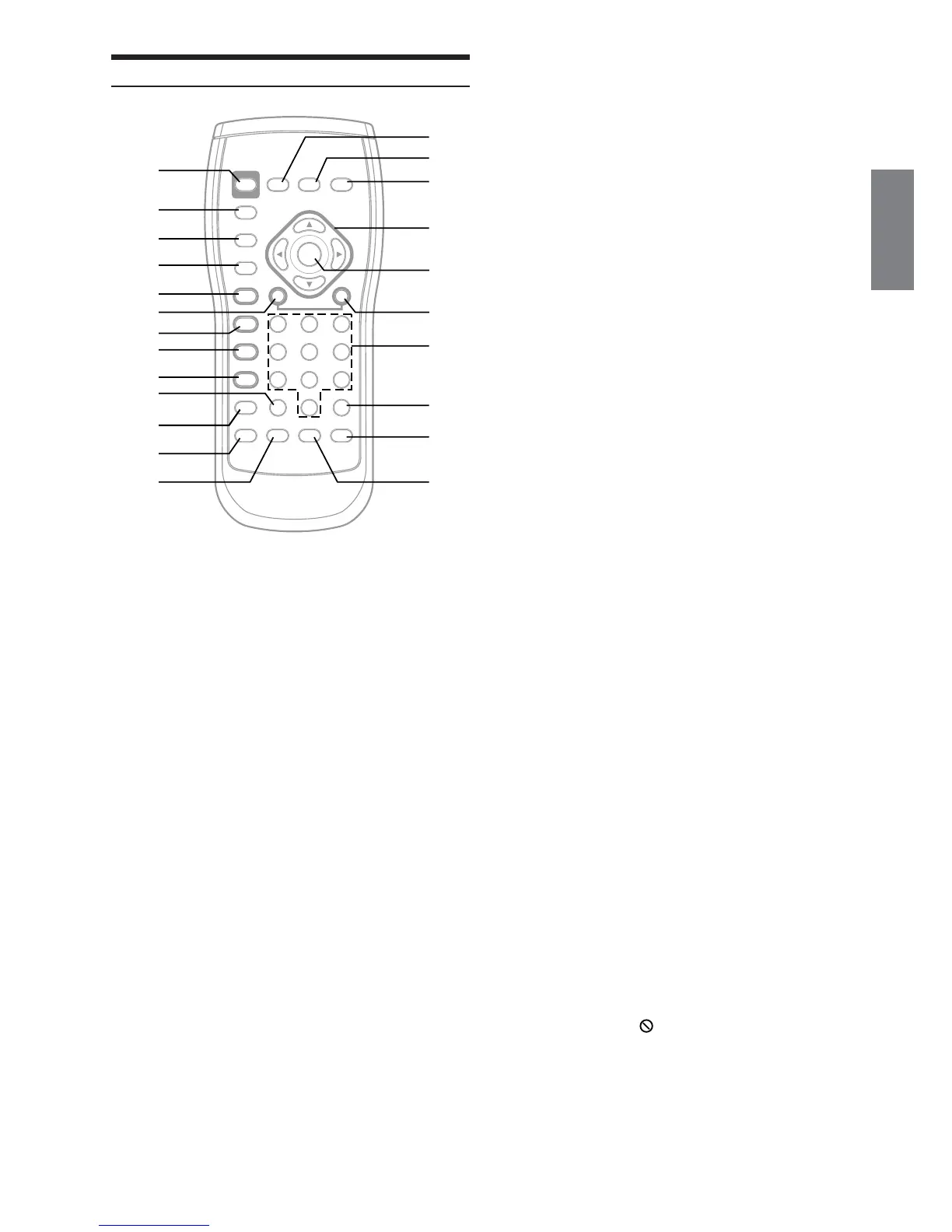
Operating the DVE-5207 Video Player
1 PWR button
Turns the power ON and OFF.
2 SETUP button
Displays the SETUP (initial setting) screen.
3 LIST button
MP3 Folder and File Search.
4 RETURN button
Returns to the selection screen just prior to the
current screen.
5 -/J button
Switches between play and pause.
6 g button
CD mode: Press the button to go back to the
beginning of the current track. Press and
hold to fast reverse.
MP3 mode: Press the button to go back to the
beginning of the current file. Press and
hold to fast reverse.
DVD/Video CD mode:
• Move to the desired position on the disc.
• During playback, press and hold for more
than 1 second to reverse the disc at
double speed. Hold for more than 5
seconds to reverse the disc at 8 times the
normal speed.
• When pressed and held in while in the
pause mode, the disc is played in reverse
slow motion at 1/8th the normal speed.
When held in for 5 more seconds, the
reverse slow motion speed switches to
1/2 the normal speed (DVD only).
• The picture is reversed by one frame
each time the button is pressed in the
pause mode (DVD only).
7 L button
Performs PRE STOP. Press again to cancel PRE STOP
and stop the playback.
8 FOLDER 8 button
Selects MP3 folders.
9 FOLDER 9 button
Selects MP3 folders.
! CLR (ALL CLR) button
Removes numbers (one character at a time) that have
been selected and input.
Press and hold for 2 seconds. All the characters which
were selected and input are erased.
" REPEAT button
Repeats playback.
# M.I.X. button
M.I.X. play for CDs and MP3
$ AUDIO button
Switches the audio tracks.
% DISPLAY button
Displays playback status on the screen.
& MENU button
Displays the DVD menu.
( TOP M. button
Displays the title Menu.
) 8, 9, ;, :
Selects the items displayed on the screen.
~ ENT. button
Determines the selected item.
+ f button
CD mode: Press the button to advance to the
beginning of the next track. Press and hold
to fast forward.
MP3 mode: Press the button to advance to the
beginning of the next file. Press and hold to
fast forward.
DVD/Video CD mode:
• Move to the desired position on the disc.
• During playback, press and hold for
more than 1 second to forward the disc
at double speed. Hold for more than 5
seconds to forward the disc at 8 times
the normal speed.
• When pressed and held in while in the
pause mode, the disc is played in slow
motion at 1/8th the normal speed. When
held in for 5 more seconds, the slow
motion speed switches to 1/2 the normal
speed.
• The picture is forwarded by one frame
each time the button is pressed in the
pause mode.
, Numeric Keypad
Inputs numbers
- V.OUT button
This button is not used.
. ANGLE button
Switches the angle.
/ SUBTITLE button
Switches the subtitle.
• Operation may not be possible depending on the type of disc and
the playback conditions. At such a time the following mark is
displayed on the screen:
%
&
(
)
~
+
,
-
.
/
1
2
3
4
5
6
7
8
9
!
"
#
$






 To Next Page