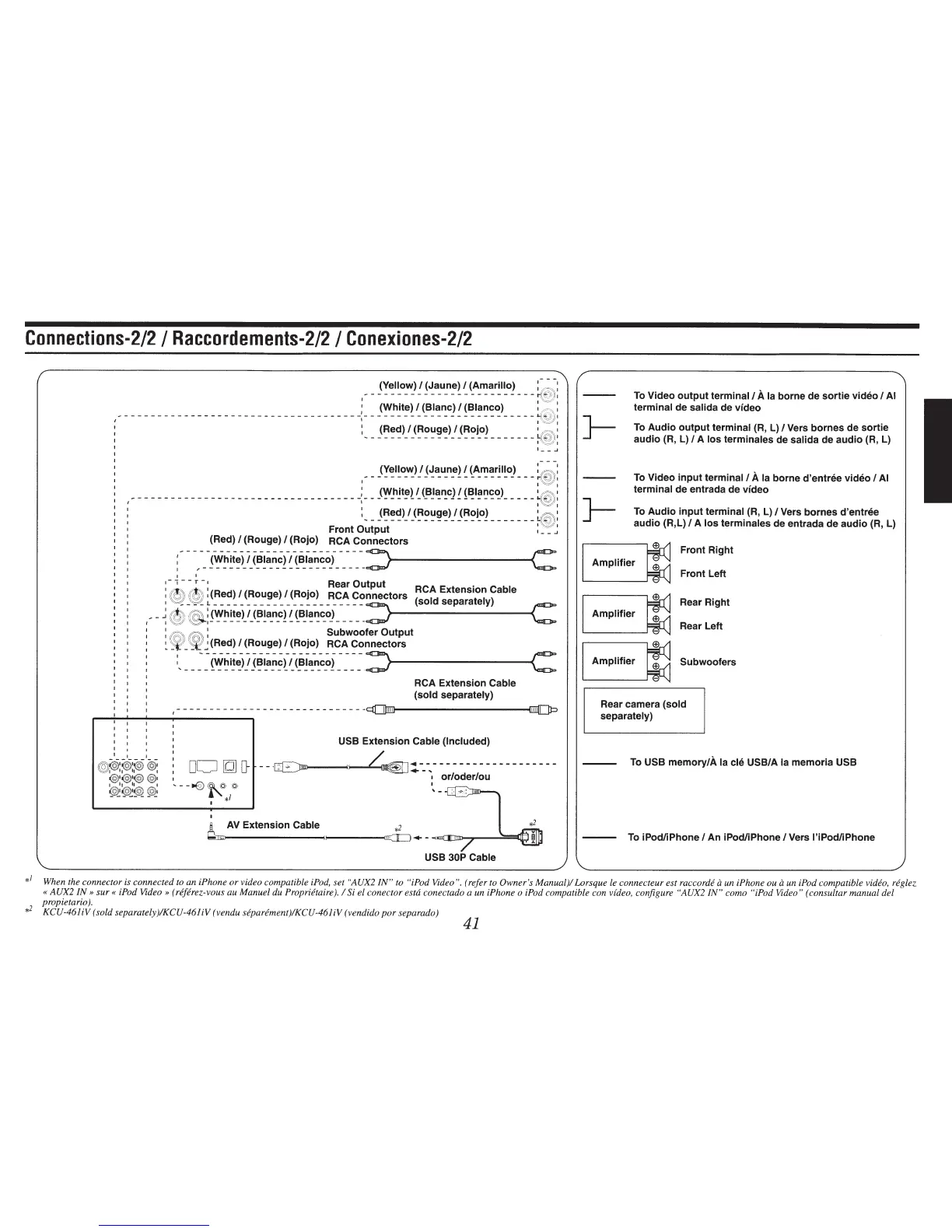
Connections-212
I
Raccordements-212
I
Conexiones-212
~-
__
(~~l~o~}!
~~a_u_n~!
~
~A-~~r~l~oJ
___
~
:
1
(White)
I
(Blanc)
I
(Blanco)
1
<
":\,
:
I
-
- - - - - - - - - - - - - - - - - - - - - - - - - - - - - - - - - - -
-:
- - - - - - - - - - - - - - - - - - - - - - - - - -
~
~
:
: (Red)
I
(Rouge)
I (Rojo)
1
.-.-~
1
--------------------------
{
©)
1
ji\,
~~
1
I_-
.J
(Yellow)
I
(Jaune)
I
(Amarillo)
:-
@)
:: :
--------------------------
r'
,
©l
ll
I
~
~
~
___________________________________
: ___
(~-h~t~~
~
(_B~~~c)!
{~~~~c_:~)
_____
~
:
I I
~
~
I
:_-
_(~~~)_l_(~~~~~)j_(~~i_o2-------
i@
:
Front
Output
1
__
.J
(Red)
I
(Rouge)
I
(Rojo) RCA Connectors
:--
-,---~~~~~)_1_(~!~-~-~f(~~~~~~~i_-_-_-_-_::>~----------<C:
I I
1
-
1
-
-
r
-
1
Rear Output RCA Extension
Cable
: @
@
:(Red)
I
(Rouge)
I (Rojo) RCA Connectors
(sold
separately)
~--
~
®
®
r~~~~~!>)_<~!~-~-~l-(~~~~~~~)-_-_-_-_-_::>>----------~c:
:
~~
«5))
:
Subwoofer Output
~
~
_~~(Red)
I
(Rouge)
I
(Rojo) RCA Connectors
:,
___
-
~
~~~ii~!
j~~~~~i,~<~I~~-~~i
~
~
~ ~
.
::>>----------~C:
RCA Extension
Cable
(sold separately)
-----------------------------
lffilll~l
--------------------~
USB
Extension
Cable (Included)
DO
[Q]
D-
--
-~~:.---
..
-------------------
1
or/oder/ou
I
~
AV
Extension
Cable~~·_
-cm:~In;m-,.-----=~y
USB 30P Cable
}-
}-
To
Video
output
terminal/
A
Ia
borne de
sortie
video I
AI
terminal
de
salida
de video
To
Audio
output
terminal
(R, L)
IVers
barnes de
sortie
audio (R, L)
I
A los terminales
de
salida
de audio
(R,
L)
To
Video
input
terminal/
A
Ia
borne d'entree video
I
AI
terminal
de entrada de video
To Audio
input
terminal
(R,
L)
I
Vers barnes d'entree
audio (R,L)
I
A
los
terminales
de entrada de audio (R, L)
Front Right
Amplifier
Front Left
Rear Right
Amplifier
Rear Left
Amplifier
Subwoofers
Rear camera
(sold
separately)
To
USB
memory/A
Ia
cle USB/A
Ia
memoria
USB
---
To
iPodliPhone I An iPod/iPhone
IVers
l'iPod/iPhone
*
1
When the connector is connected to an iPhone or video compatible
iPod,
set
"AUX2
IN"
to
"iPod Video".
(refer
to
Owner's
Manual)/ Lorsque
le
connecteur est raccorde
a
un iPhone ou
a un
iPod
compatible
video, reglez
«
AUX2
IN»
sur«
iPod Video» (rejerez-vous
au Manuel
du
Proprietaire).
I Si
el conector
estd
conectado a un iPhone o iPod compatible con
video,
configure
"AUX2 IN"
como
"iPod Video"
(consultar manual del
propietario
).
#
KCU-461iV
(sold separately)IKCU-461iV (vendu
separement)IKCU-461iV
(vendido
por
separado)
41



 To Next Page