87-EN
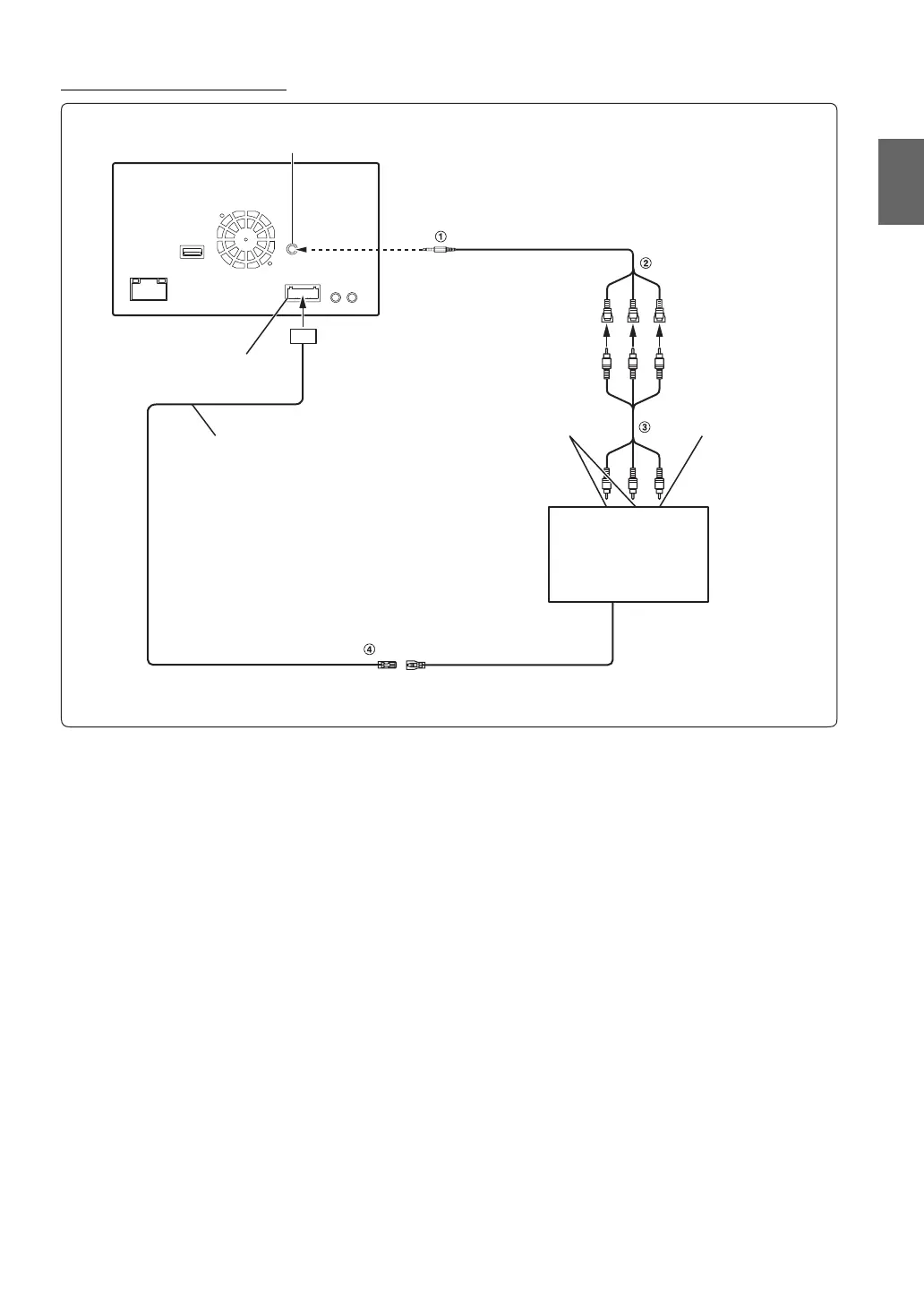
Connection of an External device
1 AV/RCA interface cable (4-pole mini AV plug to 3-
RCA) (sold separately)
2 Video/Audio Input Connectors
YELLOW is for input video, RED is right and WHITE is left
input the audio.
3 RCA Extension Cable (Sold Separately)
4 Remote Control Output Lead (Brown)
Connect this lead to the remote control input lead. This lead
outputs the controlling signals from the remote control.
• To connect an external input device to the iPod VIDEO connector, set “AUX In” to “AUX.” Refer to “Setting the AUX Mode” (page 42).
• You can change the name of an external device. Refer to “Setting the AUX Mode” (page 42).
CAMERA/AUX/PRE OUT Connector
CAMERA/AUX/PRE OUT cable
To Audio Output terminal To Video Output terminal
DVD Changer
(Sold separately)
REMOTE IN
(White/Brown)
REMOTE OUT
(Brown)
iPod VIDEO input connector


 To Next Page