56-EN
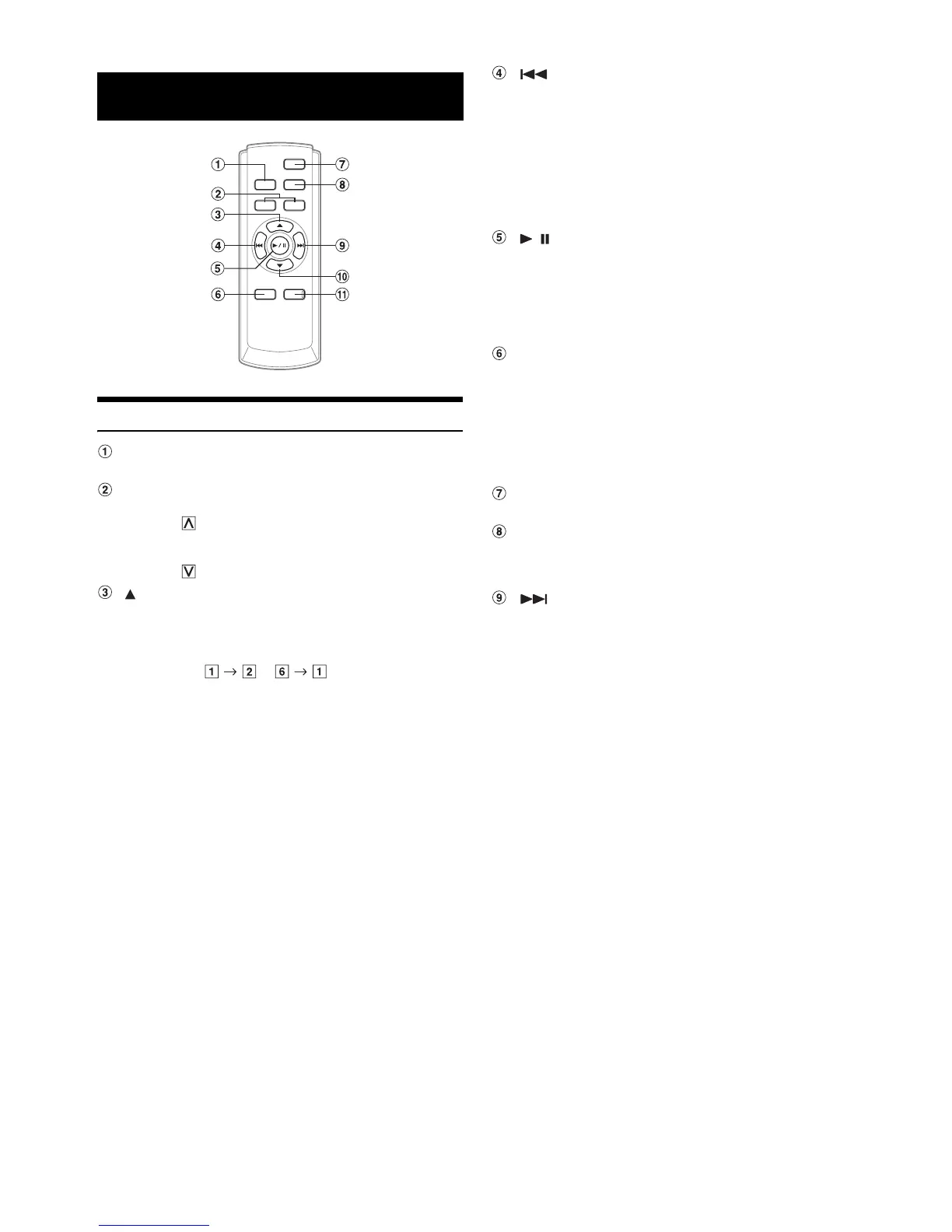
Controls on Remote Control
Source Button
Press this button repeatedly to select the desired source.
Volume Adjustment Buttons
To increase the volume level:
Press the button
To decrease the volume level:
Press the button
Button
DN Button
/ Button
Audio Processor Button
Press the button to display AUDIO SETUP screen.
Press the button to display A.PROCESSOR list screen when
the external audio processor is connected.*
* For the operation of external audio processor, refer to the Owner’s
Manual of the external audio processor you purchased. When the
IMPRINT-BOX (PXA-H100) (sold separately) is connected, refer to
“IMPRINT Operation (Optional)” on page 32.
Power Button
Press this button to turn the power on/off.
Band Button
UP Button
Remote Control
Radio mode: Pressing this button will select, in ascending
order, stations programmed into the radio’s
presets as shown below.
...
Changer mode:
DISC Select (UP) button
Press this button to select a disc in ascending
order.
MP3/WMA/AAC mode:
Folder/Playlist/Artist/Album/Genre/Composer
Select (UP) button
iPod mode:
Switches Playlist/Artist/Album/Genre/
Composer/Episode.
Radio mode: SEEK (DN) Button
MP3/WMA/AAC/iPod mode:
Press this button to go back to the beginning
of the current track.
Changer mode:
Press the button to go back to the beginning
of the current track/file. Press and hold to fast
reverse.
Radio mode: Chooses the tuning mode. By pressing it
more than 2 seconds, Automatic Memory will
be operated.
MP3/WMA/AAC/iPod mode:
Switches between play and pause.
Radio mode: To change the band.
Changer mode:
To change the disc.
Radio mode: SEEK (UP) button
MP3/WMA/AAC/iPod mode:
Press this button to advance to the beginning
of the next track.
Changer mode:
Press the button to advance to the beginning
of the next track/file. Press and hold to fast
forward.



 To Next Page