57-EN
Button
Mute Button
Press this button to lower the volume by 20 dB instantly.
Press this button again to cancel.
When Using the Remote Control
• Point the remote control at the remote sensor within
about 2 meters.
• It may not be possible to operate the remote control if
the remote control sensor is exposed to direct
sunlight.
• The remote control is a small, lightweight precision
device. To avoid damage, short battery life,
operational errors and poor response, observe the
following.
- Do not subject the remote control to excessive
shock.
- Do not put in a trouser pocket.
- Keep away from food, moisture and dirt.
- Do not place in direct sunshine.
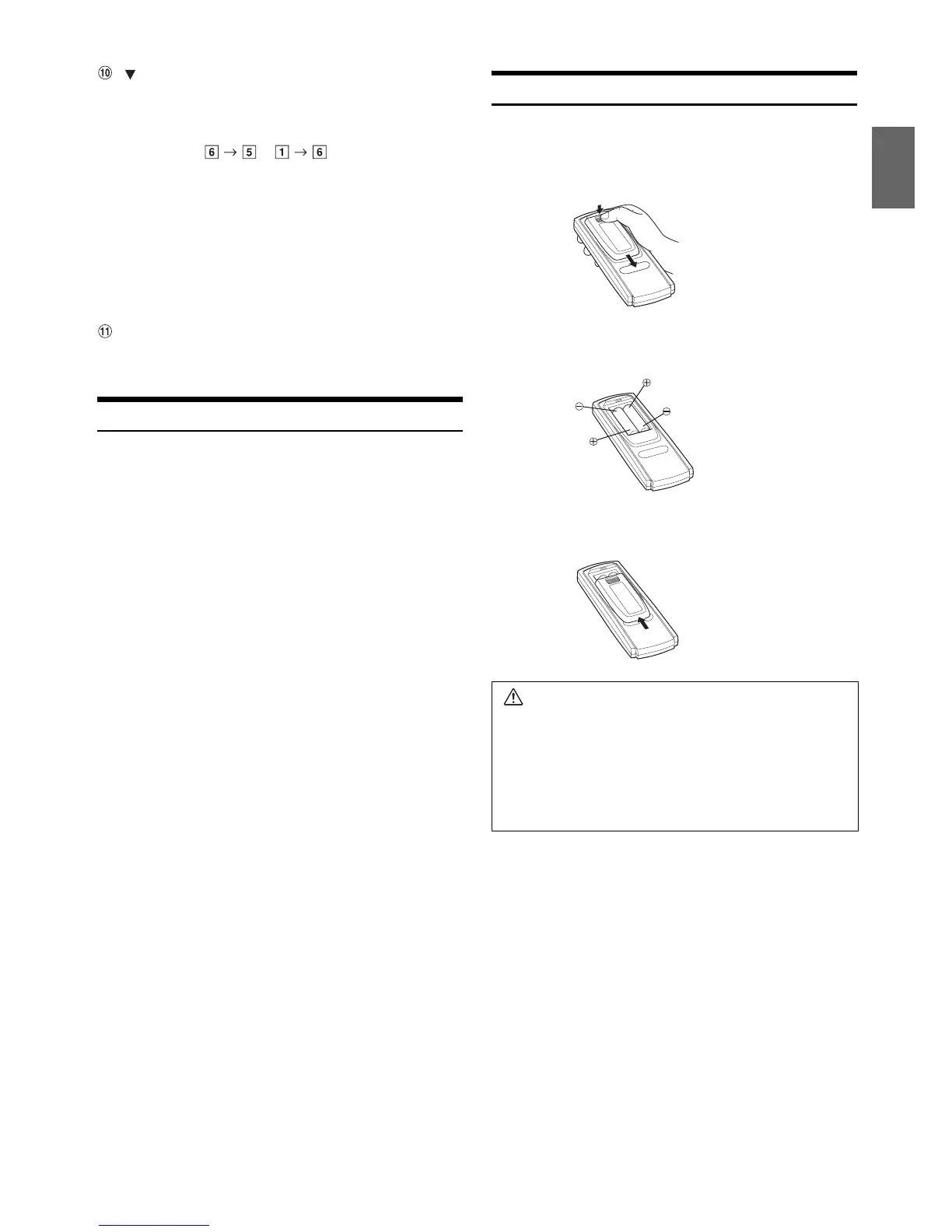
Battery Replacement
Applicable battery: Use two “AAA” sized dry batteries or equivalent.
1
Opening the battery cover
Slide out the battery cover while firmly pressing in the
direction of the arrow.
2
Replacing the battery
Insert the batteries, observing the polarities as illustrated.
3
Closing the cover
Slide the cover as illustrated until a click is heard.
Radio mode: Pressing this button will select, in descending
order, stations programmed into the radio’s
presets as shown below.
...
Changer mode:
DISC Select (DN) button
Press this button to select a disc in
descending order.
MP3/WMA/AAC mode:
Folder/Playlist/Artist/Album/Genre/Composer
Select (DN) button
iPod mode:
Switches Playlist/Artist/Album/Genre/
Composer/Episode.
Warning
DO NOT OPERATE ANY FUNCTION THAT TAKES
YOUR ATTENTION AWAY FROM SAFELY DRIVING
YOUR VEHICLE.
Any function that requires your prolonged attention should
only be performed after coming to a complete stop. Always
stop the vehicle in a safe location before performing these
functions. Failure to do so may result in an accident.



 To Next Page