1
2
3
4
5
6
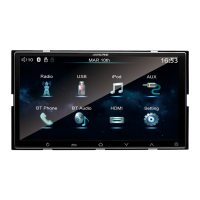
Function Summary
Multimedia is designed to present multiple
functions possessed by multiple connected
devices, and provide users with diversified
utility functions.
5 6 7 8
1
2
3
4
9
10 11 12
Radio
USB
iPod
AUX
BT Phone
BT Audio
HDMI
Setting
Volume status
Bluetooth status
DATE
TIME
7
8
9
10
11
12
Radio
Click to enter radio interface.
Display the radio frequency.
Step backward: Move up to a frequency.
Step forward: Move down to a frequency.
Search back to a frequency accompanying valid
radio signal.
Search forward to a frequency accompanying
valid radio signal.
Switch radio band: Conduct cyclic switching in
sequence of FM1-FM2-AM.
Preset scan: Browse the preset radio stations
on current radio band; click any effective button
to relieve the "seek" action.
Switch Local and DX for Radio.
Automatic saving of radio station: Automatically
search and save 6 radio stations transmitting
most powerful signals on each radio band,
amounting to 18 stations in total. Click any
button to cease automatic saving; all automatically
saved radio stations will be reserved into the
button 【Pre-stored Station】 .
Display of band frequency being listened to.
1
2
3
4
5
6
7
8
9
10
3
94
5
6 7 8
2
10
1
8-EN
*
*
Long press ICON to change the locating
place by dragging.
RDS function: While the vehicle is moving, the host
machine will reveal relevant information on receiving
RDS data in case RDS signal is available in local
region. 8 English letters will display on the screen
(corresponding to local RDS data).
Double-finger operation:
Swipe up/down: Volume up/down.
Swipe left/right: Last reserved station/next
reserved station.


 To Next Page











