15
EN
Selecting from the route menu (three routes searching)
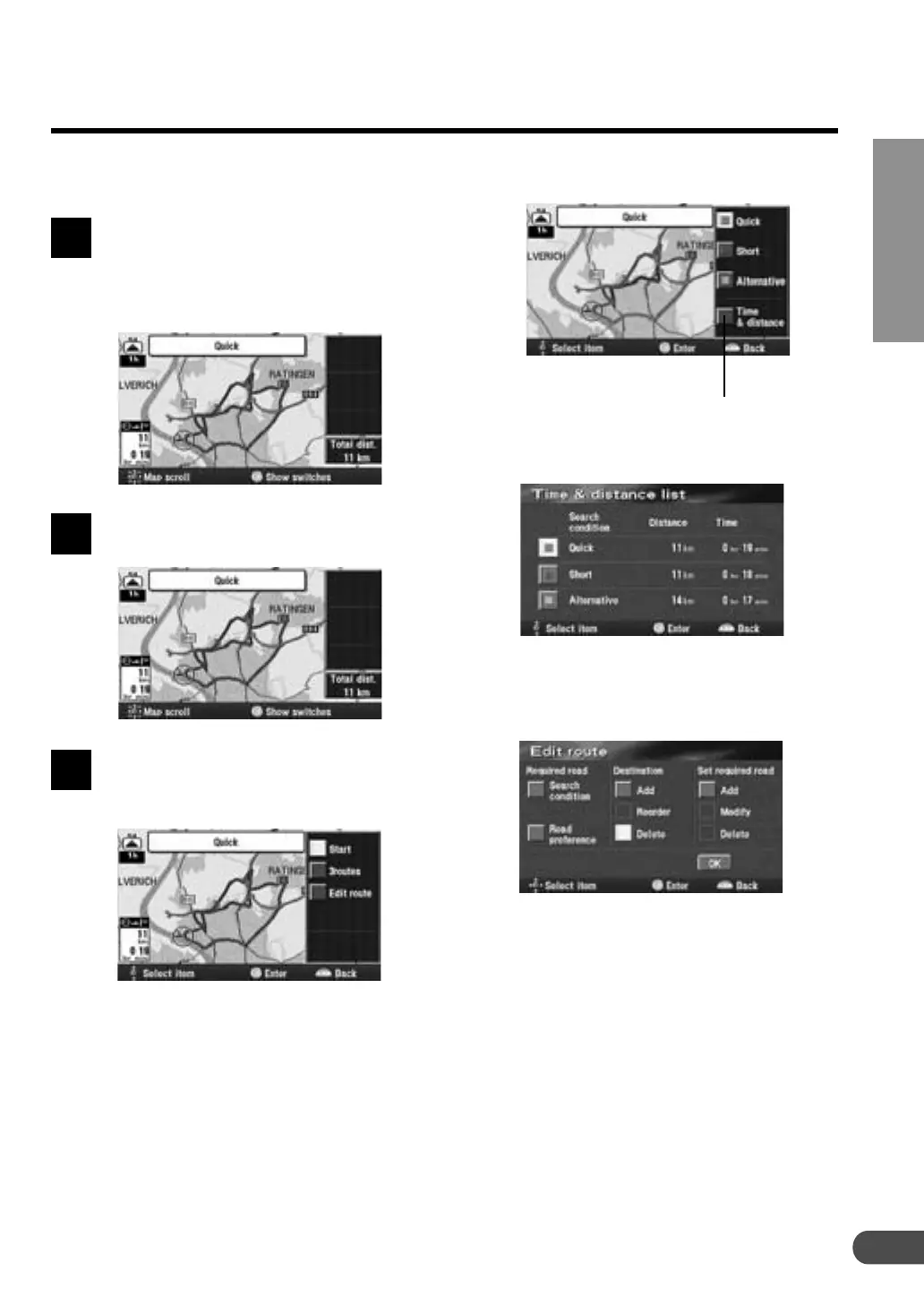
a 3 routes: Displays the 3 Routes screen.
The list showing information about the
distance and required time to the
destination is displayed.
a Edit route: Displays the Edite route
screen. For details, see page 30.
The system calculates up to three routes simulta-
neously including the recommended route. You
can choose any one of the routes.
When you have selected a desired
destination, the navigation system
calculates up to 3 routes and the
system automatically displays the
"All-route" screen.
Press ENTER while the All-route
screen is displayed.
The route menu appears.
Select the desired route menu item
and press ENTER.
The route menu items:
a Start: Starts the route guidance.
Note:
If you want to view the drive simulation to
check the details of the route, select "Start"
then press and hold the ENTER button for at
least 5 seconds while the whole route screen
is displayed. (For more information, see page
42.)
1
2
3



 To Next Page