44
Reference
Button
No.
1
2
3
4
5
6
7
8
9
!
"
#
$
%
&
(
)
Description
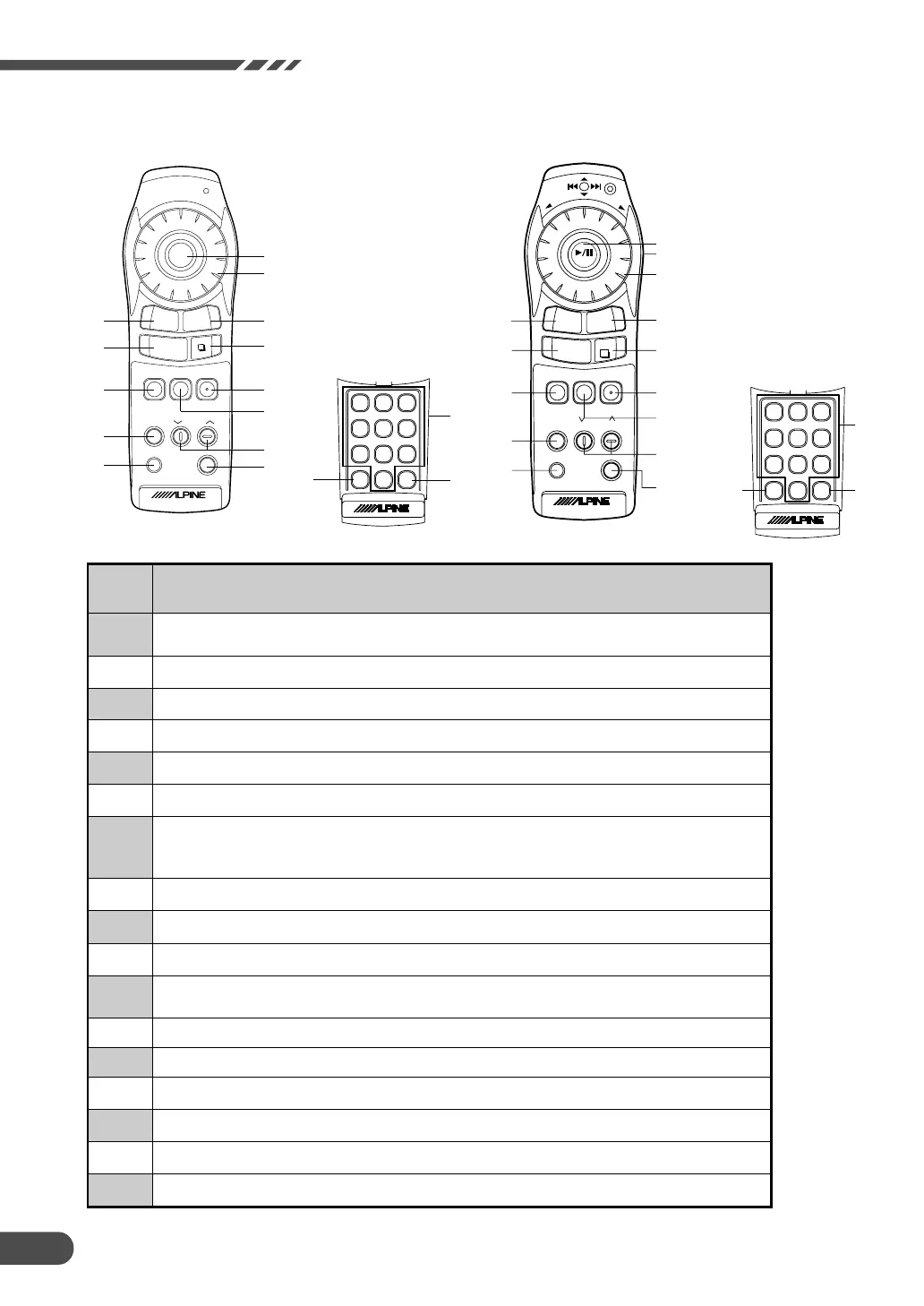
Tilting the joystick selects items from menus and moves the map in eight directions.
Pressing the ENTER(ENT) button selects a highlighted item in the menu.
Switches between Audio and Navigation for remote controlling. Push to light. (RUE-4167 only)
Not in use.
Returns the navigation system to the previous searching.
Switches between dual pictures and single picture.
Displays the destination menu.
Returns to the current position of your vehicle.
When this button is pressed while the current vehicle position map is displayed, information about places
around the current vehicle position is displayed.
Changes the map magnification ratio upward or downward.
Turns the pictorial display OFF.
Turns the pictorial display ON.
Press to diaplay the information of the set POI.
The "Local POI list" screen is displayed.
Press to change the set route. "change route" screen is displayed.
Press this button for voice guidance.
Displays the main menu screen.
Input numerals.
Executes numeral inputtings and starts searching.
Erases the previous numeral in number inputtings.
RUE-4131
BS OK
12
3
45
6
78
9
0
&
)
(
V
O
I
C
E
ZOOM
POS.
DEST.
ROUTE
LO.PT.
POWER
OFF
ENTER
RETURN
M
E
N
U
"
8
9
!
4
1
5
$
%
7
3
6
(with flap lid opened)
)
DEL
OK
12
3
45
6
78
9
0
A.S
EL
V
O
IC
E
B
A
N
D
ENT
V.SEL
NAVI
POWER
NAVI OFF
ZOOM
DISC CHG
MUTE
A.PROCA.PROCA.PROCA.PROC
POS.
DEST.
D
IS
P
M
E
N
U
ENT
LIST
RETURN
V
O
L
.
D
N
V
O
L
U
P
ENT
A.PROC
ROUTE
LO.PT.
TUNER
POWER
DEFEAT
RUE-4167
3
4
5
6
9
%
$
!
1
8
7
"
&
(
(with flap lid opened)
#
#
2



 To Next Page