2-EN
Others
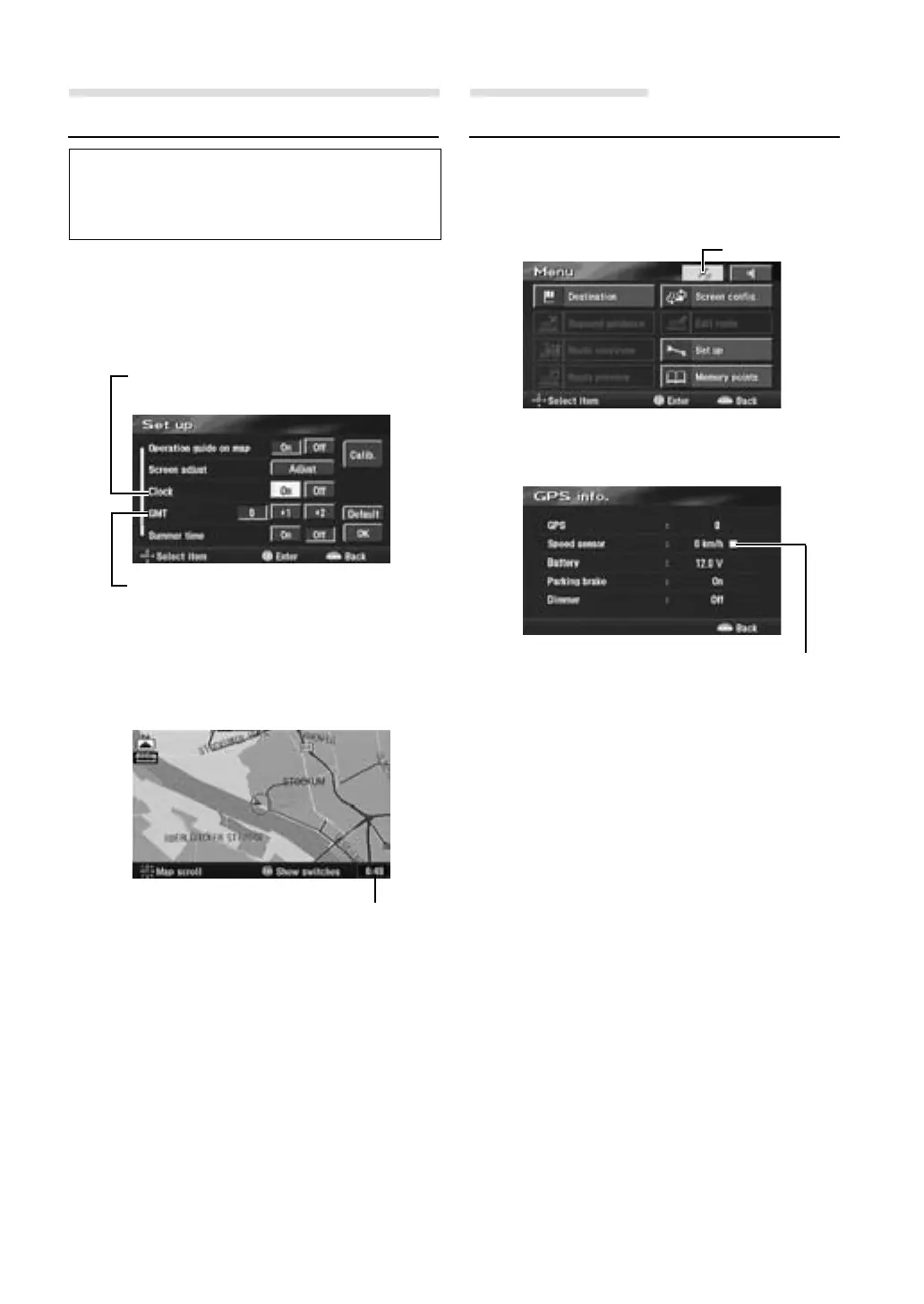
Setting the Current Time
You can display the current time calculated
from GPS information.
You can also correct the time difference from
Greenwich Mean Time.
1 Press the MENU button to display the main
menu. Select "Set up" from the main menu
by tilting the joystick and press ENTER.
2 The Set up screen appears.
3 When the settings have been completed,
select "OK" by tilting the joystick and press
ENTER.
Customizing Setups
Displaying the Speed Pulse Signal
1 Press the MENU button to display the main
menu. Select "GPS mark" from the main
menu by tilting the joystick and press
ENTER.
2 The GPS information screen is displayed.
Confirm the setting of each item.
3 Press the POS. button to return to the
current vehicle position screen.
GPS mark
Current time display
Clock
Displays the clock on the map screen.
GMT
Corrects the current time if there is any time
difference from GMT.
Blinks when the Speed Pulse signal
is being input.


 To Next Page