Chevrolet/GMC
FULL SIZE TRUCK z 12/17
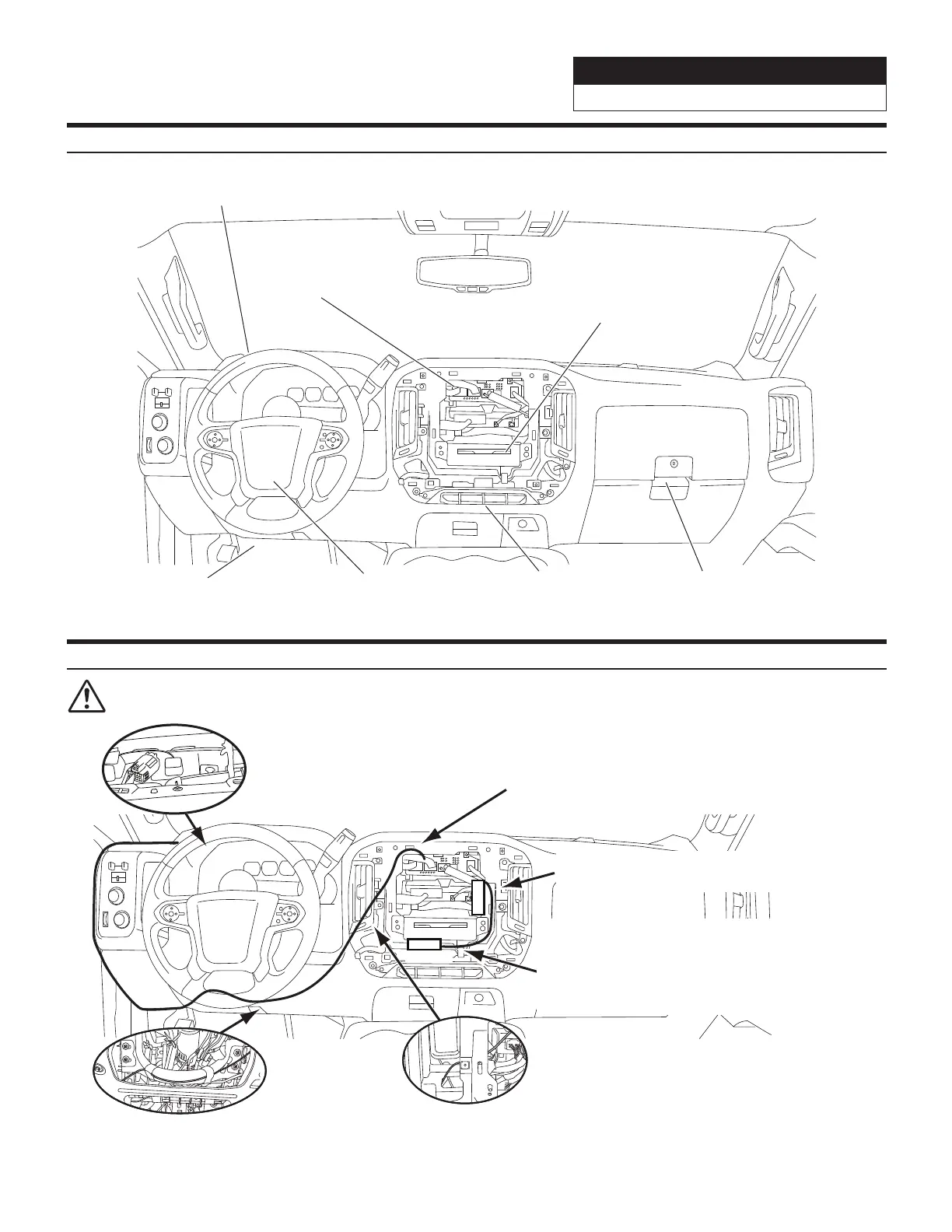
Component Locations
GPS Antenna
Radio Tuner
DVD Player
OEM Camera
Connector
Steering Wheel
Harness
OBDII Connector
Sirius XM Tuner
(sold separately)
GPS Antenna Installation
IMPORTANT: Follow the GPS installation procedure shown below. Failure to do so, will result in poor
GPSperformance.
Place the GPS antenna
on the center of the self
adhesive 70mm X 70mm
metal plate.
Keep the GPS antenna cable away from
the FPD(Display),Maestro module and
SXM tuner as these generate interference
and will decrease GPS performance.
Route the GPS antenna cable down
to the knee cover area through the
opening below left side air vent.
SXM Tuner
Tape the GPS
antenna cable
along the
steering wheel
column cover.
Maestro
Place the Maestro module
parallel to the Right side vent.
SXM tuner location (SXM Tuner sold
separately) Note: Always mount SXM
tuner away from the X110-G and GPS
antenna cable. Route the cable along the
right side vent to reduce interference.


 To Next Page